
1DM+
Vicky Bonick
58.23 MB
21.8
Varies with device
100,000+

Mod Info:
Paid Features Unlocked
● Stable mod
● Debug info removed
● Multiple languages available
● No active trackers or advertisements
● Requires android 7.0 and up
● CPUs arch: armeabi-v7a, arm64-v8a
● Optimized and cleaned resources for fast loading.
Description
1DM+ (One Download Manager Plus), previously known as IDM+, works as a high-speed download manager for Android with built-in torrent support. It can accelerate downloads significantly compared to standard downloading, and it avoids running background services when nothing is downloading (and when Smart Download is turned off), which helps protect battery life.
Clean Experience: Ad-Free and Customizable
You use 1DM+ without ads, so you can manage files without interruptions. You can switch between dark and light themes, and you can use the app in many languages, including Chinese (Traditional/Simplified), Spanish (including Latin America), French, German, Italian, Japanese, Korean, Portuguese (Brazil), Russian, Turkish, Arabic, and more.
Torrent and Streaming Support
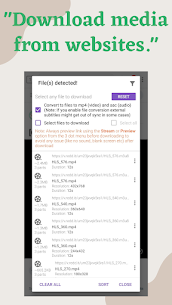
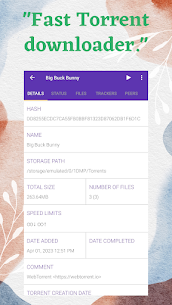
You can download torrent content using a magnet link, a torrent URL, or a torrent file stored on your device. You can also download from HTTP Live Streaming (HLS) websites, which makes the app useful for media sources that serve content in segments.
Flexible Download Controls and Reliability Tools
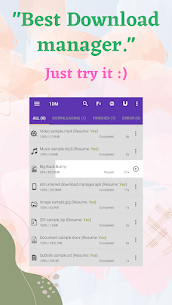
You can pause and resume downloads on supported links, start or stop everything with “Pause all” and “Start all,” and remove completed or unwanted items quickly. The app keeps downloads going even if you close it, and it retries failed downloads with unlimited attempts and a custom delay. It also handles errors intelligently to help you avoid losing progress or data.
Smart Automation: Clipboard, Scheduling, and Link Management
You can enable Smart Download so the app detects downloadable links you copy to your clipboard and prepares downloads automatically. You can import download links from a text file or directly from the clipboard, and you can export link lists when you want to move tasks elsewhere. If you need downloads to run at specific times, you can schedule them with the built-in download scheduler.
Security and Privacy Options
You can store usernames and passwords to log in automatically while browsing and downloading from password-protected sites. You can also download password-protected files directly. For privacy, you can hide downloaded files so they don’t appear openly to other users.
Storage, Sharing, and Organization
You can download directly to an SD card (when supported by your device) and manage all file types, including archives, music, videos, documents, and program files. After downloads finish, you can open or share files right from the app. You can also sort files by name, size, or date and organize them by type and time for easier browsing.
Notifications That Keep You Informed
1DM+ provides extended notifications that show download progress, either combined or per download. You can enable vibration and a completion sound so you notice when large files finish.
Advanced Speed Features: Parallel Downloads and Multi-Part Splitting
You can run up to 30 downloads at the same time, which helps when you manage lots of files. For faster single-file performance, the app supports multi-part downloading with up to 32 parts per download, letting it fetch chunks in parallel when the server supports it.
Network Tools: Proxies, Speed Limiting, and Wi‑Fi Only
You can route traffic through proxies, with or without authentication. When you need to control bandwidth, you can apply a speed limiter globally or per download. You can also restrict downloads to Wi‑Fi only, which helps you avoid mobile data usage.
Link Refresh and Integrity Checks
When a link expires, you can refresh it directly or use the inbuilt browser to recover it. For verification, the app can calculate an MD5 checksum, which helps you confirm file integrity after downloading.
Built-In Browser and Media Link Catching
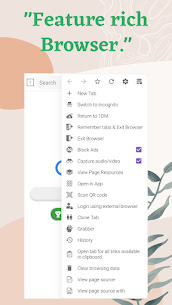
1DM+ includes its own web browser with tabs, history, and bookmarks. You can browse privately using incognito mode. The app can also catch music and video download links automatically from supported websites, so you can start downloads with less manual copying.
Why the App Requests Permissions
- Internet/Network access: the app needs this to download files.
- Storage access: the app uses this to save downloaded content.
- Vibration control: the app uses this for download-complete alerts if you enable them.
- Wake lock: the app uses this to prevent the device from sleeping during active downloads.
Images

Download links
How to install 1DM+ Mod APK?
1. Tap the downloaded 1DM+ Mod APK file.
2. Touch install.
3. Follow the steps on the screen.
Note: Important!
- Delete all previous Original/Mod before installing the latest mod.
- If necessary, log in with your email/social media. Modded App cannot be logged in with Gmail.
- Enjoy !!!
Related apps


Latest Apps
Popular apps


