
aCalendar+

Description

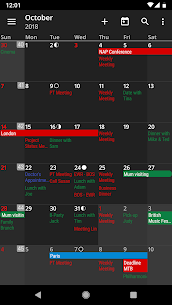
aCalendar+ helps you manage your schedule with smooth navigation and clear day, week, month, and year views. The app has supported planning for more than a decade and builds on Android’s native calendar system, so it works with your existing calendar accounts and sync solutions. aCalendar+ is the premium version of aCalendar, which means it unlocks all features and removes ads.
Support and Help Resources
If you run into questions or problems, you can use the online help system at https://acalendar.tapirapps.de or contact the support team at [email protected].
Premium Extras (Included in aCalendar+ / Also Available as In‑App Purchases)
aCalendar+ adds advanced tools that expand beyond basic event viewing:
- Public holidays (and school holidays in some countries), configurable in your calendar list
- More colors for themes, backgrounds, calendars, and events
- Business features such as inviting attendees, linking contacts, viewing free/busy status, private events, profiles, sharing events as ICS
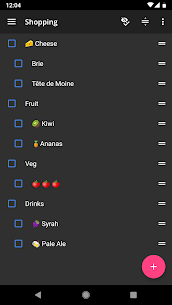
- Tasks support to manage Google Tasks or tasks via CalDAV/OpenTasks
- No ads, so your calendar stays distraction-free
Tapir Apps Donation and Conservation Support
Your purchase supports ongoing development and also contributes to conservation efforts. Tapir Apps donates 10% of all revenue to rainforest conservation through the World Land Trust, with the goal of helping protect habitats (including those important to endangered species like the Mountain Tapir).
Core Calendar Features
aCalendar+ focuses on flexibility and readability while keeping controls simple:
- Smooth, intuitive navigation with clean transitions
- Day, week, month, and year views
- Fullscreen widgets for quick access on your home screen
- Flexible recurrence rules such as every 3 weeks, every 17 days, or specific weekdays (e.g., Mon/Wed/Fri)
- 100+ color choices for calendar coloring
- Per-event color support even if the original calendar does not support it
- Customizable event font size for better readability
- Birthday and anniversary tracking with photos from your contacts, plus editing options
- Uses Android’s native calendar backend and existing synchronization
Gestures and Productivity Shortcuts (How You Use It)
aCalendar+ emphasizes fast scheduling through gestures and configurable controls:
- Swipe vertically to move forward and backward through time
- Swipe horizontally to switch views based on where you start the gesture, or double-tap to jump to day view
- Tap an event to open details
- Long-press to create a new event quickly
- Long-press the mini-month to jump to today or pick a date
- Configure actions for three-finger tap, title tap, and even volume buttons
- Long-press an event in day view to drag it to a new time slot
Images


Download links
How to install aCalendar+ Mod APK?
1. Tap the downloaded aCalendar+ Mod APK file.
2. Touch install.
3. Follow the steps on the screen.
Note: Important!
- Delete all previous Original/Mod before installing the latest mod.
- If necessary, log in with your email/social media. Modded App cannot be logged in with Gmail.
- Enjoy !!!
Related apps





Latest Apps
Popular apps


