
Allminder

Description

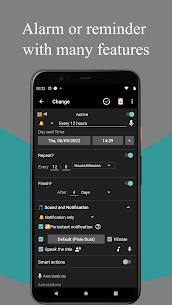
Allminder combines alarms, pill reminders, and general reminders in a single app designed for both simple alerts and complex schedules. You can build repeating routines, attach notes, and control how reminders behave so they fit real life—like medication timing, meal-based habits, or monthly tasks that happen on specific weekdays.
Alarm, Pill, and General Reminder Modes
Allminder supports three main reminder types:
- Alarms for wake-ups and time-critical alerts
- Pill reminders for medication schedules and dosing routines
- General reminders for tasks, appointments, and recurring obligations
Powerful Repetition Options (From Hourly to Yearly)
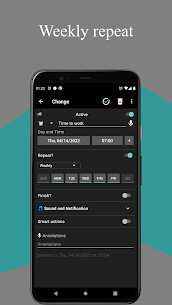
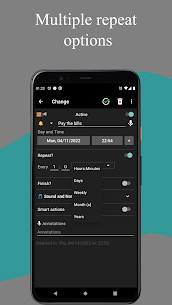
Allminder offers multiple repeat patterns so you can match almost any routine: hourly, daily, weekly, monthly, and yearly. You can also set multiple executions for the same alarm, which helps when you need reminders at different times on the same day or on specific days within a month.
Advanced Monthly Scheduling
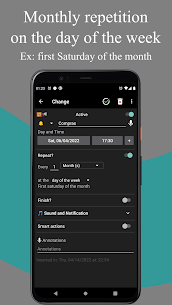
You can create monthly repeating alarms based on weekday position—such as the first Monday of the month or the last Sunday. This is useful for bills, reporting deadlines, or recurring appointments that don’t fall on a fixed date.
Notes, Labels, and Clear “Next Alarm” Visibility
You can add annotations to alarms so you remember the purpose of each reminder. Allminder also uses automatic color labels to show when the next execution happens:
- Red: next execution is still today
- Yellow: next execution is tomorrow
- Green: next execution is the day after tomorrow
When you save an alarm, the app shows how long remains until the next trigger, which helps you confirm you scheduled it correctly.
Spoken Titles and Audio Playback
Allminder can speak the reminder title, which helps when you don’t want to look at your screen. You can also choose an audio file to play at alarm time, or record your own audio and use it as the alarm sound.
Smart Actions: Volume and Bluetooth Control
Allminder includes smart actions that can automatically adjust settings when an alarm triggers. For example, it can change volume levels and enable or disable Bluetooth, helping you prepare for routines like commuting, workouts, or bedtime without manual toggles.
Sleep Time: Quiet Hours with Notifications Only
You can set a sleep time window where alarms do not ring and only show notifications. This feature helps you avoid loud alerts at night while still keeping reminders visible.
Reliable Notifications (Even After Reboot)
Allminder keeps reminders dependable across device restarts. After a reboot, it can still show notifications that you didn’t dismiss, and it can display the next scheduled alarm in the notification area. You also control how many hours before an alarm the “next alarm” notification appears, or you can disable that preview if you prefer.
Images

Download links
How to install Allminder Mod APK?
1. Tap the downloaded Allminder Mod APK file.
2. Touch install.
3. Follow the steps on the screen.
Note: Important!
- Delete all previous Original/Mod before installing the latest mod.
- If necessary, log in with your email/social media. Modded App cannot be logged in with Gmail.
- Enjoy !!!
Related apps





Latest Apps
Popular apps


