AppChecker

Mod Info:
Paid Features Unlocked
● No ads
● Stable mod
● Debug info removed
● No active trackers or advertisements
● Requires android 6.0 and up
● CPUs arch: Universal
● Optimized and cleaned resources for fast loading.
Description
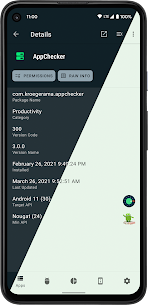
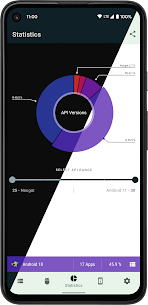
AppChecker shows the targetSdkVersion (Target API) for every app installed on your device. This helps you understand which apps already target newer Android versions and are more likely to support recent platform behaviors, security changes, and UI updates.
Check Target API for All Installed Apps
AppChecker scans your installed apps and lists each app’s Target API level. With this view, you can quickly identify outdated apps that still target older Android versions and compare them with apps that keep up with current Android releases.
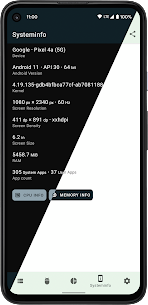
View System Information and DRM Status
Recent versions of AppChecker also display key device info such as:
- Screen size and resolution
- CPU details
- Memory information
It also lets you check your device’s DRM state, including the Widevine security level, which matters for streaming and protected media playback.
Inspect an App’s AndroidManifest.xml
AppChecker can display the AndroidManifest.xml of any installed app. This is useful for advanced users who want to review declared components and settings without connecting to a computer.
Permission Support Checks (Android 6.0+)
If you run Android 6.0 Marshmallow or later, AppChecker helps you see which apps support Android’s granular runtime permission model. This makes it easier to spot apps that follow modern permission practices versus apps designed for older permission behavior.
Why Target SDK Matters (Google’s Guidance)
Google recommends that developers set an app’s targetSdkVersion to the latest Android version available. When developers do this, the app can adopt new Android behaviors and styling changes and better match how the operating system works on each device.
Images


Download links
How to install AppChecker Mod APK?
1. Tap the downloaded AppChecker Mod APK file.
2. Touch install.
3. Follow the steps on the screen.
Note: Important!
- Delete all previous Original/Mod before installing the latest mod.
- If necessary, log in with your email/social media. Modded App cannot be logged in with Gmail.
- Enjoy !!!