Audiomack
Audiomack Music Apps
60 MB
8.1.0
7.0 and up
100,000,000+

Mod Info
Paid Features Unlocked
● No ads
● Stable mod
● Sign in is required
● Debug info removed.
● Multiple languages available.
● No active trackers or advertisements.
● Requires android 7.0 and up
● CPUs arch: Universal
● Optimized and cleaned resources for fast loading
Description
Audiomack lets you stream and download trending songs and albums from your favorite artists across multiple genres. Enjoy ad-free listening, offline downloads, and curated playlists that bring your music experience to life.
Introduction
Audiomack: Music Downloader is your all-in-one destination for discovering, streaming, and downloading the best new songs and albums across genres like Hip-Hop, Afrobeats, R&B, EDM, Reggae, and more. Designed for music lovers who crave freedom and accessibility, Audiomack allows users to stream unlimited music or download tracks for offline listening—completely data-free. Whether you’re vibing to trending artists or revisiting your personal MP3 collection, Audiomack provides a smooth, intuitive, and personalized music experience that connects you directly to the sounds you love.
Stream and Discover Trending Music
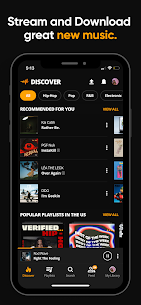
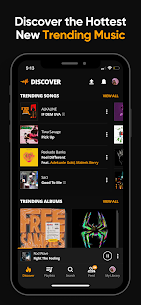
Audiomack’s core strength lies in its massive collection of trending and emerging music. The platform continuously updates its “Trending” section, highlighting the hottest songs and mixtapes from around the world. From the pulsating beats of Hip-Hop and Trap to the soulful rhythms of R&B and the high-energy vibes of Afrobeat and Reggae, Audiomack delivers fresh sounds directly to your fingertips. With unlimited full-track streaming, you can stay ahead of the curve and discover what’s next in global music before anyone else.
Download Songs and Listen Offline
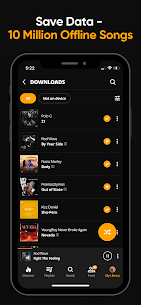
One of the most powerful features of Audiomack is its offline download capability. Users can download full albums and individual tracks to enjoy music anytime, anywhere—without the need for an internet connection. This is especially convenient for travelers or users with limited data plans. Once your favorite songs are saved offline, you can enjoy uninterrupted listening during commutes, workouts, or long flights. Audiomack’s offline mode ensures your playlists are always within reach, even without Wi-Fi or mobile data.
Enjoy Your Local Music Files
In addition to streaming global hits, Audiomack doubles as a local music player. You can listen to MP3s, AAC, WAV, M4A, and other file formats directly from your device. This integration ensures that all your favorite music—whether downloaded from the web or transferred from another source—is accessible within one convenient app. With smooth playback and seamless transitions between online and local tracks, Audiomack creates a unified experience for your entire music library.
Curated Playlists and Smart Recommendations
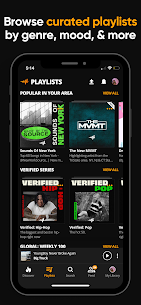
Audiomack goes beyond standard streaming by offering expertly curated playlists that match your mood, taste, and listening habits. Whether you’re in the mood for chilled Lo-Fi beats, high-energy dance mixes, or soulful R&B vibes, there’s always something new to explore. The app’s editorial team and algorithmic system work hand-in-hand to suggest songs that resonate with your style, ensuring every listening session feels personal and dynamic.
Create and Manage Your Own Playlists
For users who prefer to take control of their music experience, Audiomack offers the ability to create unlimited playlists. You can easily favorite tracks, organize them by genre or theme, and shuffle your personal collection anytime. Whether you’re crafting a gym playlist or building the ultimate road trip soundtrack, Audiomack gives you the flexibility to customize your music the way you like it.
Connect with Artists and Communities
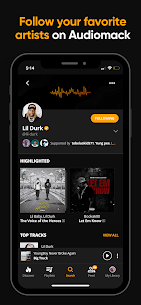
Audiomack isn’t just a music app—it’s also a platform that connects fans with their favorite artists. Through the Connect Tab, users can follow musicians, producers, and tastemakers to receive exclusive messages, updates, and new releases. From big names like 21 Savage, Young Thug, and Kevin Gates to rising independent talents, the app bridges the gap between artists and their audiences. This social element makes Audiomack more than just a streaming service—it’s a living music community.
Ad-Free Premium Experience
For listeners who value uninterrupted music sessions, Audiomack offers a premium subscription option for just $4.99 per month. This upgrade removes all ads and enhances playback quality, ensuring a seamless and immersive experience. With Audiomack Premium, you can dive into your favorite songs without distractions, focusing purely on the music.
Cross-Platform Compatibility
Audiomack is designed to keep up with your lifestyle, no matter where you are. The app supports multiple platforms, including Android, iOS, Wear OS, and Android Auto. This means you can easily switch between your smartphone, smartwatch, and car without missing a beat. Whether you’re driving, running, or relaxing at home, Audiomack keeps your music accessible wherever you go.
Conclusion
Audiomack: Music Downloader stands out as one of the most versatile and user-friendly music streaming apps available today. With its vast library of trending songs, offline download capabilities, local file support, curated playlists, and artist connection features, Audiomack redefines how you experience music on mobile. Whether you’re a die-hard Hip-Hop fan, a Reggae enthusiast, or someone who loves discovering new global sounds, Audiomack ensures your next favorite song is always one tap away.
FAQ
Q1: Can I use Audiomack without an internet connection?
Yes, Audiomack allows you to download songs and albums for offline listening without using data.
Q2: Does Audiomack support local music playback?
Absolutely. Audiomack lets you play MP3s, AAC, WAV, and other local files directly from your device.
Q3: Is Audiomack free to use?
Yes, Audiomack is free to stream and download music, but you can upgrade to a premium plan for an ad-free experience.
Q4: Can I create my own playlists on Audiomack?
Yes, users can create unlimited playlists, favorite songs, and organize their music however they like.
Q5: Does Audiomack feature independent artists?
Yes, Audiomack supports both major and independent artists, helping new talents reach global audiences.
Images
Download links
How to install Audiomack Mod APK?
1. Tap the downloaded Audiomack Mod APK file.
2. Touch install.
3. Follow the steps on the screen.
Note: Important!
- Delete all previous Original/Mod before installing the latest mod.
- If necessary, log in with your email/social media. Modded App cannot be logged in with Gmail.
- Enjoy !!!