BikeComputer Pro

Description

BikeComputer Pro turns your Android device into a powerful bike computer for training, touring, and route navigation. You get the full Pro feature set without ads, and you don’t need to create an account or log in. The app keeps your ride data on your device by default, and you only upload activities when you choose to share them.
Privacy, No Ads, and Local Data Control
BikeComputer Pro runs completely ad-free and avoids forced sign-ups. You stay in control of your privacy because the app stores sessions locally unless you export or upload them to another platform. This approach suits riders who want clean tracking without giving away personal data.
German Quality and Direct Support
The developers provide “Made in Germany” quality standards and offer personal support via email. If you run into setup issues, sensor pairing problems, or route questions, you can contact support instead of relying only on community forums.
Sensor Support for Serious Training
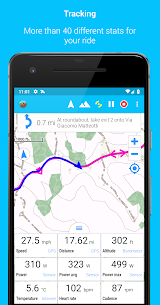
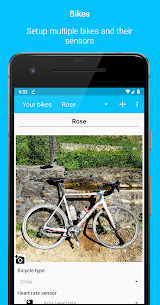
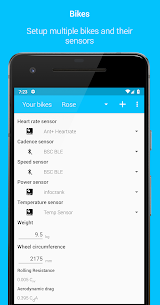
BikeComputer Pro connects to ANT+ and Bluetooth accessories, so you can train with real performance data. You can pair compatible power meters as well as heart-rate, cadence, speed, and temperature sensors, which helps you monitor effort, pacing, and conditions accurately during a ride.
Route Planning and Easy Setup
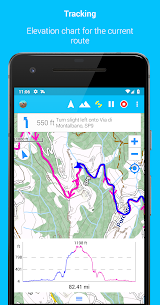
You can plan a route directly inside the app by tapping the map where you want to go. BikeComputer Pro calculates the route and shows distance, elevation gain, and an elevation profile, then saves the route for turn-by-turn use during your ride. You can also adjust the look of the offline map by changing map resolution and font size for your on-screen values.
Offline Maps and Multi-Map Use
BikeComputer Pro supports offline navigation and even lets you use multiple offline map files at the same time. This feature helps when you ride across regions or want different map sources available without switching files mid-trip.
Turn-by-Turn Navigation and Rotating Map View
The app guides you with turn-by-turn instructions and alerts you when you need to make the next turn. You can also load turn-by-turn guidance for imported GPX routes. The rotating map keeps your direction of travel at the top, so you can read upcoming turns more naturally while riding.
Route Imports and Platform Sharing
You can share completed rides to Strava, Komoot, and other training platforms. You can also import routes from Strava and Komoot, which makes it easy to reuse planned tours or popular segments without rebuilding them manually.
Recalculation When You Leave the Route (Premium Requirement)
When you accidentally go off course, the app can recalculate your route to bring you back. This rerouting feature requires BikeComputer Premium, so riders who need automatic recovery for complex routes can upgrade for that capability.
Audio Feedback During the Ride
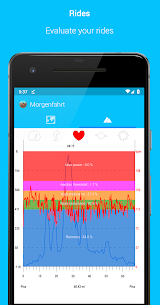
BikeComputer Pro can speak ride stats while you ride, so you don’t need to stare at the screen. Audio feedback can announce metrics such as average speed, current elevation, remaining distance on the route, climbing speed, heart rate, training zone, and warnings when you lose the trail.
GPX Tracks, POIs, Friend Tracking, and On-Ride Notes
You can import GPX tracks or points of interest and follow them on the map. The app also lets you display a friend’s track, which helps when you want to meet up or follow someone else’s route. During a session, you can take photos or add waypoints to mark important locations.
Elevation Accuracy and GPS Control
If your device includes a barometric sensor, you can use it to capture more precise elevation change data. You can also tune GPS sensitivity by choosing how often the app refreshes GPS values. Advanced riders can view additional stats like the number of satellites in use, GPS accuracy, and direction based on GPS position.
Customizable Ride Screens and Saved Layouts
You can arrange your session values exactly how you prefer, and the app remembers the layout. This flexibility helps you build different screens for training rides, long-distance touring, or climbing-focused sessions.
Migration and Backup When You Change Phones
You can import sessions from the free version, and you can protect your ride history by backing up sessions to an SD card and restoring them on a new phone. You can also rely on synchronization: plan a route on a tablet, sync it, and then use it on your phone when you ride.
Images
Download links
How to install BikeComputer Pro Mod APK?
1. Tap the downloaded BikeComputer Pro Mod APK file.
2. Touch install.
3. Follow the steps on the screen.
Note: Important!
- Delete all previous Original/Mod before installing the latest mod.
- If necessary, log in with your email/social media. Modded App cannot be logged in with Gmail.
- Enjoy !!!