CalcTape
schoettler Software GmbH
14 MB
6.5.0 (2025121810)
5.0 and up
1,000,000+

Mod Info
Paid Features Unlocked
● No ads
● Stable mod
● Debug info removed
● All premium features are working
● No active trackers or advertisements
● Requires android 5 and up
● CPUs arch: Universal
● Optimized and cleaned resources for fast loading.
Description
CalcTape Calculator with Tape is a modern calculation tool that combines the simplicity of a standard calculator with the flexibility of note-taking. Designed for accuracy, clarity, and day-to-day practicality, it allows users to edit calculations like text, maintain a calculation history, create templates, and customize layouts for efficient workflow.
Introduction
Calculators have come a long way from the traditional handheld devices that once dominated offices and homes. Today, mobile calculators are expected to handle more than just simple operations; users want clarity, flexibility, history tracking, and the ability to fix mistakes without starting over. CalcTape Calculator with Tape brings a unique approach to solving these everyday challenges by merging a classic calculator with the convenience of a notes app. Rather than forcing users to redo calculations from scratch or rely on memory, CalcTape displays all operations in a scrollable, editable tape that feels more like a notepad than a calculator screen.
This distinctive design makes CalcTape especially useful for people who frequently work with long sequences of numbers, such as shoppers, freelancers, small business owners, accountants, students, or anyone who wants a clear breakdown of their calculations. Instead of hiding previous steps behind a single result, CalcTape displays everything in a clean, understandable layout. Users can verify input, correct mistakes instantly, or add new numbers anytime without ruining the flow of the entire computation. Every change updates the calculation automatically, making the process more dynamic and transparent than traditional calculators.
With features like editable entries, customizable keypads, templates, user-defined functions, and export capabilities, CalcTape stands out as a powerful everyday companion for accurate and organized calculations.
A Calculator That Feels Like a Notepad
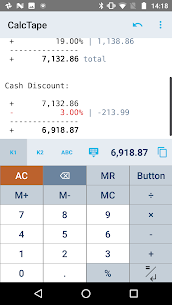
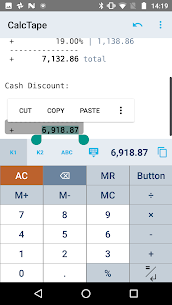
One of CalcTape’s greatest strengths is its ability to treat calculations like editable text. Each number, operator, and result is displayed on a virtual “tape,” similar to the paper strip on a desktop calculator. However, unlike physical tapes, CalcTape’s version is interactive. Users can place the cursor anywhere within the tape, modify existing numbers, add new lines, or remove unwanted entries. The app immediately recalculates all dependent values, ensuring accuracy without manual rework.
This design solves one of the most common frustrations of conventional calculators: the inability to correct mistakes easily. If a user accidentally enters the wrong number or forgets a value, they no longer need to repeat the entire sequence. Instead, they simply edit the specific line and continue working. This feature makes CalcTape ideal for budgeting, financial planning, shopping lists, or any scenario that requires adjustments and revisions.
The ability to comment on lines also gives users valuable context. For example, labeling entries with descriptions like “tax,” “discount,” or “rent” makes complex calculations easier to understand later. When users revisit these tapes weeks or months later, the notes help reconstruct the logic behind the original computation.
A Perfect Companion for Long and Complex Calculations
CalcTape excels in handling multi-step calculations that require precision and clarity. When performing lengthy computations, many users often wonder whether they typed the last number correctly or whether the final result is reasonable. CalcTape eliminates this uncertainty by displaying every step clearly and logically. Each result appears directly below its related entries, creating a structured flow that is easy to review.
If a user realizes that a number is missing, they can insert a new line right where it belongs. This level of flexibility transforms CalcTape into something more powerful than a simple calculator. It behaves more like a spreadsheet but preserves the straightforward appearance of a classic calculator interface. The familiarity of the layout ensures that users can focus on their work instead of adapting to a complex new tool.
Create Templates for Repetitive Calculations
Many people use calculators for repetitive tasks such as monthly budgets, invoices, or business estimates. CalcTape makes these scenarios easier by allowing users to create templates. Templates act as reusable calculation sheets with preset structure and comments. Users simply replace the numbers while the calculations automatically update.
This reduces the need to rebuild the same layout repeatedly. Instead of starting from scratch, users can build a template once and reuse it as often as needed. Templates also help maintain consistency, especially for financial tasks that require accurate and predictable outcomes.
This feature is particularly useful for professionals who bill clients, work with percentages, or manage variable yet familiar tasks. Reusing calculation frameworks saves time and reduces the likelihood of mistakes.
Customizable Keypads and User-Defined Functions
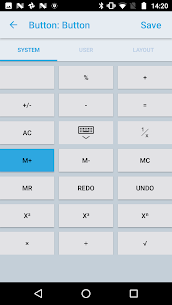
CalcTape becomes even more powerful with its customizable keypad options, especially in the Pro version. Users can rearrange or resize keys, create their own function buttons, and even build custom keypads with specialized tools tailored to their workflow. This customization enables users to streamline their calculation process and eliminate unnecessary clutter.
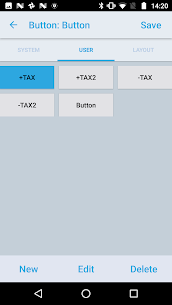
The option to assign user-defined functions to buttons adds another layer of convenience. For example, a user who frequently adds a certain tax percentage can create a button that instantly performs the operation. These personalized shortcuts drastically reduce repetitive manual input and make the calculator uniquely suited to each individual’s needs.
CalcTape also offers different keypad layouts, including a function-focused keypad with nearly complete customization. Switching between layouts on the main screen is quick and intuitive, allowing users to adapt their workspace depending on the complexity of the task.
Export, Save, and Share Calculations Easily
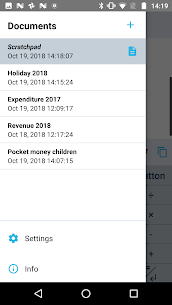
Saving and sharing calculations is an essential feature for users who need permanent documentation. CalcTape’s Pro version allows users to save calculation tapes into files and access them later whenever necessary. This storage option is helpful for bookkeeping, business records, study notes, or any scenario requiring accurate reference materials.
CalcTape integrates with Android’s standard sharing functions, enabling users to send calculations via email, messaging apps, cloud storage, or any supported platform. The ability to export tapes as HTML or print them directly enhances flexibility even further. These export tools ensure that users can present clean, organized documentation whether they are preparing financial reports, sharing estimates with clients, or simply safeguarding their personal records.
A Clean and Friendly User Experience
Despite its power, CalcTape remains remarkably easy to use. The interface is designed to feel comfortable for both casual users and professionals. Buttons are clearly labeled, the tape is easy to read, and changes occur instantly without unnecessary steps. The blend of simplicity and capability makes CalcTape stand out as one of the most approachable advanced calculators available on Android.
Additionally, the app avoids the complexity of scientific calculators. Instead of overwhelming users with trigonometric functions and symbols rarely needed in everyday life, CalcTape focuses on calculations that matter the most outside academic or engineering environments. Its practical, user-centered design ensures that each function remains relevant, intuitive, and accessible.
Conclusion
CalcTape Calculator with Tape redefines what a calculator app can be. By combining the logical structure of a spreadsheet, the transparency of a classic desktop calculator, and the flexibility of a notes app, it provides an innovative and practical solution for everyday calculations. Users can edit, annotate, customize, save, and reuse their tapes effortlessly, making it a powerful tool for budgeting, finance, planning, shopping, and professional tasks.
Its dynamic calculation engine, clear visual layout, templates, custom keypads, and export features make it far more than a basic calculator. CalcTape focuses entirely on usability, accuracy, and efficiency, making it one of the most reliable daily calculation companions available for Android. Whether you are managing personal finances or preparing work-related estimates, CalcTape offers the clarity and control needed to work with confidence.
FAQ
Can I correct a mistake in my calculation without starting over?
Yes. CalcTape allows you to edit any number or operator directly within the tape. The entire calculation updates instantly.
Are templates supported for repetitive calculations?
Yes. You can create templates to reuse the same calculation structure and replace only the numbers.
Is CalcTape suitable for scientific or engineering use?
No. CalcTape is not a scientific calculator, but it is highly effective for everyday financial and practical calculations.
Can I save and share my calculations?
Yes. With the Pro version, you can save tapes to files, export as HTML, print calculations, and share them through Android’s standard sharing tools.
Images
Download links
How to install CalcTape Mod APK?
1. Tap the downloaded CalcTape Mod APK file.
2. Touch install.
3. Follow the steps on the screen.
Note: Important!
- Delete all previous Original/Mod before installing the latest mod.
- If necessary, log in with your email/social media. Modded App cannot be logged in with Gmail.
- Enjoy !!!