
CPU-Z

Mod Info
● Premium | Paid Features Unlocked
● No ads
● Stable mod
● Debug info removed
● Multiple languages available
● No active trackers or advertisements
● Requires android 6.0 and up
● CPUs arch: Universal
● Optimized and cleaned resources for fast loading.
Description

Discover a powerful Android tool that analyzes your device hardware in detail, including CPU, system specs, battery health, and sensors—all in one lightweight and free application.
Introduction
The Android edition of CPU-Z brings the well-known PC hardware identification utility directly to your smartphone. This free app delivers precise and real-time insights into your device’s internal components. Whether you want to check processor performance or monitor battery health, it provides a comprehensive breakdown in a simple interface.
Detailed Hardware Information
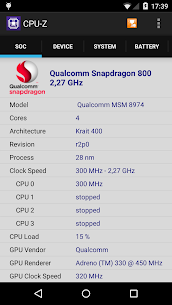
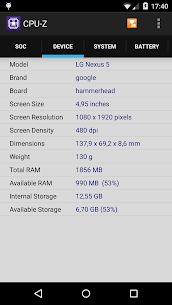
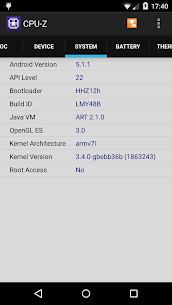
This application actively scans your device and presents accurate technical data about the System on Chip (SoC). It identifies the chipset name, CPU architecture, and clock speed for each individual core. In addition, it reveals detailed system specifications, including your device’s brand, model, display resolution, RAM capacity, and available storage. All information is displayed clearly, helping users understand their device performance without needing advanced technical knowledge.
Battery and Sensor Monitoring
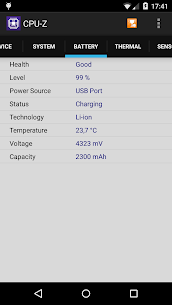
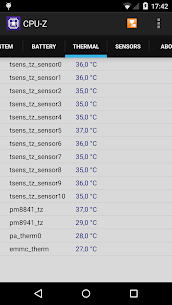
Beyond core hardware details, the app also tracks battery metrics in real time. It shows the current battery level, charging status, temperature, and estimated capacity, allowing users to monitor battery health effectively. Furthermore, it detects and lists all available sensors on your device, providing insights into components such as accelerometers, gyroscopes, and more. This makes it especially useful for diagnostics and performance checks.
System Requirements
To run the application smoothly, your device must operate on Android 2.2 or later. Versions starting from 1.03 and above ensure compatibility with a wide range of Android smartphones and tablets, making it accessible even for older devices.
Permissions Explained
The app requires specific permissions to function properly. Internet access enables the online validation feature, ensuring accurate hardware verification. Meanwhile, network state access allows the app to collect anonymous usage statistics, which helps improve performance and reliability over time.
Online Validation Feature
Starting from version 1.04, the application includes an online validation system. This feature allows users to upload their device’s hardware specifications to a dedicated database. Once validated, the app automatically opens a unique validation link in your browser. If you choose to provide your email address, you will receive a copy of this link for future reference, making it easy to revisit your device’s profile anytime.
Settings and Debug Options
In cases where the app encounters a crash or unexpected error, it automatically displays a settings screen during the next launch. This recovery feature allows users to disable certain detection modules, helping the app run more stable on problematic devices. It ensures that even if issues occur, you can still access essential functionality without interruptions.
Images
Download links
How to install CPU-Z Mod APK?
1. Tap the downloaded CPU-Z Mod APK file.
2. Touch install.
3. Follow the steps on the screen.
Note: Important!
- Delete all previous Original/Mod before installing the latest mod.
- If necessary, log in with your email/social media. Modded App cannot be logged in with Gmail.
- Enjoy !!!
Related apps





Latest Apps
Popular apps


