Edge Gestures

Mod Info:
- No root or Lucky Patcher or Google Play Modded required;
- Disabled / Removed unwanted Permissions + Receivers + Providers + Services;
- Optimized and zipaligned graphics and cleaned resources for fast load;
- Google Play Store install package check disabled;
- Debug code removed;
- Remove default .source tags name of the corresponding java files;
- Languages: Full Multi Languages;
- CPUs: universal architecture;
- Screen DPIs: 160dpi, 240dpi, 320dpi, 480dpi, 640dpi;
- Original package signature changed;
Description
Edge Gestures helps you trigger common actions with simple gestures along the edges of your screen. It improves one-handed navigation by letting you access apps, system controls, and shortcuts without stretching your thumb across the display.
Gesture Types You Can Use
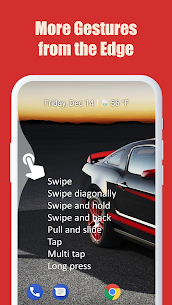
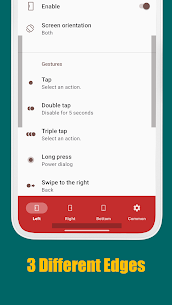
Edge Gestures supports a wide set of gesture inputs so you can choose what feels natural: tap, double tap, long press, swipe, diagonal swipe, swipe-and-hold, pull-and-slide, and pie controls. You can assign different actions to different gestures for faster control.
Actions You Can Trigger from the Edge
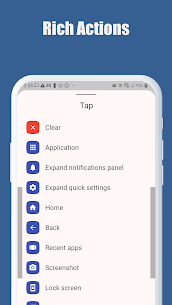
You can map edge gestures to many useful system and productivity actions, including:
- Launch any app or shortcut
- Navigate the system with Back, Home, and Recent apps
- Expand the status bar to open Notifications or Quick Settings
- Scroll to top (Android 6.0+)
- Open the power menu dialog
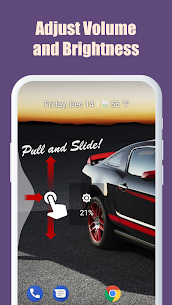
- Adjust brightness or media volume
- Use fast scroll for quicker page movement
- Toggle split-screen mode
- Switch back to the previous app
Customize the Edge Activation Area
Edge Gestures lets you fully customize where and how the gesture zone works. You can change the thickness, length, and position of the edge area to match your grip, phone size, and preferred hand. The app also focuses on requesting only the permissions needed to provide its features.
Accessibility Service Disclosure (What It’s Used For)
Edge Gestures uses the Android Accessibility Service API to enable certain system-level actions. The app uses this permission only to perform functions such as:
- Expand notifications panel and quick settings
- Home, Back, and Recent apps
- Tap-through support
- Screenshot
- Power dialog
- Scroll to start and fast scroll
- Toggle split screen
- Lock screen
Images

Download links
How to install Edge Gestures Mod APK?
1. Tap the downloaded Edge Gestures Mod APK file.
2. Touch install.
3. Follow the steps on the screen.
Note: Important!
- Delete all previous Original/Mod before installing the latest mod.
- If necessary, log in with your email/social media. Modded App cannot be logged in with Gmail.
- Enjoy !!!