Flexcil

Description
Flexcil combines a powerful note-taking app and a full PDF reader for Android in a single place. Millions of users rely on it to take class notes, review documents, annotate PDFs, manage memos, and build digital planners. You can read, write, and organize without jumping between separate apps, which helps you study faster and keep everything structured.
Recognized by Major Platforms
Flexcil has earned visibility across major ecosystems. Apple has showcased it in stores and featured it repeatedly on the App Store in many countries, while Samsung selected it for its C-Lab Outside startup program. Flexcil has also ranked as a top revenue app on Google Play in South Korea, highlighting strong adoption among productivity-focused users.
Note-Taking + PDF Reader: Built for Studying and Work
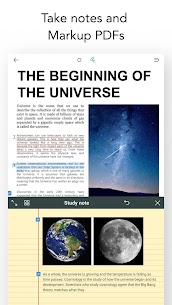
Flexcil lets you open PDFs instantly, mark them up, and keep related notes together. You can edit, annotate, and organize both PDF documents and notebooks in the same library. The app uses a vector-based pen engine to produce smooth handwriting and offers extensive choices for pen colors, stroke sizes, and fonts so you can match your style and take clearer notes.
Hyperlinks That Connect Sources to Your Notes
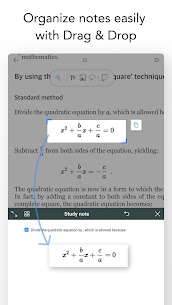
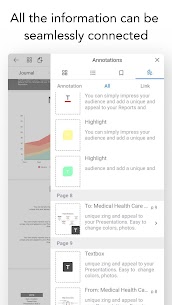
Flexcil speeds up review by linking what you capture to where it came from. When you grab text or images from a document, Flexcil automatically creates a link back to the original source. You can jump from your notes directly to the exact spot in the PDF, which helps you verify information, cite sources, and study more efficiently.
Gesture-Based Editing: Faster Highlighting and Capturing
Flexcil emphasizes pen gestures to make marking up documents feel natural and quick. You can highlight or underline with minimal steps, add text annotations, and capture images or sections of a document into your notes without a complicated workflow. This gesture-first approach reduces the friction of traditional note-taking and helps you work longer with less strain.
Multitasking: Read and Write at the Same Time
Flexcil supports productive study layouts so you can view a PDF and take notes simultaneously during class or meetings. You can drag and drop text or images from other apps into your PDFs or notebooks, and you can use advanced viewing options—such as full-screen view, vertical scrolling, and multi-page viewing—to match how you prefer to read and review.
Digital Planner Tools and Creative Templates
Flexcil also works well as a digital planner. You can personalize your notebooks with aesthetic covers and templates, then use a wide range of pen styles and colors to make planning, journaling, outlining, or sketching more engaging. Students, teachers, researchers, writers, and artists can build a system that feels both structured and creative.
Audio Recording with Playback Linked to Notes
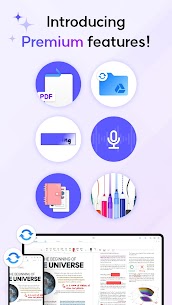
Flexcil includes audio recording so you can capture lectures or meetings while you write. During review, you can replay the recording and revisit what you heard alongside what you wrote. The app also lets you tap on a part of your notes to hear the audio from that moment, which makes revision more accurate and less stressful.
Works with Popular Services and Learning Tools
Flexcil fits into modern workflows by supporting common platforms and storage options. You can use it with tools such as Zoom, Notion, Google Classroom, and cloud services like Google Drive, Dropbox, and Box. It also supports NAS storage and works with digital textbooks, ebooks, and PDFs, making it easier to keep study materials in sync.
Images

Download links
How to install Flexcil Mod APK?
1. Tap the downloaded Flexcil Mod APK file.
2. Touch install.
3. Follow the steps on the screen.
Note: Important!
- Delete all previous Original/Mod before installing the latest mod.
- If necessary, log in with your email/social media. Modded App cannot be logged in with Gmail.
- Enjoy !!!