FolderSync Pro

Mod Info:
Paid Features Unlocked
● Stable mod
● Debug info removed
● Multiple languages available
● All features are working
● No active trackers or advertisements
● Requires android 8.0 and up
● CPUs arch: Universal
● Optimized and cleaned resources for fast loading.
Description

FolderSync Pro is a powerful file synchronization and backup app that lets users seamlessly connect local device storage with a wide range of cloud services. Discover its features, automation options, file management tools, and how it streamlines your workflow.
Introduction
FolderSync Pro stands out as one of the most versatile file synchronization solutions available for mobile devices. Designed to bridge the gap between local storage and cloud-based services, it offers complete control over how files are stored, backed up, and transferred across locations. For users who depend heavily on cloud environments or need a reliable automated backup system, FolderSync Pro provides a streamlined and dependable workflow suitable for personal and professional tasks.
At its core, FolderSync Pro gives users the ability to synchronize folders on their device with numerous cloud providers, ensuring that files remain updated and safely stored across platforms. It supports two-way syncing as well as one-way backups, making it adaptable to a variety of needs—from safeguarding photos and documents to maintaining synchronized project files. The app emphasizes reliability, efficiency, and user control, which enables even complex file operations to be handled smoothly from one interface.
The inclusion of advanced protocols like FTP, SFTP, SMB, and WebDAV expands its power beyond traditional cloud storage. This makes it especially useful for users managing private servers, NAS systems, or enterprise environments. Whether you need scheduled backups, automatic folder mirroring, or fine-grained control over multiple storage endpoints, FolderSync Pro delivers robust functionality wrapped in a clean and intuitive interface.
Seamless Sync Between Local Storage and Cloud Services
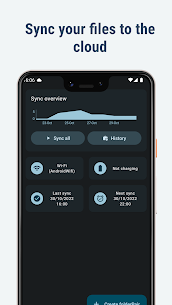
One of the defining aspects of FolderSync Pro is its ability to synchronize files between a device’s internal storage or SD card and nearly any major cloud provider. The sync engine is designed to be both powerful and flexible, allowing users to set detailed rules for how files are uploaded, downloaded, or compared. This ensures that file transfers are consistent and automated based on the user’s preferences.
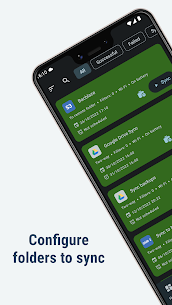
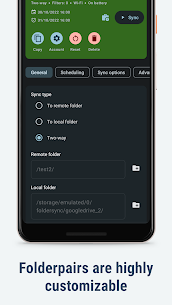
FolderSync Pro supports one-way and two-way sync, giving users the freedom to tailor their workflows. For example, it can back up photos from local storage to Google Drive automatically or maintain mirrored copies of important documents between the phone and a cloud folder. The syncing process is fast, dependable, and capable of handling large volumes of data without unnecessary delays.
The app helps minimize the risk of data loss by eliminating manual handling and storing critical files safely in remote storage locations. Users who regularly edit documents, manage media files, or switch between multiple devices will find the automated sync system especially valuable.
Extensive Cloud Provider Compatibility
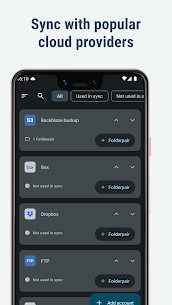
FolderSync Pro sets itself apart with its unprecedented support for cloud storage platforms. It integrates seamlessly with major names like Google Drive, Dropbox, OneDrive, Amazon S3, MEGA, pCloud, and many other popular services.
Beyond mainstream cloud services, the app also supports enterprise-level solutions such as Google Cloud Storage, OneDrive for Business, Kolab Now, NetDocuments, and Storegate. This allows organizations and professional users to manage cloud relationships within a secure and centralized environment.
Its compatibility with self-hosted and open-source platforms like OwnCloud, NextCloud, and WebDAV-based servers further elevates its value. Users who maintain personal servers or privacy-focused cloud systems can connect their devices effortlessly, preserving full control over data.
This extensive range of cloud integrations makes FolderSync Pro one of the most inclusive sync applications available, suitable for virtually any type of user or storage environment.
Support for Advanced File Transfer Protocols
Another standout feature of FolderSync Pro is its support for numerous file transfer and network protocols. This makes the app an excellent tool for managing files across custom server setups or professional infrastructures.
Supported protocols include FTP, FTPS, FTPES, SFTP, SMB1, SMB2, SMB3, and WebDAV. These protocols ensure compatibility with remote servers, network-attached storage (NAS), Windows shared folders, and secure SSH file transfers. Users can create sync tasks that connect directly to local networks, private hosting environments, or enterprise cloud servers without needing separate apps.
For power users, the ability to combine cloud services and direct server access within a single interface enables a level of flexibility that few mobile applications provide. Whether you’re transferring large archives to a home NAS, backing up configuration files from a private server, or managing folders via WebDAV, FolderSync Pro handles each connection smoothly and securely.
Built-in File Manager With Full Local and Remote Access
FolderSync Pro includes a fully functional file manager that allows users to manipulate files stored locally or remotely without switching apps. Users can view, rename, delete, move, or copy files within both local folders and cloud directories. This makes it easy to reorganize cloud storage, clean up outdated files, or manage large remote folders directly from the device.
Unique features such as creating or deleting buckets in Amazon S3 add further flexibility for professionals or advanced users who rely on cloud object storage services. Users can upload or download individual files manually, making the app not just a sync tool but a comprehensive cloud file management solution.
Having both sync automation and manual file management in one place ensures efficiency and convenience, especially for users who handle a wide variety of data types and storage locations.
Automation Through Tasker and Scheduled Syncing
For users who prefer full automation, FolderSync Pro integrates smoothly with Tasker and other automation applications. This feature enables users to create advanced triggers, conditions, and automated workflows. Whether it’s syncing files when connected to Wi-Fi, backing up folders at certain times, or initiating sync tasks based on device events, the automation possibilities are extensive.
Scheduled syncing is another essential feature that helps users maintain consistent backups without manual intervention. You can automate daily photo backups, periodic updates to cloud archives, or synchronized folders for professional projects. This ensures that data stays safe and up-to-date at all times, while also reducing the burden of repetitive tasks.
Conclusion
FolderSync Pro delivers one of the most complete file synchronization and cloud management experiences for mobile users. Its powerful features, extensive cloud support, advanced protocol compatibility, and intuitive file manager make it a dependable companion for managing local and remote data. Whether you need automated backups, seamless cloud integration, or professional-level storage connectivity, FolderSync Pro provides the tools to handle it efficiently and securely.
Its combination of simplicity, flexibility, and depth makes it suitable for casual users, professionals, and anyone who relies on cloud services for work, storage, or personal archiving. With FolderSync Pro, managing files across multiple platforms becomes a smooth and effortless experience, offering peace of mind through reliable syncing and backup functions.
FAQ
What is FolderSync Pro used for?
FolderSync Pro is used to synchronize files between local device storage and cloud services, providing automated backups and structured file management.
Does FolderSync Pro support multiple cloud services?
Yes, the app supports a wide range of cloud providers such as Google Drive, Dropbox, OneDrive, Amazon S3, MEGA, and many others.
Can I use FolderSync Pro with private servers or NAS?
Yes, the app supports protocols like FTP, SFTP, SMB, and WebDAV, making it ideal for NAS devices and private server environments.
Is automation available in FolderSync Pro?
FolderSync Pro supports automation through scheduled sync options and integration with Tasker for advanced workflow controls.
Images
Download links
How to install FolderSync Pro Mod APK?
1. Tap the downloaded FolderSync Pro Mod APK file.
2. Touch install.
3. Follow the steps on the screen.
Note: Important!
- Delete all previous Original/Mod before installing the latest mod.
- If necessary, log in with your email/social media. Modded App cannot be logged in with Gmail.
- Enjoy !!!