hyperion launcher

Mod Info:
● Premium | Paid Features Unlocked
● Stable mod
● Debug info removed
● All premium features are working
● No active trackers or advertisements
● Requires android 5.0 and up
● CPUs arch: Universal
● Optimized and cleaned resources for fast loading.
Description
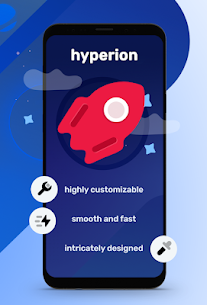
Hyperion Launcher aims to feel polished, modern, and fast—more than “just a home screen.” It blends familiar Launcher3-style foundations with extra customization, frequent updates, and a focus on keeping the experience feature-rich without adding unnecessary bloat. If you want a clean UX that still lets you shape almost every detail of your setup, Hyperion is built for that.
Community and Optional Google Feed
If you want help or want to follow development discussions, Hyperion provides a support chat. For Google Feed integration, you can enable it through Hyperion Dock.
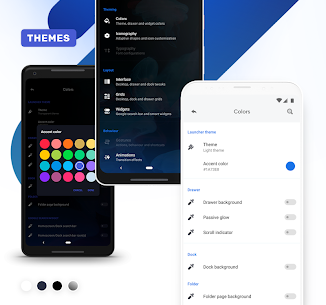
Color and Theme Controls
Hyperion gives you deep control over colors across the launcher, including:
- Overall launcher and accent theming (including the Deep Darkness theme design)
- App drawer background, glow adjustments, and scroll indicator color
- Dock background color
- Folder background color
- Search widget colors (drawer/dock)
- Smart widget colors
Icon Customization and Adaptive Shapes
You can adjust icons and labels independently on the desktop, in the drawer, and on the dock. Hyperion supports:
- Icon size, label size, text color, text shadows, and multi-line labels
- Adaptive icon shaping so icons match your preferred style and system look
Typography (Pro Feature)
Hyperion Pro unlocks full launcher font changes, letting you apply a consistent typography style across the entire UI.
Interface Features That Improve Daily Use
Hyperion includes quality-of-life tools that make your setup feel more intentional:
- Folder covers: swipe up to open a folder or mask it with a main icon
- Instant icon pack preview: see icon pack changes immediately without closing apps
- Hidden apps for a cleaner drawer
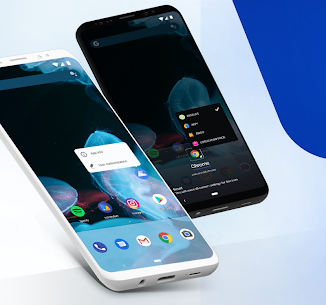
- Custom long-press options: choose what appears in the overview menu
- App launch locking: blocks launching from the launcher only (apps can still open elsewhere)
- Desktop locking: prevents accidental edits, with temporary unlock support
- Scrolling wallpaper and gradient adjustments
- Status/nav bar icon coloring: match wallpaper, dark, or light modes
- Dark mode wallpaper dimming
- Drawer and dock blur
- Dock and page indicator styling, shadows, and two-row dock option
- Auto-hide icon pack/substratum dashboards and similar apps (Pro)
- Remember drawer position and optionally auto-close the drawer
- Navigation bar display controls
- Google Feed support via Hyperion Dock
Grid Layout Control
Hyperion lets you configure grids for:
- Desktop
- App drawer
- Dock
This helps you fit more (or fewer) icons per page depending on screen size and preference.
Widgets and Smart Widgets
Hyperion includes Google-style widgets such as:
- Google Search Widget
- Google Smart Widget (Pro): works without needing a separate launcher plugin/bypass
Gestures (Pro Feature)
Hyperion Pro adds custom gestures, including:
- One- and two-finger double tap
- Swipe up
- Swipe down
Animation Tuning
You can adjust how Hyperion feels in motion with options like:
- Launcher animation speed
- App launch animation behavior
- Fade transitions on swipe
- Bounce-style physics
Profile Manager for Easy Setup Switching
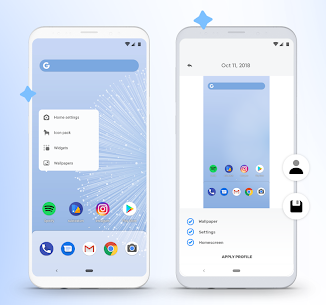
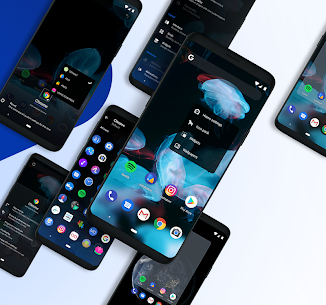
Hyperion includes a visual profile manager that shows what your setup looks like. This helps when you want to save layouts, test a new theme, or switch between different home screen styles quickly.
Images
Download links
How to install hyperion launcher Mod APK?
1. Tap the downloaded hyperion launcher Mod APK file.
2. Touch install.
3. Follow the steps on the screen.
Note: Important!
- Delete all previous Original/Mod before installing the latest mod.
- If necessary, log in with your email/social media. Modded App cannot be logged in with Gmail.
- Enjoy !!!