InSaver
Video Downloader Story Saver
36 MB
3.20.1
7.0
50,000,000+

Mod Info
- Premium / Paid Features Unlocked
- CPU Arch.: arm64-v8a
- Ads Removed
Description
Introduction to InSaver: Photo & Video Downloader for Social Media
People scroll through social media every day to watch videos, view photos, and check stories. Often, they want to save or share that content with friends or keep it for later. InSaver: Photo & Video Downloader & Story Downloader for Social Media helps users download and store their favorite content quickly and easily.
This app works as a simple and efficient tool that allows users to download social media videos, photos, stories, and even music directly to their phones. With its fast performance and easy interface, users can save content from social platforms in just a few steps.
Download Social Media Videos, Photos, Stories, and Music
InSaver allows users to download various types of content from social media platforms. The app lets you save videos, photos, stories, and music files directly to your device so you can access them anytime without an internet connection.
The downloader works quickly and automatically, which makes it convenient for users who frequently save content from social media. Whether you want to keep memorable photos, entertaining videos, or trending stories, this app provides a reliable solution.
Simple and Secure Story Saver
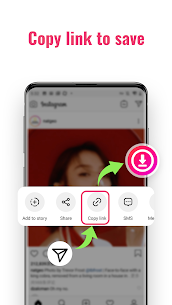
The story saver feature offers a safe and easy way to download stories from social media. Users only need to copy the link of the content or share the post directly to the app. After that, the downloader automatically starts saving the media file.
Because of its straightforward process, users can download content without complicated steps. The app focuses on speed, simplicity, and security, ensuring that anyone can use it comfortably.
How to Download Content by Copying the Link
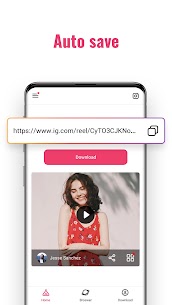
Users can quickly download social media stories, photos, and videos by copying the link of the post. First, copy the link of the video, photo, or music you want to download. After that, open the downloader, and the app will automatically detect the copied link. The download process then starts instantly, allowing you to save the content to your phone within seconds.
How to Save Content by Using the Share Option
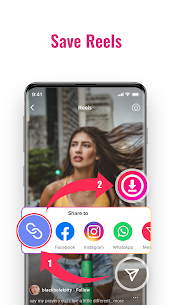
Another simple method allows users to download media through the share feature. First, select the content you want to save on social media. Then tap the “Share to” option and choose the story saver downloader application. The app immediately processes the request and downloads the story, photo, or video automatically.
This method makes downloading even easier because users do not need to copy and paste links manually.
Key Features of the Video Downloader and Story Saver
InSaver provides several useful features designed to improve the downloading experience. The app allows users to download photos and videos directly from social media posts. It also supports saving music files and story videos quickly.
Users can download content from various posts, including media from private accounts when accessible. The app functions as both a post downloader and a picture downloader, giving users full flexibility when saving content.
Another advantage is the offline viewing capability. After downloading videos or photos, users can watch them anytime without internet access. The app also saves captions, tags, and descriptions along with the media files.
InSaver supports batch downloading, which means users can download multiple videos and photos at once. Despite offering many features, the app remains safe, lightweight, and easy to operate.
Fast and Reliable Social Media Downloader
InSaver stands out as a fast and reliable downloader for saving social media content. The application combines a story saver, video downloader, music downloader, and photo downloader into one simple platform.
With automatic downloads, secure performance, and a user-friendly design, the app makes it easy to store social media stories, videos, music, and photos directly on your device. If you want a quick and efficient way to save content from social media, this downloader provides a practical solution.
Images


Download links
How to install InSaver Mod APK?
1. Tap the downloaded InSaver Mod APK file.
2. Touch install.
3. Follow the steps on the screen.
Note: Important!
- Delete all previous Original/Mod before installing the latest mod.
- If necessary, log in with your email/social media. Modded App cannot be logged in with Gmail.
- Enjoy !!!