Instant Voice Translate

Description
Instant Voice Translate is a free, easy-to-use translation app that uses modern AI to help you communicate across languages. You can rely on it while traveling, meeting international friends, or handling daily situations where you need fast and clear translations.
Real-Time Voice Translation
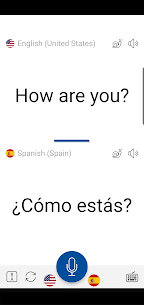
Speak normally and let the app translate your speech instantly. You can use this feature to ask questions, respond naturally, and keep conversations moving without stopping to type every sentence.
Split-Screen Mode for Two-Person Chats
Use split-screen mode to support face-to-face bilingual conversations. The app displays both languages clearly, which helps both people follow along and respond faster during live interactions.
Translate Text from Images
Capture a photo or import an image to translate the text inside it. This tool helps you understand menus, street signs, notices, and documents when you don’t know the local language.
Fast Text Translation for Words and Phrases
Type a word or short phrase and get an accurate translation in real time. This option works well for quick lookups, message replies, and short clarifications.
Slow Audio Playback for Learning and Clarity
Replay translated phrases at a slower speed when you want to hear pronunciation more clearly. This feature supports language learning and helps you understand tricky phrases without rushing.
AI Optimization for More Natural Results
Enable AI optimization to improve translation quality. The app uses AI to produce translations that sound more precise and natural.
Offline Translation When You Don’t Have Internet
Translate even without an internet connection, which is especially useful on trips or in places with weak coverage. Offline mode helps you stay prepared and communicate when data access isn’t available.
70+ Languages Supported
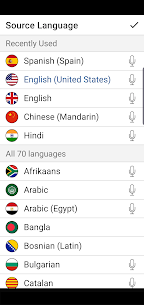
Instant Voice Translate supports over 70 languages, including English, Arabic, Chinese, French, German, Hindi, Italian, Japanese, Korean, Portuguese, Russian, and Spanish—plus many more you can explore for translation and practice.
Images


Download links
How to install Instant Voice Translate Mod APK?
1. Tap the downloaded Instant Voice Translate Mod APK file.
2. Touch install.
3. Follow the steps on the screen.
Note: Important!
- Delete all previous Original/Mod before installing the latest mod.
- If necessary, log in with your email/social media. Modded App cannot be logged in with Gmail.
- Enjoy !!!