Mobizen Screen Recorder

Mod Info
Paid Features Unlocked
● Draw
● No ads
● Mini mode
● No watermark
● My own watermark
● Create an animated GIF
● Multiple languages available
● All premium features are working
● No active trackers or advertisements
● Requires android 5.0 and up
● CPUs arch: armeabi-v7a, arm64-v8a
● Optimized and cleaned resources for fast loading.
Description
Mobizen Screen Recorder is a powerful, easy-to-use screen recording app that offers high-quality capture, free watermark removal, advanced editing tools, auto-tap features, and seamless recording without login. Discover everything about this award-winning screen recorder trusted by millions.
Introduction
Mobizen Screen Recorder has become one of the most popular and reliable screen recording apps for Android users around the world. Recognized as one of Google’s “Best of 2016 Apps” and used by more than 200 million people, Mobizen continues to deliver an intuitive, high-performance screen recording experience suitable for gamers, content creators, educators, and everyday users. With its lightweight design, powerful toolset, and simple one-tap recording system, the app is built for anyone who wants to record gameplay, tutorials, video calls, livestreams, or app walkthroughs without hassle.
Mobizen focuses on convenience and flexibility. Unlike many recording apps that require account registration or cloud storage, Mobizen allows users to record instantly without logging in, and all videos are saved directly to the device instead of external servers. This gives users full control of their files and eliminates privacy concerns. Whether you want to record your first gameplay session or create professional video content, Mobizen delivers an effortless and customizable recording experience.
Clean and High-Quality Screen Recording
One of Mobizen’s core strengths is its ability to deliver clean, high-resolution recordings across various devices. The app supports FULL HD and QUAD HD recording, allowing users to capture crisp visuals with resolutions up to 1440p, bitrates up to 24 Mbps, and frame rates up to 60fps. These settings give users the flexibility to create smooth, detailed recordings that look great whether viewed on mobile phones, tablets, or large screens.
Mobizen includes a Clean Mode that removes the watermark for free, giving users polished and professional-looking videos. There is also a Hide Air Circle mode that removes the floating record button from the screen during recording, ensuring that the final output remains clean and uninterrupted. These features make Mobizen a preferred choice for creators who want seamless footage without distractions.
Facecam, Audio Recording, and Long Capture Sessions
Mobizen supports Facecam recording, allowing users to overlay their reactions directly onto the video. This feature is especially useful for gamers, reviewers, educators, and presenters who want to create engaging and personalized content. With the ability to record internal audio, game sounds, and voice commentary at the same time, Mobizen provides a complete recording environment for all types of creators.
Another major advantage is the ability to save recordings directly to external memory, such as an SD card. This enables users to capture long sessions—over an hour or more—without worrying about running out of internal storage space. Whether you are recording a lengthy tutorial, a lecture, or a multi-hour gaming stream, Mobizen offers a stable and uninterrupted experience.
Built-In Video Editing Tools for Perfect Output
Mobizen does more than just record. It also provides a range of built-in editing tools that help users polish their videos immediately after recording. Users can trim unnecessary parts, add background audio, adjust sound levels, and include intro/outro clips directly through the app. These simple yet effective tools reduce the need for third-party editing apps and allow creators to produce ready-to-share content in minutes.
Mobizen also supports various image editing functions, enhancing the visual quality of recorded videos. These features are particularly helpful for users who want to elevate their content without going back and forth between different applications. The goal is simple: record, edit, and share—all from one place.
Exclusive Auto Tap and Auto Swiping Features
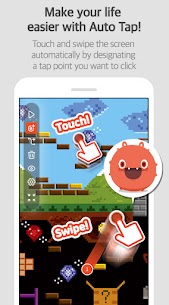
Mobizen stands out by offering advanced tools like Auto Tap and Auto Swiping. These features rely on the AccessibilityService API and provide users with automated touch actions, making it easier to perform repetitive tasks on the device. Whether you’re conducting app tests, creating step-by-step tutorials, or automating complex sequences, these functions add a new layer of functionality to the screen recording experience.
For creators who need precision, Mobizen also includes a drawing tool that allows you to highlight important areas directly on the screen. This is extremely useful for instructional videos, guides, and demonstrations. Additionally, users can create custom watermarks, generate GIFs, and choose from multiple Air Circle styles to personalize their recording interface.
Flexible Recording Interface and Customization
Mobizen offers a wide range of customization options to ensure users can adapt the app to their preferences. From choosing Air Circle types—such as mini, time bar, or transparent—to adjusting recording settings like resolution and frame rate, users have full control over how the recording experience looks and feels.
These options help users maintain a clean workspace on the screen while also optimizing performance for their device. Whether you want minimal interface clutter or a more informative display, Mobizen allows you to tailor your setup for different recording scenarios.
Fast, Secure, and User-Friendly Recording Experience
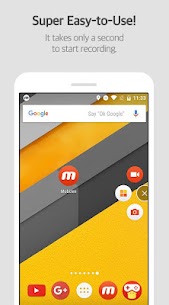
Mobizen is designed to be accessible to everyone, from beginners to advanced creators. The one-tap start recording makes it extremely easy to capture content instantly, while the lack of mandatory login ensures quick access at all times. Since recorded videos are saved only on the user’s device, Mobizen provides enhanced privacy and peace of mind.
The app has earned global recognition, featuring in multiple countries across Asia, Europe, and the Americas. Its strong reputation and wide user base reflect its reliability and consistent performance across different devices and Android versions.
Conclusion
Mobizen Screen Recorder offers one of the most comprehensive and user-friendly screen recording experiences available for Android. Its combination of high-resolution recording, watermark-free output, Facecam support, audio capture, built-in editing tools, and exclusive features such as Auto Tap and Auto Swiping makes it a standout solution for content creators and everyday users alike. The ability to record long sessions, save files to external storage, and customize the recording interface further enhances its appeal.
Whether you’re documenting gameplay, creating tutorials, recording video calls, or producing professional content for social media, Mobizen ensures that your recordings look clean, smooth, and high-quality. With its global recognition and powerful feature set, Mobizen remains one of the top choices for screen recording on Android.
FAQ
Does Mobizen require an account to start recording?
No, Mobizen allows users to start recording immediately without signing up or logging in.
Can I record my screen without a watermark?
Yes, Mobizen’s Clean Mode allows watermark-free screen recording at no cost.
What is the maximum recording quality in Mobizen?
The app supports up to 1440p resolution, 24 Mbps quality, and 60fps frame rate.
Does Mobizen save videos to the cloud?
No, all recorded videos are saved only to the user’s device, ensuring privacy and control.
Images



Download links
How to install Mobizen Screen Recorder Mod APK?
1. Tap the downloaded Mobizen Screen Recorder Mod APK file.
2. Touch install.
3. Follow the steps on the screen.
Note: Important!
- Delete all previous Original/Mod before installing the latest mod.
- If necessary, log in with your email/social media. Modded App cannot be logged in with Gmail.
- Enjoy !!!