Motion Ninja

Mod Info
Paid Features Unlocked
● No ads
● Stable mod
● No watermark
● Blur effects
● Shake effects
● Advanced 3D effects
● Basic 3D effects
● Saber effects
● 3D models
● 3D particle
● Rhythm effects
● VHS effects
● Distortion meta effects
● Lens flare
● Film effects
● Multi effects
● Scatter effects
● Velocity effects
● Magic sky Eleffects
● Pro animation
● Premium adjustment
● Move& transform effects
● Light&Color meta effects
● Blur meta effects
● Procedural meta effects
● Pro fonts
● Pro animated texts
● Pro stickers
● Pro overlay
● Pro music
● Pro intros
● Premium greenscreen
● Premium filters
● Premium backgrounds
● Frame effects
● Cool effects
● Al effects
● Moving photo
● Pro blending modes
● Cartoon effects
● Music effects
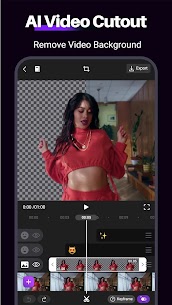
● Advanced cutout tools
● Pro fonts
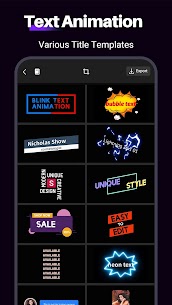
● Pro animated texts
● Procedural meta effects
● Blur meta effects
● Pro transitional videos
● Pro transitions
● No active trackers or advertisements
● Requires android 5.0 and up
● CPUs arch: armeabi-v7a, arm64-v8a
● Optimized and cleaned resources for fast loading
Description
Motion Ninja Video Editor is a powerful Android app designed for creating professional-quality video animations, fan edits, and cinematic visual effects. With tools like keyframe animation, slow motion, chroma key, and 3D transitions, this app empowers both beginners and pros to produce After Effects-level videos right from their mobile devices.
Introduction
Motion Ninja Video Editor is a feature-rich motion design and After Effects-style video editing app that brings advanced cinematic tools to Android. It’s ideal for anyone—from professional video creators to casual users—who wants to transform simple footage into breathtaking edits. Whether you’re producing anime music videos, creating fan edits, or enhancing social media clips, Motion Ninja delivers the creative freedom to achieve polished, studio-grade results.
This versatile app enables you to work with multiple layers, apply custom keyframes, perform slow-motion edits, and even integrate chroma key effects. Every aspect of video production—from animation to color correction—is accessible within a sleek, mobile-friendly interface.
Professional Animation and Keyframe Editing
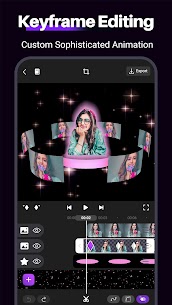
At the heart of Motion Ninja lies its powerful keyframe animation system. This allows users to control every element in their video—movement, opacity, effects, and transitions—with frame-by-frame precision. You can animate text, filters, stickers, and even audio elements using custom keyframes or motion curves.
The app also supports custom graphs and preset motion curves, giving editors precise control over timing and movement. With these tools, creators can design smooth camera pans, cinematic zooms, and fluid transitions that rival desktop software like After Effects.
Advanced Multi-Layer Editing
Motion Ninja’s multi-layer editing system lets you blend videos, images, and effects seamlessly. You can apply masking tools such as linear, radial, or star masks, and use edge feathering to blend clips naturally. This is perfect for creating picture-in-picture effects, compositing multiple scenes, or designing dynamic overlays for YouTube or TikTok videos.
This multi-layer structure gives editors the freedom to organize complex projects, experiment with visual elements, and achieve high-level precision—all from a mobile interface.
Visual Effects and Color Correction
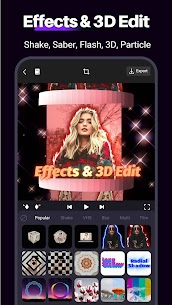
Motion Ninja offers a stunning collection of over 100 preset effects, including motion blur, glow, particle bursts, and magical sky replacements. These tools let users quickly add cinematic flair to any scene without requiring advanced skills.
The app also includes pro-grade color correction features, such as brightness, contrast, and saturation adjustments. Upcoming tools like HSL tuning and curve adjustments will further enhance its grading capabilities, allowing users to establish unique moods and tones across their edits.
Smooth Slow Motion and Time Remapping
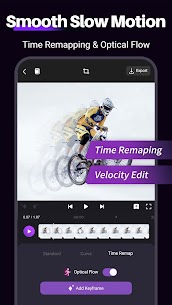
With optical flow interpolation, Motion Ninja creates ultra-smooth slow-motion sequences that feel natural and fluid. The velocity editor allows users to manipulate playback speed with precision, blending slow-motion and fast-forward effects to craft dramatic, time-bending visuals.
The Time Remap tool lets you adjust speed dynamically across clips, perfect for creating velocity edits, rhythmic transitions, or music-synced effects that align perfectly with beats and soundtracks.
Green Screen and Chroma Key Editing
For creators looking to explore compositing, Motion Ninja includes a chroma key tool that supports green screen effects. This allows you to replace backgrounds, simulate virtual environments, or add cinematic overlays. The app even offers built-in green screen resources, making it easy for users to experiment with creative compositions.
This feature, combined with motion blur and particle effects, enables users to produce high-quality scenes that feel straight out of a Hollywood studio.
3D Transitions and Dynamic Effects
Motion Ninja’s library of 3D transitions adds depth and sophistication to your edits. Whether you’re using shake effects, glitch transitions, or creative morphs, you can instantly elevate your project’s visual flow. With just one click, transitions can be added between clips for a seamless, professional look.
Users can also create 3D text animations to design cinematic intros, lower-thirds, and end titles. Each effect can be customized for timing, motion, and color, ensuring your video maintains a consistent and engaging aesthetic.
Music and Sound Integration
Motion Ninja isn’t just about visuals—it’s also a powerful music video editor. The app allows you to sync clips perfectly to sound, add beat markers, and remix audio tracks. You can import background music or use built-in sound effects to match your project’s tone.
This makes Motion Ninja ideal for creating TikTok edits, Instagram reels, and AMVs (Anime Music Videos) that synchronize rhythmically with your favorite songs.
High-Quality Output and Optimization
When your project is complete, Motion Ninja lets you export in 1080p or 4K resolution with optimized rendering quality. The built-in quality enhancer ensures that both images and videos retain crisp detail even after multiple layers of effects.
The app’s efficient compression and export system maintain smooth playback without excessive file size, ensuring compatibility with social platforms like YouTube, Instagram, and TikTok.
Conclusion
Motion Ninja Video Editor is a complete mobile solution for anyone passionate about cinematic editing. It merges the precision of desktop tools with the accessibility of an Android app, allowing users to produce everything from fan edits to professional visual compositions.
Whether you’re animating, color grading, or working with complex layers, Motion Ninja provides the flexibility and control needed to bring your vision to life. It’s not just a video editor—it’s a creative powerhouse in your pocket.
FAQ
Q1: Is Motion Ninja suitable for beginners?
Yes, Motion Ninja provides an intuitive interface and preset effects, making it easy for beginners while offering advanced tools for professionals.
Q2: Can I use Motion Ninja for green screen editing?
Absolutely. The chroma key feature lets you replace backgrounds and add cinematic effects easily.
Q3: Does Motion Ninja support 4K export?
Yes, the app supports high-quality exports up to 4K resolution.
Q4: Can I create smooth slow-motion videos with Motion Ninja?
Yes, Motion Ninja uses optical flow interpolation for fluid, professional-grade slow-motion effects.
Q5: Is Motion Ninja available for Android only?
Currently, Motion Ninja is designed for Android devices, offering a complete suite of mobile editing tools.
Images
Download links
How to install Motion Ninja Mod APK?
1. Tap the downloaded Motion Ninja Mod APK file.
2. Touch install.
3. Follow the steps on the screen.
Note: Important!
- Delete all previous Original/Mod before installing the latest mod.
- If necessary, log in with your email/social media. Modded App cannot be logged in with Gmail.
- Enjoy !!!