
n-Track Studio DAW

Description
n-Track Studio transforms your Android phone or tablet into a powerful music production workspace. You can record audio, instrument parts, and beats on unlimited tracks, then shape your songs with professional tools. The app lets you build ideas quickly, refine them with effects, and share your work when you are ready. If you want to create music on the go, this app gives you the tools to record, edit, mix, and produce from one device.
Record, Edit, and Build Your Tracks
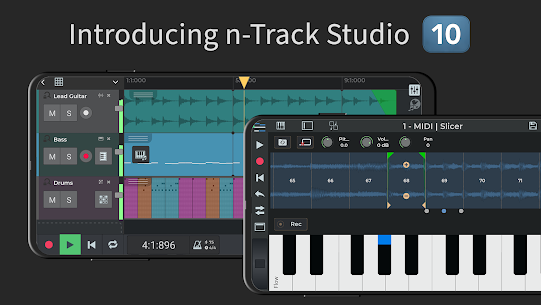
You can record with your device’s built-in microphone or connect an external USB audio interface for better input options. After recording, you can add more audio layers, arrange loops, and use royalty-free sample packs to expand your sound. The step sequencer helps you create beats, while the built-in keyboard and virtual instruments let you write melodies easily. You can also connect an external MIDI keyboard if you prefer a more hands-on workflow.
Mix With Professional Effects
n-Track Studio gives you a full mixer for shaping each song. You can adjust volume, pan, and EQ, then add creative effects such as reverb, echo, chorus, tremolo, pitch shift, phaser, distortion, compressor, denoiser, lo-fi, dynamic EQ, and convolution reverb. The app also includes guitar and bass amp plugins, VocalTune pitch correction, a metronome, and a chromatic tuner. These tools help you polish vocals, instruments, and complete mixes with greater control.
Collaborate and Share Your Music
The app connects you with the Songtree community, where you can collaborate with other musicians and build tracks together. You can import songs from your music library, automate changes in volume, pan, and effects with envelopes, and export or share your finished recording directly from your device. This makes it easy to move from rough idea to completed track without leaving the app.
Advanced Tools for Serious Creators
n-Track Studio also includes advanced features for users who need more precision. It supports a 64-bit audio engine, sampling rates up to 192 kHz with compatible hardware, live input monitoring, and recording of multiple tracks at once with supported USB devices. You can also export 16-bit, 24-bit, or 32-bit audio files and use multiple audio outputs on compatible hardware. With support for several languages and a free trial option, the app gives musicians a flexible way to create music anywhere.
Images


Download links
How to install n-Track Studio DAW Mod APK?
1. Tap the downloaded n-Track Studio DAW Mod APK file.
2. Touch install.
3. Follow the steps on the screen.
Note: Important!
- Delete all previous Original/Mod before installing the latest mod.
- If necessary, log in with your email/social media. Modded App cannot be logged in with Gmail.
- Enjoy !!!
Related apps





Latest Apps
Popular apps


