Parallel Space

Mod Info
Paid Features Unlocked
● No ads
● Stable mod
● Debug info removed
● Multiple languages available
● No active trackers or advertisements
● Requires android 7.0 and up
● CPUs arch: Universal
● Optimized and cleaned resources for fast loading.
Description
Parallel Space allows users to clone apps, manage multiple accounts on a single device, and enhance privacy with hidden apps and secure locking features. Discover how this powerful application virtualization tool transforms multitasking and personal privacy on Android.
Introduction
Parallel Space has become one of the most essential tools for Android users who need to manage multiple accounts or separate their personal and work lives within the same device. With over 200 million users worldwide, the app stands out for its stability, simplicity, and advanced virtualization technology powered by the multiDroid engine. This engine enables Android apps to run in a parallel environment, allowing users to duplicate apps without conflict and operate multiple accounts simultaneously.
In a world where multitasking and digital privacy are more important than ever, Parallel Space offers a convenient solution that caters to both casual users and professionals. Gamers can level up two accounts at once, social media users can keep different profiles active, and business users can maintain work-related communication tools separately. Beyond account management, the app also brings privacy-focused features such as Incognito Installation, hidden apps, and secure locking systems, ensuring personal data is protected from unwanted access.
Parallel Space supports 24 languages and maintains compatibility with a majority of Android applications, making it accessible and reliable for users across various regions and needs. Its clean interface and optimized performance ensure that cloned apps run smoothly without affecting the device’s primary system.
Clone and Run Multiple Accounts Smoothly
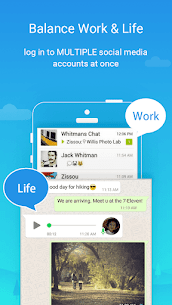
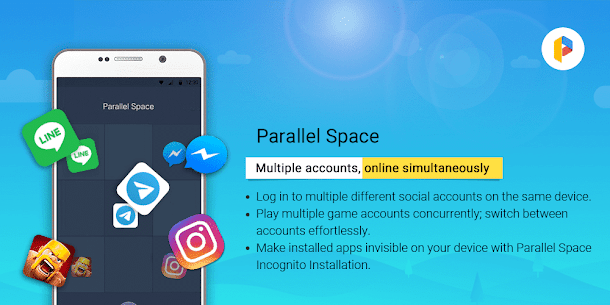
One of the core strengths of Parallel Space lies in its ability to clone apps and allow users to run multiple accounts on the same device. Whether you are balancing social media profiles, managing business communication tools, or engaging in mobile gaming, the app ensures that each cloned instance operates independently with its own data set. This separation prevents any overlap or conflict between accounts, ensuring a smooth and organized experience.
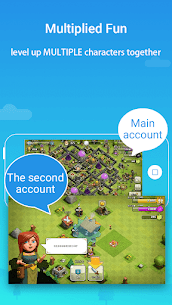
Parallel Space gives users the freedom to explore different game strategies simultaneously or manage multiple app sessions for productivity. This feature is particularly useful for players who want to experiment with different builds or roles in role-playing games or need to progress multiple accounts in strategy games. For professionals, it simplifies the ability to maintain personal and corporate accounts on apps like messaging platforms or email clients without constantly logging in and out.
The reliability of these cloned environments is powered by the multiDroid virtualization technology, which has been engineered to ensure optimal performance, minimal lag, and stable operations—even with multiple apps running in parallel. This makes the experience seamless and dependable for heavy users.
Enhanced Privacy With Hidden Apps and Incognito Installation
Privacy has become a growing concern for mobile users, and Parallel Space addresses this by offering features designed to keep apps discreet and secure. The Incognito Installation feature enables users to install apps directly inside Parallel Space without leaving a trace on the device’s primary app list. This ensures that sensitive applications remain invisible and protected from anyone who might browse the device.
In addition to keeping apps hidden, the app includes a secure lock system that adds an extra layer of protection. Users can password-protect their private space to ensure that only authorized individuals can access the cloned or hidden apps. Whether you need to secure messaging apps, business tools, or personal accounts, this feature offers peace of mind by safeguarding your information.
These privacy tools make Parallel Space especially useful for individuals who want extra separation between personal activities and public visibility. The ability to hide apps efficiently ensures that sensitive data remains protected, while still allowing the user to access everything conveniently within the app.
Seamless Switching Between Accounts
A standout convenience of Parallel Space is the ability to transition between multiple accounts with a single tap. This seamless switching is one of the reasons the app appeals to users who juggle various tasks or need to respond quickly to notifications across different profiles.
Whether you’re handling a business conversation, responding to friends on social media, or switching back to a gaming account, the smooth transitions allow for uninterrupted workflow. The app ensures that both cloned and main apps remain active in real time, making multitasking easier and more efficient. This functionality saves valuable time and helps maintain productivity throughout the day.
Stable, Powerful, and User-Friendly Design
Parallel Space is designed with performance in mind. Despite running duplicated versions of apps, the tool maintains impressive efficiency without causing excessive strain on the device’s resources. Users will find the interface clean and intuitive, with clear options for cloning apps, organizing accounts, and customizing the appearance of their workspace.
The multiDroid engine serves as the backbone of the platform, ensuring that parallel environments operate as smoothly as native ones. This technological advantage sets Parallel Space apart from other cloning tools and explains why it continues to be a leading choice in the app virtualizer category.
Moreover, the app’s compatibility with most Android applications makes it incredibly versatile. Whether you are using social media apps, messaging services, games, or productivity tools, Parallel Space ensures that each cloned version runs efficiently.
Conclusion
Parallel Space is a versatile and powerful application that caters to users who need more flexibility and privacy on their Android devices. Its ability to clone apps, manage multiple accounts, keep sensitive apps hidden, and ensure smooth switching between sessions makes it a valuable tool for those who want control over their digital life. The multiDroid virtualization engine ensures a stable and high-performance experience, while features like Incognito Installation and secure lock bring enhanced privacy to the forefront.
Whether you’re a gamer managing multiple characters, a professional balancing work and personal accounts, or someone looking to maintain increased privacy, Parallel Space delivers a dependable and user-friendly solution. With its global language support and wide compatibility, it remains one of the leading tools for app cloning and digital privacy management on Android.
FAQ
Can Parallel Space run multiple accounts of the same app?
Yes, you can clone apps and run multiple accounts independently on a single device without conflict.
Does Parallel Space support hidden apps?
Yes, it includes features to hide apps and protect them using a secure lock for enhanced privacy.
Is Parallel Space compatible with most Android apps?
Yes, it supports the majority of Android apps and offers smooth performance using the multiDroid virtualization engine.
Can I switch between accounts easily?
Yes, Parallel Space allows seamless switching between cloned and main apps with a single tap.
Images
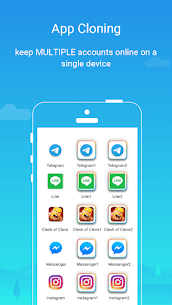

Download links
How to install Parallel Space Mod APK?
1. Tap the downloaded Parallel Space Mod APK file.
2. Touch install.
3. Follow the steps on the screen.
Note: Important!
- Delete all previous Original/Mod before installing the latest mod.
- If necessary, log in with your email/social media. Modded App cannot be logged in with Gmail.
- Enjoy !!!