PDF Viewer Pro

Mod Info
aid Features Unlocked
● No ads
● Stable mod
● Debug info removed
● No active trackers or advertisements
● Requires android 8 and up
● CPUs arch: Universal
● Optimized and cleaned resources for fast loading.
Description

PDF Viewer Pro is a versatile and professional-grade PDF reader and annotation tool that enhances productivity with advanced viewing, editing, organizing, and sharing capabilities. Explore its features, functionality, and benefits in this comprehensive overview.
Introduction
PDF Viewer Pro is designed for users who depend on PDF documents for work, study, or collaboration. Built on the trusted PSPDFKit engine, this application offers a smooth and reliable PDF reading experience that meets the demands of both casual readers and professionals. Whether you are reviewing contracts, reading e-books, editing class notes, or collaborating with team members on shared documents, PDF Viewer Pro delivers a refined and efficient workflow.
What sets this application apart is its attention to detail and commitment to productivity. The intuitive interface makes it easy to open, search, and explore documents from any location—your device storage, cloud services, email, or even directly from the web. Users can annotate documents effortlessly with highlights, notes, drawings, and markup tools, transforming the PDF viewer into a powerful workspace. With advanced capabilities available in the Pro version, such as document merging, theme customization, metadata editing, and robust annotation management, PDF Viewer Pro becomes an essential tool for anyone who works with PDFs regularly.
The app is built to function seamlessly on Android phones, tablets, and Chromebooks, ensuring a consistent and optimized experience across devices. Whether you read large manuals, handle legal files, or edit school assignments, PDF Viewer Pro ensures smooth performance, polished design, and rich customization.
Viewing Documents With Ease and Precision
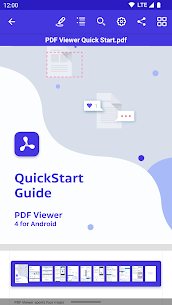
PDF Viewer Pro excels in document readability. Users can instantly open PDFs from any source, including cloud services and web browsers. The Smart Zoom feature allows you to double-tap the screen and automatically zoom in on the exact text you want to read, making navigation smooth and effortless. This feature is particularly useful for dense documents, research papers, and legal text that require precise inspection.
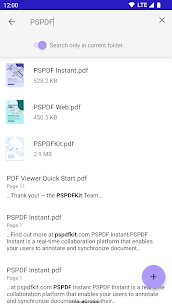
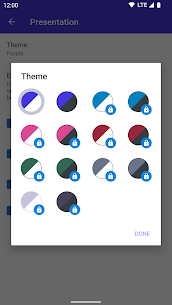
The built-in search function enhances efficiency by helping users locate specific words and phrases within seconds. This is invaluable for students reviewing long notes or professionals scanning through complex reports. The ability to customize reading themes in the Pro version adds another layer of comfort, ensuring that the reading environment matches your preference. Whether you prefer dark mode, sepia tones, or minimalist themes, the app adapts to your visual needs.
With advanced configuration settings, Pro users can fine-tune every aspect of the reading experience. From text rendering to scrolling behavior, the app offers granular control so users can shape the interface exactly the way they want. This deep level of customization highlights the app’s focus on user-centric design.
Powerful Annotation Tools for Productive Collaboration
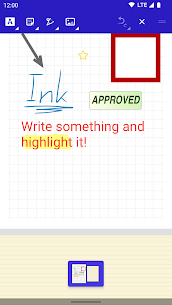
At the core of PDF Viewer Pro lies its annotation system, which is carefully crafted to support accurate and intuitive markup. Using either your finger or a stylus, you can highlight text, underline important points, circle critical details, or add freehand drawings directly onto your document.
Adding notes is equally simple, allowing users to leave comments, reminders, or explanations for personal use or for shared team projects. These annotations help create a more interactive reading environment and turn static PDFs into dynamic working documents.
With PDF Viewer Pro, you can also rotate stamps, adjust text annotations, or mark up images such as JPEGs and PNGs. This makes it useful not only for document editing but also for casual design workflows, school assignments, or visual reviews. The ability to undo changes instantly offers reassurance and encourages experimentation with annotations without fear of making mistakes.
Collaborators benefit from the option to share annotated PDFs or even annotated images. This makes reviewing and editing tasks more transparent, especially for work teams and educational groups. The annotation tools are versatile, accessible, and built to reflect natural writing motions.
Document Creation and Editing Made Simple
Beyond viewing and annotating, PDF Viewer Pro allows users to edit PDFs in ways that typically require full desktop software. You can manipulate pages by adding new ones, rotating pages to correct orientation, deleting unwanted content, or rearranging the flow of the document. These editing tools make it easy to prepare professional-looking PDFs quickly and efficiently.
The bookmarking system enables users to mark important sections, making navigation faster in large documents. Bookmarks are especially useful for manuals, multi-chapter documents, or academic readings where returning to specific points is necessary.
The Pro version includes a document merging capability that allows users to combine multiple PDFs into one cohesive file. This feature is convenient for assembling reports, merging scanned pages, organizing class materials, or preparing official documents without needing external software.
Organize, Store, and Share Documents Effortlessly
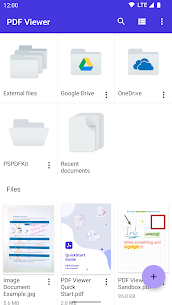
PDF Viewer Pro integrates seamlessly with major cloud storage platforms such as Google Drive, Dropbox, OneDrive, and Box. This connectivity makes storing and sharing documents straightforward, whether you prefer cloud backups or collaborative workflows.
Users can open files from their device, browser, email attachments, or third-party apps, ensuring complete file accessibility. The sharing tools allow documents to be printed, emailed, or uploaded back to cloud folders with ease.
Pro users gain the ability to edit document metadata, making it easy to adjust titles, authorship information, subject tags, and other details needed for professional document management. These advanced organization tools help keep your PDF library structured and searchable.
Conclusion
PDF Viewer Pro stands out as a robust and reliable PDF solution for individuals and teams who require comprehensive tools for reading, annotating, editing, and sharing documents. Built on the trusted PSPDFKit platform, it offers performance, versatility, and professional-grade functionality in a user-friendly design.
Whether you use it for business tasks, classroom notes, personal reading, or project collaboration, PDF Viewer Pro adapts effortlessly to your workflow. Its powerful annotation system, advanced editing tools, flexible customization options, and seamless cloud integration make it one of the most complete PDF apps available on Android.
For users who want even more control and advanced capabilities, the Pro subscription unlocks premium features that significantly enhance productivity. From theme customization and metadata editing to document merging and image annotation, PDF Viewer Pro delivers a premium experience tailored for professionals and serious readers alike.
FAQ
Is PDF Viewer Pro free to use?
Yes, the basic PDF Viewer application is free. A Pro subscription unlocks additional premium features.
Can I annotate documents using this app?
Yes, the app supports highlighting, notes, drawings, text markup, and more. Pro features provide advanced annotation options.
Does PDF Viewer Pro support cloud storage?
Yes, you can open and save documents to major cloud services like Google Drive, Dropbox, Box, and OneDrive.
Can I merge PDFs using the app?
Yes, PDF merging is available in the Pro version of the app.
Images
Download links
How to install PDF Viewer Pro Mod APK?
1. Tap the downloaded PDF Viewer Pro Mod APK file.
2. Touch install.
3. Follow the steps on the screen.
Note: Important!
- Delete all previous Original/Mod before installing the latest mod.
- If necessary, log in with your email/social media. Modded App cannot be logged in with Gmail.
- Enjoy !!!