RAR
RARLAB (published by win.rar GmbH)
18 MB
7.30.build194
5.0 and up
100,000,000+

Mod Info
● Paid Features Unlocked
● No ads
● Stable mod
● Debug info removed
● All premium features are working
● No active trackers or advertisements
● Requires android 5 and up
● CPUs arch: Universal
● Optimized and cleaned resources for fast loading.
Description

RAR is a fast, reliable, and feature-rich compression and extraction tool for Android, offering efficient file management, support for multiple archive formats, strong encryption, and advanced repair capabilities. Learn how RAR enhances your mobile productivity with seamless performance and intuitive design.
Introduction
Mobile devices have become more than just communication tools; they now function as productivity hubs, storage centers, and entertainment platforms. With this increased usage comes the need to efficiently manage files, reduce storage consumption, and extract various types of compressed archives quickly. RAR, developed by RARLAB—the same team behind WinRAR—brings a powerful, lightweight, and easy-to-use compression solution directly to Android users. It serves as a complete file compression suite, extractor, repair utility, and basic file manager, offering a level of speed and stability that many other mobile archivers struggle to match.
RAR stands out because it provides support for a wide range of archive formats, including RAR, ZIP, TAR, GZ, BZ2, XZ, 7z, ISO, and ARJ. Whether you need to pack files to save space, extract a downloaded archive, or manage folders inside your device’s internal storage, the app handles each task with impressive efficiency. Its well-designed interface ensures that both casual users and advanced users can quickly navigate through features without confusion. Combined with CPU-optimized compression, advanced encryption, and recovery tools, RAR has become one of the most trusted file management apps on Android.
A Complete File Compression Solution for Mobile Users
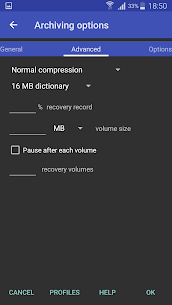
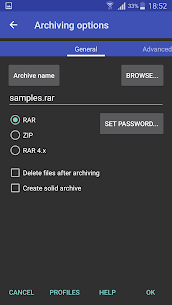
RAR is built to handle compression operations quickly and effectively. It allows users to create RAR and ZIP files directly from their smartphones, making it convenient for sharing documents, backing up folders, or organizing storage. The app supports modern compression standards and provides multiple levels of compression based on the user’s needs. Whether you want faster performance or a smaller archive size, RAR lets you choose the right mode for each situation.
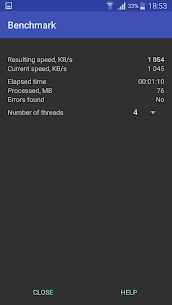
The app utilizes multiple CPU cores during the compression process, which greatly accelerates tasks compared to traditional single-threaded archiving. This optimization becomes especially noticeable when compressing large files or multiple items at once. Even on older or mid-range devices, RAR maintains consistent performance while preventing excessive battery drain or thermal buildup. This careful balance of power and efficiency is one of the reasons users trust RAR for frequent file management tasks.
Fast and Seamless Extraction Across Many Formats
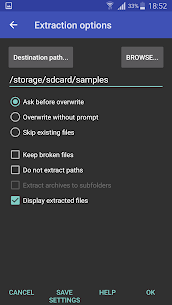
RAR’s extraction capabilities are among the strongest in the Android ecosystem. It supports a long list of archive formats, including password-protected files, multipart archives, and modern standards like RAR5. This comprehensive compatibility ensures that users won’t encounter issues when opening downloaded files, work documents, or compressed assets from the web.
The app also offers full support for ZIPX files, including those that use more advanced compression algorithms such as BZIP2, LZMA, PPMd, and XZ. Many Android extraction apps fail to open these formats correctly, but RAR processes them reliably. Extraction is typically fast, even when dealing with larger archives, thanks to its multi-core optimization. When handling encrypted archives, RAR prompts for passwords securely and opens them without unnecessary delay or failure.
Overall, the app’s extraction tools are designed to eliminate compatibility problems and streamline the process of accessing compressed content. From standard ZIP files to complex multipart RAR archives, RAR provides a smooth, error-free experience.
Advanced Repair and Recovery Tools
One of RAR’s strongest advantages is its built-in repair capabilities. Compressed archives sometimes become corrupted due to incomplete downloads, storage errors, or transfer interruptions. When this happens, many archive apps simply fail to open the file. RAR takes a different approach by offering a repair function that attempts to rebuild the damaged archive and restore usable data.
This feature is especially helpful for users who frequently download files from the internet, where corrupt archives are common. The app’s repair process is powered by technology similar to the one found in WinRAR, meaning it is reliable and capable of restoring archives that other apps may not be able to salvage. Additionally, RAR supports recovery records and recovery volumes, giving users extra options to protect their compressed files from data loss.
The repair tool is not guaranteed to fix every corrupt file, but it significantly improves the chances of rescuing important documents or data that might otherwise be lost.
A Simple Yet Effective File Manager
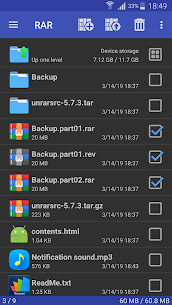
While RAR is primarily a compression and extraction tool, it also functions as a lightweight file manager. Users can navigate through folders, copy and move files, rename items, delete unused content, and even create new directories. This basic file management functionality allows RAR to operate as a multi-purpose utility, reducing the need to switch between apps.
The file manager also supports installation of APK files directly from inside the interface. This makes RAR useful for users who frequently download application packages and want a fast way to install them without using the default file manager. Everything is designed to feel simple and intuitive, making RAR a practical all-in-one solution for everyday file handling.
Strong Security and Encryption for Sensitive Files
Security is another area where RAR excels. The app supports encrypted compression, allowing users to protect data using passwords and strong AES-based algorithms. This ensures that sensitive documents remain safe even if the compressed file is shared or stored online. For users handling private or professional data, this encryption capability offers peace of mind and convenience.
The app’s encryption features are easy to configure, with clear password prompts and straightforward options. Users can also encrypt file names to prevent unauthorized access to the file list inside the archive. Combined with its repair tools and advanced compression engine, RAR becomes a reliable choice for secure archiving on mobile devices.
Conclusion
RAR is one of the most complete, efficient, and reliable compression tools available for Android. Its ability to create and extract numerous archive formats, utilize multi-core processing, repair damaged files, and function as a simple file manager makes it an essential app for users who frequently manage files on their devices. Whether you are organizing storage, compressing documents, opening downloaded archives, or securing sensitive information, RAR provides the performance and flexibility needed to handle every task with ease.
Its clean design, stable performance, and advanced features make it suitable for both casual users and professionals. If you need a powerful, trustworthy, and fast archiving tool for your Android device, RAR continues to stand out as one of the top options available today.
FAQ
Is RAR safe to use on Android?
Yes, RAR is developed by RARLAB, the creators of WinRAR, and is widely recognized as a safe and trustworthy application for compression and extraction tasks.
Can RAR open password-protected archives?
Yes, RAR fully supports password-protected archives, including encrypted RAR, ZIP, and ZIPX files.
Does RAR support 7z and other advanced formats?
Yes, RAR can unpack 7z, ISO, ARJ, TAR, GZ, BZ2, XZ, and multiple other formats.
Can RAR repair damaged compressed files?
RAR includes a repair function that attempts to reconstruct corrupted ZIP and RAR archives using recovery data.
Images
Download links
How to install RAR Mod APK?
1. Tap the downloaded RAR Mod APK file.
2. Touch install.
3. Follow the steps on the screen.
Note: Important!
- Delete all previous Original/Mod before installing the latest mod.
- If necessary, log in with your email/social media. Modded App cannot be logged in with Gmail.
- Enjoy !!!