Root Explorer

Mod Info
- Languages: Full Multi Languages;
- CPUs: universal architecture;
- Screen DPIs: 120dpi, 160dpi, 240dpi, 320dpi, 480dpi, 640dpi;
- Untouched [Paid] apk with Original Hash Signature, no [Mod] or changes was applied;
- Certificate MD5 digest: d6156aed452cbdacb479975b9eab784d
Description
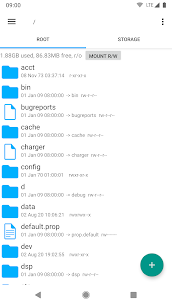
Root Explorer is a powerful file manager designed specifically for rooted Android devices. It gives you full access to Android’s entire file system, including restricted areas such as the /data folder. If you need deeper control than a standard file browser can provide, Root Explorer lets you manage system files, app data, and advanced storage locations directly from your device.
Advanced File Management and Navigation
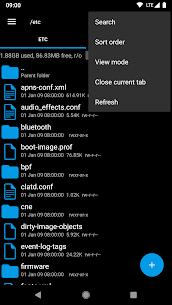
Root Explorer speeds up daily file work with features aimed at power users. You can open multiple tabs to move between folders faster, select many items at once, create bookmarks, and search across directories. The app also supports an “Open with” option so you can choose exactly which app handles a file.
Cloud and Network Access (Drive, Dropbox, SMB)
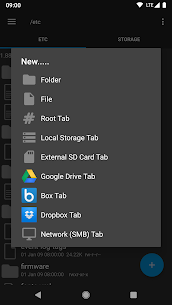
Root Explorer connects local storage with popular services and network shares. It supports Google Drive, Box, Dropbox, and network access via SMB, which helps when you manage files across PCs, NAS devices, or cloud backups from one interface.
Built-In Tools: Editor, Databases, Archives, and Checksums
Root Explorer includes utilities that reduce the need for extra apps:
- Text editor for editing configuration files and scripts
- SQLite database viewer for inspecting app databases
- ZIP and TAR/GZIP creation/extraction plus RAR extraction
- MD5 support for verifying file integrity
- Image thumbnails for easier browsing
- APK binary XML viewer for inspecting APK-related resources
Root-Specific Power Features
Because the app targets root users, it includes functions you usually need root to use effectively:
- Remount system partitions (for read/write access when required)
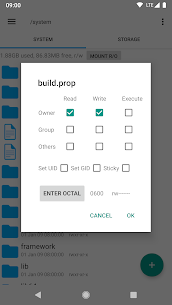
- Manage file permissions
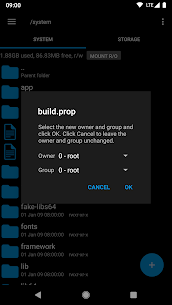
- Change file owner and group
- Create symbolic links
- Execute scripts directly from the file manager
- Create shortcuts for quick access to key paths and actions
Sharing and Sending Files
Root Explorer lets you send files through common methods such as email and Bluetooth, making it easy to move logs, configs, APKs, or backups to another device.
Support, Refund Policy, and User Satisfaction
The developers offer direct support through email ([email protected]) and state they aim to help resolve issues quickly. If they can’t help, they offer a refund. They also honor a 24-hour refund policy if you email them within that time and provide your Google order number. The app highlights 22,000+ five-star ratings as a sign that many users are satisfied.
Permissions Explained (Why the App Requests Them)
Root Explorer lists reasons for newer permissions:
- Full network access: enables cloud and SMB features; the developer states they don’t transmit user information to themselves.
- Add or remove accounts / Find accounts on device: supports Google Drive login via the Drive SDK, mainly to list accounts and add one if you choose.
- Prevent device from sleeping: keeps long file operations running without interruption.
Images
Download links
How to install Root Explorer Mod APK?
1. Tap the downloaded Root Explorer Mod APK file.
2. Touch install.
3. Follow the steps on the screen.
Note: Important!
- Delete all previous Original/Mod before installing the latest mod.
- If necessary, log in with your email/social media. Modded App cannot be logged in with Gmail.
- Enjoy !!!