
RS File Manager

Mod Info
● Paid Features Unlocked
● No ads
● Stable mod
● Unlock all themes
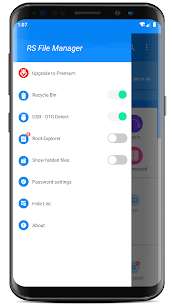
● 128 bit file encryption
● Find hidden media files
● Up to 12 pages can be locked
● Unlimited folders pinned to the top
● Auto delete expired recycle bin files
● No active trackers or advertisements
● Requires android 7.0 and up
● CPUs arch: Universal
● Optimized and cleaned resources for fast loading.
Description
RS File Manager File Explorer Mod APK is a free, secure, and efficient file management app for Android that gives you complete control over your device storage. Manage local and cloud files effortlessly with advanced tools, root access, and encryption.
Introduction
Managing files on Android devices has become increasingly essential as smartphones now store thousands of files—ranging from photos and videos to app data and documents. RS File Manager File Explorer Mod APK (Premium Unlocked) offers one of the most advanced and efficient ways to handle these files. Designed for both casual users and professionals, this file manager brings desktop-like control to your mobile device. It is not just another file explorer; it is an all-in-one management suite that allows users to organize, analyze, and protect their files easily.
With full Android 15 support, RS File Manager ensures compatibility with the latest devices and file formats. Whether you want to browse your internal storage, access your cloud accounts, or even explore system directories with root privileges, RS File Manager provides everything in one powerful package.
Efficient File Management Experience
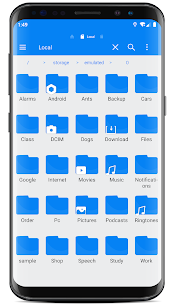
At the heart of RS File Manager File Explorer Mod APK is its clean and intuitive design. The app mimics the desktop experience by offering familiar features such as copy, cut, paste, rename, and delete. It also supports drag-and-drop actions and batch operations, allowing users to manage multiple files simultaneously. You can bookmark frequently accessed folders for quicker navigation or hide private folders to keep them secure from prying eyes.
The dual-pane view makes managing multiple folders simple and efficient. Users can easily move or transfer files between different directories without constantly switching screens. This streamlined interface helps you save time and effort, making it ideal for heavy file users and those who frequently organize their storage.
Powerful Storage Analysis and Cloud Integration
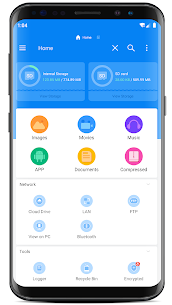
RS File Manager includes an advanced Disk Analysis feature that visually displays your storage usage. It shows folder sizes, large files, and file categories to help you identify what consumes most of your device space. This function is especially useful when cleaning up unnecessary data or optimizing your phone’s performance.
One of the standout features of RS File Manager File Explorer Mod APK is its cloud drive integration. You can link multiple cloud storage services such as Google Drive, Dropbox, OneDrive, Box, Mega, Yandex, and NextCloud. This enables seamless file transfers between your phone and the cloud, providing a unified file management hub. Whether you’re working on documents stored in OneDrive or want to back up photos to Google Drive, RS File Manager handles it all with just a few taps.
Network and Remote Access Capabilities
RS File Manager isn’t limited to local storage—it extends its reach to remote file systems as well. It supports major network protocols like FTP, FTPS, SFTP, WebDAV, SMB 2.0, NAS, and CIFS. This makes it easy to connect to your computer, local server, or even web-based storage directly from your phone.
Additionally, the FTP Server feature allows you to access your phone’s internal storage from your computer using a browser or an FTP client. This function turns your device into a portable file server, eliminating the need for cables or third-party transfer tools. It’s particularly helpful for users who frequently exchange large files between their PC and mobile device.
Enhanced Features for Advanced Users
For power users, RS File Manager File Explorer Mod APK offers several advanced tools that go beyond basic file management. The Root Explorer mode allows access to system files for rooted devices, making it possible to modify or replace core files responsibly. Additionally, the App Manager lets you view, back up, or uninstall applications directly from within the file manager, providing total control over app data.
File compression and decompression are also supported for popular formats such as ZIP, RAR, 7ZIP, and OBB. Users can compress multiple files into one archive to save space or extract downloaded files instantly without needing additional software. This feature is essential for managing game data and other large file sets efficiently.
Security and Encryption
Security is another area where RS File Manager File Explorer Mod APK excels. The app includes built-in 128-bit file encryption, allowing users to password-protect important data. This ensures that sensitive files remain private even if the device is lost or shared with others. Files encrypted with RS File Manager can only be accessed after entering the correct password or authentication, providing peace of mind for users who handle confidential data.
USB OTG and Cross-Device Access
RS File Manager File Explorer Mod APK also supports USB OTG (On-The-Go), allowing users to connect external storage devices like flash drives or portable SSDs. You can directly browse, move, or copy files between your phone and external drives without the need for a computer. This makes it an excellent solution for professionals who often transfer media files or backups on the go.
The app also allows file sharing through Bluetooth, email, or any supported Android sharing method. Whether sending a single photo or a large compressed archive, RS File Manager ensures that your data moves quickly and securely.
User Experience and Customization
RS File Manager offers extensive customization options, allowing users to personalize their file browsing experience. From themes and icon packs to adjustable viewing modes, you can make the interface fit your aesthetic preferences. The app also generates thumbnails for images, videos, and APK files, making it easier to preview content before opening it.
Furthermore, it supports multiple languages, including English, Arabic, German, Spanish, French, Italian, Portuguese, and Russian, making it accessible to users across the globe. This multilingual support enhances usability and reflects the developer’s commitment to a broad user base.
Conclusion
In a market filled with file management apps, RS File Manager File Explorer Mod APK (Premium Unlocked) stands out as a comprehensive and professional-grade solution. It combines the simplicity of a traditional file explorer with advanced features like cloud integration, root access, encryption, and powerful analysis tools. Whether you are managing personal files or operating multiple cloud drives, RS File Manager delivers the speed, flexibility, and reliability you need.
With its elegant design, cross-platform capabilities, and top-notch security, RS File Manager remains one of the most capable and user-friendly file explorers for Android. It’s not just a file manager—it’s a complete digital workspace in your pocket.
FAQ
Q1: What is RS File Manager File Explorer Mod APK?
A1: RS File Manager File Explorer Mod APK is a premium-unlocked version of the original RS File Manager app that offers advanced file management features without restrictions, including cloud integration, encryption, and network access.
Q2: Does RS File Manager support cloud storage?
A2: Yes, it supports multiple cloud platforms such as Google Drive, Dropbox, OneDrive, Box, Mega, and Yandex, allowing seamless file transfers.
Q3: Can I use RS File Manager on Android 15?
A3: Absolutely. The latest version fully supports Android 15, ensuring smooth performance and compatibility.
Q4: Is it safe to use RS File Manager Mod APK?
A4: The Mod APK itself offers the same secure encryption and privacy features as the original app. Always ensure you download it from trusted sources to avoid tampered versions.
Q5: Does the app require root access?
A5: No, RS File Manager works perfectly without root access. However, rooted users can take advantage of advanced features like system file editing through Root Explorer mode.
Images


Download links
How to install RS File Manager Mod APK?
1. Tap the downloaded RS File Manager Mod APK file.
2. Touch install.
3. Follow the steps on the screen.
Note: Important!
- Delete all previous Original/Mod before installing the latest mod.
- If necessary, log in with your email/social media. Modded App cannot be logged in with Gmail.
- Enjoy !!!
Related apps





Latest Apps
Popular apps


