
SD Card Test Pro

Mod Info:
- No root or Lucky Patcher or Google Play Modded required;
- Disabled / Removed unwanted Permissions + Receivers + Providers + Services;
- Optimized and zipaligned graphics and cleaned resources for fast load;
- Debug code removed;
- Languages: Full Multi Languages;
- CPUs: armeabi-v7a, arm64-v8a, x86, x86_64;
- Screen DPIs: 160dpi, 240dpi, 320dpi, 480dpi, 640dpi;
- Original package signature changed;
Description
SD Card Test Pro helps you benchmark storage performance on Android. You can test both your external (removable) SD card and your internal storage with quick, beginner-friendly tools, while still getting advanced options when you need deeper analysis.
Test External SD Cards and Internal Memory
You can measure read and write speeds on:
- Removable SD cards (Micro SD, SDHC, SDXC)
- Built-in device storage (internal memory)
The app runs fast benchmarks and shows results clearly, so you can compare cards, check whether a new card performs as advertised, or verify if internal storage slows down under load.
Detect Fake or Damaged Cards with Data Verification
SD Card Test Pro doesn’t just measure speed—it also verifies the data it writes. This helps you identify corrupted, unstable, or fake-capacity memory cards that appear normal until you start saving large files.
Flexible Read/Write Benchmarks
You can run several read/write test combinations and also create custom benchmarks. This flexibility helps you test real-world scenarios, such as many smaller files versus fewer large files, which can affect performance differently.
Storage Type and SD Class Detection
After testing, the app estimates hardware details based on measured performance, including:
- Internal storage type: eMMC or UFS 2.0 / 2.1+
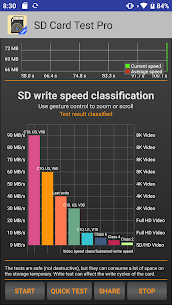
- SD card speed class: Class 2/4/6/10, UHS-I / UHS-II / UHS-III (and related ratings such as U1/V10 when applicable)
Because the app calculates class/type from speed results, it needs a meaningful test run to avoid inaccurate labels.
File System and Storage Mode Support
SD Card Test Pro supports multiple file systems, including:
- ext4
- exFAT
- FAT / FAT32
It also works with both Android storage configurations:
- Portable storage
- Adoptable storage (with limitations—see below)
Detailed Storage Information
Along with speed results, the app shows useful device and storage details such as:
- free space and total space
- mount options
- device / storage name
This helps you confirm you’re testing the correct storage location.
How to Use SD Card Test Pro
- Select storage type: choose internal storage or external SD card.
- If the app shows “Storage cannot be detected,” you can still browse manually if your phone has an SD card inserted.
- Choose a write test or a read test—run a write test first for the most reliable baseline.
- Watch speed live:
- Dashboard shows a speedometer
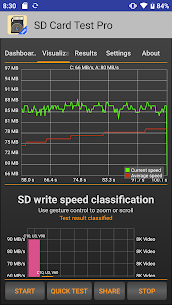
- Visualization shows current and average speed on a graph
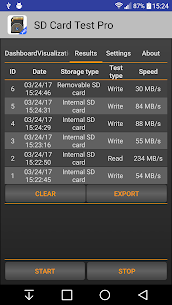
- Open the Results tab to review processed data amount, storage path, runtime, and average speeds. You can also share results with a one-tap option.
Accuracy Requirements (Important)
To classify storage type and SD card class correctly, the app needs:
- at least 4 GB of data read/written, and
- at least 10 seconds of runtime
Shorter tests can produce misleading class detection and performance averages.
Advanced Settings for Power Users
In Settings, you can control the benchmark workload by:
- adjusting file size used for read/write tests
- setting the number of files (typically 1–10)
This helps you stress-test cards more realistically.
FAT32 File Size Limit and exFAT Tip
If your SD card uses FAT/FAT32, the maximum single file size is 4 GB. Don’t set a test file larger than that—use multiple files instead. If you need larger files, format the SD card to exFAT (usually on a computer), but keep in mind some older Android devices may not support exFAT.
Note About Adoptable Storage
If your SD card is formatted as adoptable storage, the app may not access it directly. To fix this, you can either:
- move the app onto the adoptable storage (change install storage), or
- reformat the card as portable storage.
Images


Download links
How to install SD Card Test Pro Mod APK?
1. Tap the downloaded SD Card Test Pro Mod APK file.
2. Touch install.
3. Follow the steps on the screen.
Note: Important!
- Delete all previous Original/Mod before installing the latest mod.
- If necessary, log in with your email/social media. Modded App cannot be logged in with Gmail.
- Enjoy !!!
Related apps





Latest Apps
Popular apps


