Smart AudioBook Player
11.6.7
This app is designed specifically for playing audiobooks. It focuses on simple library organization, reliable progress saving, and listening tools that make long books easier to follow.
Developer
Books Software
Books Software
Size
10.12 MB
10.12 MB
Version
11.6.7
11.6.7
Requirements
Varies with device
Varies with device
Downloads
5,000,000+
5,000,000+
Get it on

Report this app
Mod Info:
- Full / Paid features unlocked;
- Disabled / Removed unwanted Permissions + Receivers + Providers + Services;
- Optimized and zipaligned graphics and cleaned resources for fast load;
- Cleaned some Permissions / Services / Providers from AndroidManifest.xml;
- Google Play Store install package check disabled;
- Debug code removed;
- Rate dialog disabled;
- Analytics removed and disabled;
- AOSP compatible;
- Remove default .source tags name of the corresponding java files;
- Languages: Full Multi Languages;
- CPUs: armeabi-v7a, arm64-v8a, x86, x86_64;
- Screen DPIs: 120dpi, 160dpi, 240dpi, 320dpi, 480dpi, 640dpi;
- Original package signature changed;
Description
This app is designed specifically for playing audiobooks. It focuses on simple library organization, reliable progress saving, and listening tools that make long books easier to follow. You get the full version for the first 30 days, then the app switches to a basic version. The app also stays ad-free.
How to Add Audiobooks (Manual Library Setup)
You add books manually by downloading the audio files yourself and placing them into the correct folder structure on your phone.
1) Create the Correct Folder Structure
- Put all audiobooks inside a main folder named “My Audiobooks”.
- Create a separate subfolder for each book, even if the book contains only one audio file.
2) Choose the Root Folder in the App
- Open Library → Settings → Root folder
- Select the “My Audiobooks” folder
3) Update the Library
- After selecting the root folder, go back to the Library and press “Update” at the top of the Library window so the app scans and imports your books.
Playback and Listening Controls
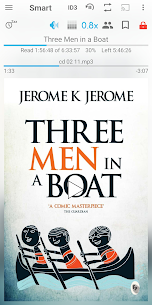
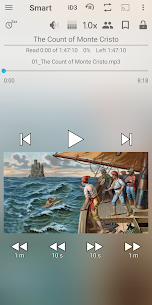
- Playback speed control: adjust narration speed when the reader is too slow or too fast.
- Chromecast support: stream audio to speakers for better listening at home.
- Home screen widget: control playback without opening the app.
Progress Tracking and Organization
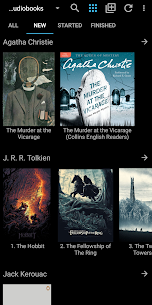
- Book classification: the app sorts titles into new, started, and finished, so you can see your status at a glance.
- Independent progress saving: you can switch between books anytime, and the app saves progress separately for each one.
- Playback history: jump back to the previous position if you accidentally skip to the next file or hit the wrong control.
Navigation Tools for Long Books
- Bookmarks: mark important scenes or sections you want to revisit.
- Character list: create your own list of characters to help track the story, especially in complex novels.
- Cover download: fetch cover art from the internet to make your library easier to recognize and more visually organized.
Sleep and Safety Features
- Automatic pause if you fall asleep: the app pauses playback when it detects you’re asleep.
- Shake to resume: shake your phone to continue listening quickly without hunting for buttons.
No Ads
The app runs without ads, so you can listen without interruptions.
Images

Download links
5
How to install Smart AudioBook Player Mod APK?
1. Tap the downloaded Smart AudioBook Player Mod APK file.
2. Touch install.
3. Follow the steps on the screen.
Note: Important!
- Delete all previous Original/Mod before installing the latest mod.
- If necessary, log in with your email/social media. Modded App cannot be logged in with Gmail.
- Enjoy !!!