Solid Explorer

Mod Info
Premium | Paid Features Unlocked
● No ads
● Stable mod
● Debug info removed
● Multiple languages available
● No active trackers or advertisements
● Requires android 4.4 and up
● CPUs arch: Universal
● Optimized and cleaned resources for fast loading.
Description
Solid Explorer Mod APK is a premium file manager for Android that offers dual-pane browsing, encryption, cloud integration, and root access—all in one sleek and customizable interface.
Introduction
Solid Explorer Mod APK redefines file management on Android with its modern design and powerful set of tools. Built as an evolution of the classic file commander concept, it combines efficiency, security, and flexibility. With this app, you can manage your files locally, organize your cloud storage, and even protect sensitive data through strong encryption. Whether you are an everyday Android user or a tech enthusiast, Solid Explorer provides a perfect balance between simplicity and advanced functionality.
Dual-Pane File Management
One of the most distinguishing features of Solid Explorer is its dual-pane layout, which offers a side-by-side browsing experience. This layout makes it incredibly easy to copy, move, or organize files between directories. You can drag and drop items from one panel to another, giving you full control and visibility over your file operations. It’s the ideal setup for multitasking users who handle multiple file transfers simultaneously.
Secure File Encryption
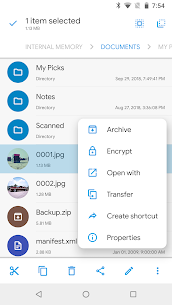
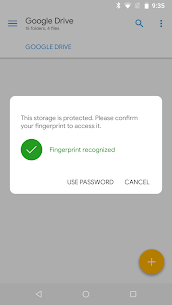
Data privacy is a top concern for many Android users, and Solid Explorer addresses this with strong AES encryption. You can easily protect sensitive files by placing them in a secure folder that requires a password or fingerprint to access. Even if the app is uninstalled, your encrypted files remain safe and unreadable by other applications. This robust layer of protection ensures that your private documents, photos, and videos stay secure at all times.
Comprehensive Storage Analysis
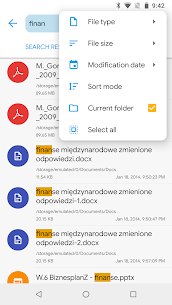
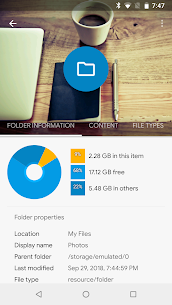
While Solid Explorer doesn’t feature a dedicated visual analyzer, it includes a powerful storage insight function. Users can check the folder properties of internal storage or SD cards to view how much space each directory occupies. The built-in search feature with size filters helps identify large files quickly, making it simple to clean up your device and free storage space.
Cloud and NAS Integration
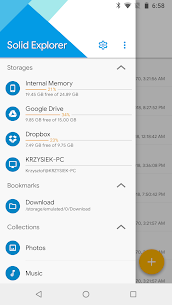
Solid Explorer Mod APK truly stands out when it comes to managing remote storage. The app supports all major cloud storage providers, including Google Drive, OneDrive, Dropbox, Box, and Yandex. You can also connect to NAS servers using popular network protocols like FTP, SFTP, SMB, and WebDav. Once connected, transferring files between different servers or between cloud accounts becomes effortless thanks to the dual-pane interface. This feature transforms Solid Explorer into a centralized hub for all your cloud and network storage management.
Advanced Features for Power Users
Solid Explorer goes beyond basic file management. It includes a wide range of advanced features that make it a favorite among experienced Android users. Root access allows you to explore system directories, modify files, and perform administrative tasks on rooted devices. The app also includes built-in viewers for images, text, and music, allowing quick previews without leaving the file manager. Archive management is another major highlight—Solid Explorer supports ZIP, 7ZIP, RAR, and TAR formats, allowing you to extract or compress files easily.
Customization and User Experience
Solid Explorer Mod APK emphasizes both function and form. It offers a clean Material Design interface that’s both intuitive and visually appealing. Users can personalize the appearance through theme customization and icon sets, creating a workspace that matches their aesthetic preferences. The app also supports dark mode, which makes long sessions easier on the eyes. On Chromebooks, Solid Explorer works seamlessly with mouse and keyboard input, expanding its usability beyond mobile devices.
Performance Tracking and Efficiency
Performance is where Solid Explorer truly excels. Its fast indexing and optimized search capabilities make locating files nearly instant. The app’s stability ensures smooth operation even when managing large storage volumes or transferring massive files. Whether you’re backing up photos, editing text documents, or streaming videos from cloud storage, Solid Explorer delivers a seamless experience with no lag or crashes.
Conclusion
Solid Explorer Mod APK is not just a file manager—it’s a complete file ecosystem for Android. With its dual-pane layout, encryption, remote file support, root access, and deep customization options, it covers all aspects of modern file management. It’s an excellent choice for users who demand both simplicity and power from their tools. If you want to take total control of your Android’s storage—locally and in the cloud—Solid Explorer is the premium solution that stands above the rest.
Frequently Asked Questions (FAQ)
What is Solid Explorer Mod APK?
Solid Explorer Mod APK is a premium version of the popular Android file manager app, offering unlocked features such as dual-pane navigation, encryption, and full cloud integration.
Is Solid Explorer safe to use?
Yes, Solid Explorer is completely safe. It uses AES encryption to protect files and provides fingerprint authentication for secure access.
Does Solid Explorer support cloud storage?
Absolutely. It supports major cloud services such as Google Drive, Dropbox, OneDrive, and more, allowing you to manage multiple accounts from one app.
Can Solid Explorer manage system files?
Yes, with root access enabled, Solid Explorer allows you to view and edit system files safely.
Is Solid Explorer available for Chromebooks?
Yes, Solid Explorer works perfectly on Chromebooks, with full mouse and keyboard support for easy file management.
Images
Download links
How to install Solid Explorer Mod APK?
1. Tap the downloaded Solid Explorer Mod APK file.
2. Touch install.
3. Follow the steps on the screen.
Note: Important!
- Delete all previous Original/Mod before installing the latest mod.
- If necessary, log in with your email/social media. Modded App cannot be logged in with Gmail.
- Enjoy !!!