Swift Backup

Description
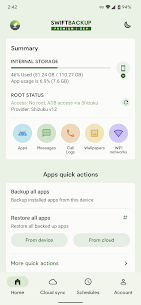
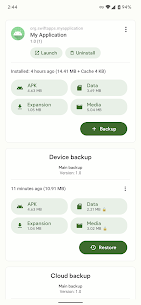
Swift Backup helps you protect important Android data in minutes. It runs quickly, works efficiently, and uses an elegant interface that makes backing up and restoring feel simple instead of stressful. You can use it as a single place to manage backups for your most important content.
Sign-in Requirement for Cloud and Premium Features
Swift Backup requires Google Sign-in to enable cloud backups and to access premium features. If your device doesn’t include Google Play services, the app supports browser-based sign-in so you can still log in and use cloud options.
What You Can Back Up (No Root Required)
Swift Backup lets you back up essential items even on non-rooted devices, including:
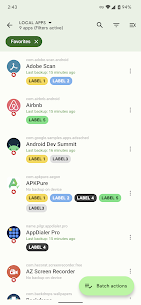
- Apps (APKs)
- SMS messages
- Call logs
- Applied wallpapers
Extra Backup and Restore Tools for Rooted Devices
On rooted phones, Swift Backup expands into a full backup and restore solution. It can back up and restore:
- App data, so you can return many apps to the same state they were in at backup time
- Special app data, such as granted permissions, battery optimization settings, Magisk Hide state, app SSAIDs, and other advanced values
- Wi‑Fi network configurations
Restore Notes: Batch Restore Requirements
Swift Backup supports batch restoring apps only when you run it on a rooted device or when you run the Shizuku service. This requirement allows the app to perform restores at scale with the permissions it needs.
Cloud Storage Services You Can Use
Swift Backup supports many cloud providers and server types, so you can store backups where you prefer:
- Google Drive, Dropbox, OneDrive, Box
- Mega.nz, pCloud
- CloudMail.Ru (requires CloudMail.Ru premium plan)
- Yandex
- WebDAV servers (Nextcloud, ownCloud, Synology NAS, and more)
- S3 storage (Amazon S3 and other S3-compatible services)
- SMB (Samba), SFTP, FTP/S/ES
Images

Download links
How to install Swift Backup Mod APK?
1. Tap the downloaded Swift Backup Mod APK file.
2. Touch install.
3. Follow the steps on the screen.
Note: Important!
- Delete all previous Original/Mod before installing the latest mod.
- If necessary, log in with your email/social media. Modded App cannot be logged in with Gmail.
- Enjoy !!!