Texpand
Prometheus Interactive LLC
15.67 MB
2.5.3
7.0
500,000+

Mod Info:
- Premium / Paid features unlocked;
- Disabled / Removed unwanted Permissions + Receivers + Providers + Services;
- Optimized and zipaligned graphics and cleaned resources for fast load;
- Google Play Store install package check disabled;
- Debug code removed;
- Remove default .source tags name of the corresponding java files;
- Analytics / Crashlytics / Firebase disabled;
- Languages: Full Multi Languages;
- CPUs: universal architecture;
- Screen DPIs: 120dpi, 160dpi, 213dpi, 240dpi, 320dpi, 480dpi, 640dpi;
- Original package signature changed;
Description

Texpand is a text-expansion app that helps you speed up typing by turning short shortcuts into full phrases. You create an abbreviation for anything you type often, then Texpand expands it automatically as soon as you enter the shortcut. This workflow reduces repetitive typing and helps you write faster in chats, emails, notes, and work messages.
Create Shortcuts for Frequently Used Phrases
Texpand lets you set up custom text shortcuts so you can insert long, commonly used sentences with just a few characters. After you type your abbreviation, the app fills in the full phrase instantly, which keeps your writing consistent and saves time every day.
Get Suggestions with a Dynamic Phrase List
If you want more control, Texpand can show a dynamic list of phrases linked to the shortcut you typed. This lets you choose the right variation quickly instead of memorizing many different abbreviations.
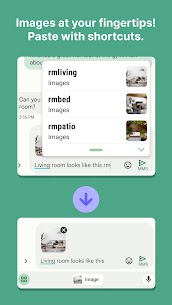
Expand More Than Text: Add Images and GIFs
Texpand doesn’t limit shortcuts to plain text. You can attach images or GIFs to abbreviations, so you can insert frequently used visuals just as easily as you insert a message template.
Undo Expansions Instantly
If an expansion triggers at the wrong time, you can undo it with a simple backspace action. This makes the app feel safe to use because you can reverse changes immediately without rewriting everything.
Backup and Transfer Your Shortcuts
Texpand protects your setup with Google Drive backup. You can also import and export your shortcuts through CSV files, which makes it easy to move your abbreviations to a new device or share them across workflows.
Customize Expansion Behavior Globally or Per Shortcut
You can fine-tune how expansions behave either for individual shortcuts or across all shortcuts. For example, you can enable instant expansion, add an automatic space after expansion, and apply other formatting rules to match your writing style.
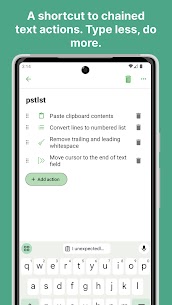
Use Variables and Chain Actions for Smarter Output
Texpand supports variables so your shortcuts can insert dynamic content such as date/time, cursor positions, or clipboard text. You can also chain actions together, letting one shortcut trigger multiple outputs or steps, which helps you complete repeated tasks with a single abbreviation.
Turn Texpand into Your Writing Assistant
Texpand acts like an intelligent helper that reduces typing effort while improving consistency. If you write repeated responses, templates, addresses, or routine messages, you can set up a shortcut once and let Texpand handle the rest.
Images



Download links
How to install Texpand Mod APK?
1. Tap the downloaded Texpand Mod APK file.
2. Touch install.
3. Follow the steps on the screen.
Note: Important!
- Delete all previous Original/Mod before installing the latest mod.
- If necessary, log in with your email/social media. Modded App cannot be logged in with Gmail.
- Enjoy !!!