WiFi Mouse Pro

Mod Info
Paid Features Unlocked
● Stable mod
● Debug info removed
● No active trackers or advertisements
● Requires android 8 and up
● CPUs arch: Universal
● Optimized and cleaned resources for fast loading.
Description
WiFi Mouse Pro transforms your Android phone into a wireless mouse, keyboard, trackpad, and remote controller with powerful features like remote desktop, media control, file browsing, and system management across Windows, macOS, and Linux.
Introduction
WiFi Mouse Pro brings an entirely new level of freedom and convenience to computer control. It converts your Android device into a full-featured wireless input tool capable of functioning as a mouse, keyboard, trackpad, and even a remote desktop viewer. Designed for users who prefer seamless and intuitive control from anywhere in a room, this app is ideal for home entertainment setups, work environments, and users who frequently operate their computer remotely. Whether you want to sit back on the sofa while watching movies, replace a faulty physical mouse, or manage your PC during presentations, WiFi Mouse Pro delivers an impressive combination of performance, comfort, and versatility.
The app communicates with your computer over a local network connection, supporting Windows, macOS, and Linux systems. With its highly responsive controls, multi-touch gesture support, voice input, media remote capabilities, and even infrared TV control on supported devices, WiFi Mouse Pro is much more than a simple wireless mouse. It is a powerful remote workstation and entertainment hub packed into your smartphone. Combined with an easy setup process and smooth interface, it has become one of the most popular tools for users seeking remote PC functionality.
Transform Your Phone Into a Fully Simulated Mouse
The core functionality of WiFi Mouse Pro lies in its ability to accurately simulate a traditional mouse. The touch interface is responsive and fluid, allowing you to move the cursor with precision and perform all standard mouse actions such as clicking, right-clicking, scrolling, and dragging content across the screen. Whether you are browsing the internet, navigating your desktop, or interacting with software, the mouse simulation is smooth and intuitive.
The app also supports gyro-based mouse control. By using your phone’s built-in gyroscope, you can move the cursor simply by tilting or moving your device, enabling a unique and convenient hands-free experience. This feature is particularly useful during presentations or gaming sessions where directional accuracy is crucial.
Powerful Keyboard and Input Method Support
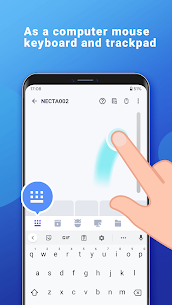
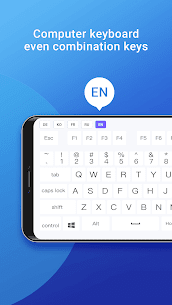
WiFi Mouse Pro includes a fully simulated keyboard that works seamlessly across operating systems. You can type using your phone’s built-in keyboard, including support for multiple language layouts and third-party input methods. This flexibility is perfect for users who frequently switch between languages or rely on specialized input options like handwriting or swipe typing.
Emoji support is integrated directly into the system, making it easy to communicate or express creativity while typing on your computer. The keyboard is responsive, reliable, and ideal for entering long texts, conducting web searches, chatting, coding, and managing your workflow without needing a physical keyboard nearby.
Multi-Touch Trackpad and Magic Trackpad Simulation
For users who prefer gesture-based navigation, WiFi Mouse Pro simulates an Apple Magic Trackpad with support for multiple touch gestures. You can scroll, pinch-to-zoom, swipe between windows, and perform advanced commands similar to those found on macOS trackpads.
This multi-touch functionality brings laptop-style navigation to your desktop setup. It is especially helpful when navigating web pages, working on creative software, or switching between applications quickly. With smooth gesture recognition and responsive controls, the trackpad mode ensures enhanced productivity and comfort.
Remote Desktop: Your Computer Screen in Your Hands
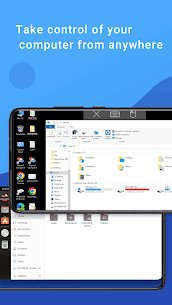
One of the most powerful elements of WiFi Mouse Pro is its built-in remote desktop feature. This function allows you to view your computer screen directly on your phone, providing complete access to your PC from anywhere on the same network.
Remote desktop access lets you launch software, edit documents, manage files, play simple games, and control your system as if you were sitting in front of it. Whether you want to operate your computer from another room or just monitor and control tasks remotely, this feature provides full visibility and control in real time.
Media Controller for Multiple Platforms
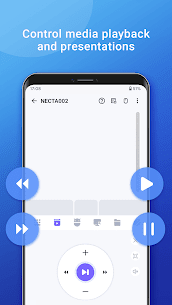
WiFi Mouse Pro includes a unified media controller that works with popular players and platforms such as VLC, Spotify, Netflix (web), Windows Media Player, QuickTime, and YouTube (web). This makes it ideal for home theater PCs or users who enjoy watching content on larger screens.
With easy access to play, pause, skip, adjust volume, and manage playlists, the app simplifies entertainment control. You can relax on your couch and control movies, music, or videos without needing to reach for your mouse or keyboard.
Launch Apps, Control Browsers, and Manage Files Remotely
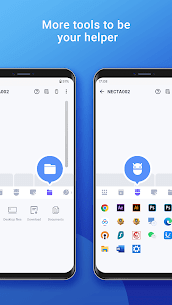
WiFi Mouse Pro provides deep integration with your computer’s file and application system. You can browse files directly from your smartphone, open documents, launch installed applications, and perform basic file operations. This remote file management is useful for retrieving content quickly or operating your computer in a hands-free manner.
The Web Remote function supports browsers such as Safari, Firefox, and Chrome, enabling you to switch tabs, scroll pages, navigate backward or forward, and input text directly from your phone.
System Controls, Voice Input, and Clipboard Sync
Beyond basic navigation, WiFi Mouse Pro offers advanced system management tools. You can shut down, restart, sleep, log out, or lock your computer instantly. There is also a feature to send your phone’s clipboard text directly to the PC, making it easy to transfer information or URLs quickly.
Voice input is supported, allowing you to dictate text to your computer through your phone’s microphone. This is especially helpful for users who prefer voice typing or need quick hands-free input for notes and documents.
Gaming Mode and Remote Control for Presentations
The built-in gamepad mode expands WiFi Mouse Pro’s versatility by enabling remote play for certain computer games, including titles like Roblox. While not a full substitute for professional controllers, it offers a convenient way to control simple games from your phone.
Presentation control is another standout feature. You can operate PowerPoint or Keynote slides with ease, making WiFi Mouse Pro a powerful companion for public speaking, teaching, or professional demonstrations.
Infrared TV Control and Broad OS Compatibility
On phones equipped with an infrared blaster, WiFi Mouse Pro can also control popular TV brands including Samsung, TCL, LG, and Apple TV. Although in beta, this feature adds another layer of flexibility for users who want to manage multiple devices with a single app.
The app is compatible with Windows 7/8/10, macOS, and major Linux distributions such as Ubuntu, Debian, Mint, Raspbian, Kali, MX Linux, and more.
Conclusion
WiFi Mouse Pro delivers a robust and feature-rich solution for controlling your computer wirelessly. Its wide range of input tools, remote desktop support, intuitive gesture control, file browsing, media management, and system functions make it one of the most comprehensive remote control apps available for Android.
Whether you are replacing a broken peripheral, setting up a home theater system, managing presentations, or simply enjoying hands-free computer control, WiFi Mouse Pro enhances productivity and comfort in meaningful ways. With its reliable performance, smooth interface, and extensive compatibility, it stands as a powerful remote tool that perfectly complements modern digital lifestyles.
FAQ
Does WiFi Mouse Pro work offline?
It requires a local network connection between your phone and computer, but it does not need internet access to operate.
Can it replace a physical mouse and keyboard?
Yes, the app offers full mouse and keyboard simulation, making it an excellent alternative to broken or missing peripherals.
Does it support Mac and Linux?
Yes, WiFi Mouse Pro fully supports Windows, macOS, and major Linux distributions.
Is remote desktop included?
Yes, the app includes integrated remote desktop functionality, allowing you to view and control your computer screen from your phone.
Images
Download links
How to install WiFi Mouse Pro Mod APK?
1. Tap the downloaded WiFi Mouse Pro Mod APK file.
2. Touch install.
3. Follow the steps on the screen.
Note: Important!
- Delete all previous Original/Mod before installing the latest mod.
- If necessary, log in with your email/social media. Modded App cannot be logged in with Gmail.
- Enjoy !!!