WPS Office
WPS SOFTWARE PTE. LTD.
185 MB
18.36
7.0 and up
500,000,000+

Mod Info
Paid Features Unlocked
● No ads
● PDF edit
● Al writer
● Fill form
● Annotation
● PDF extract
● PDF merge
● PDF to word
● Image to pdf
● Al pdf reader
● Dowload font
● Resume builder
● PDF esignature
● Download Image
● PDF watermark
● Download graph
● Export to image
● Page management
● 100,000+ templates
● No active trackers or advertisements
● Requires android 8.0 and up
● CPUs arch: armeabi-v7a, arm64-v8a
● Optimized and cleaned resources for fast loading.
Description

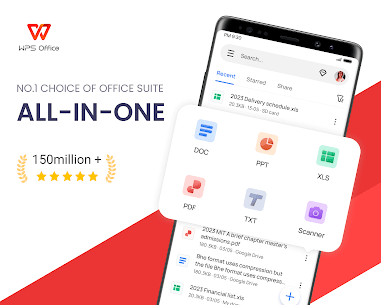
WPS Office is an all-in-one productivity suite combining Word, PDF, Sheet, Presentation, and AI-powered tools into one seamless experience. Effortlessly create, edit, convert, and share your documents anywhere with cloud sync, templates, and intelligent features.
Introduction
In today’s fast-paced digital world, flexibility and efficiency are the keys to productivity. WPS Office emerges as the ultimate all-in-one office suite for Android users who need a compact yet powerful tool for every task. Designed with innovation and accessibility in mind, it integrates Word processing, spreadsheets, presentations, PDF tools, cloud storage, and even AI-powered assistance. Whether you’re a student, professional, or entrepreneur, WPS Office transforms your smartphone into a complete digital workspace.
With its intuitive design and cross-platform compatibility, WPS Office ensures that users can create, edit, and manage documents anytime, anywhere. From scanning papers to editing PDFs, generating summaries, or collaborating in real-time, this app delivers everything you need in a modern office suite.
WPS AI – Redefining Smart Productivity
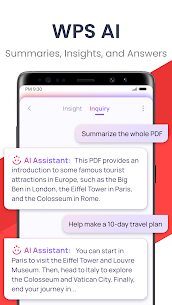
The heart of the latest WPS Office update is WPS AI, a groundbreaking addition that enhances your workflow with intelligent automation and smart content creation. Its AI-powered document scanner allows you to digitize paper files quickly, extracting and erasing elements with impressive precision. No more manual transcription or cluttered pages — everything is streamlined for efficiency.
The AI-generated content (AIGC) feature makes it easier than ever to produce high-quality material instantly. Whether you need a meeting summary, event plan, or polished resume, WPS AI delivers professional-grade output within seconds. The AI rewriting tool enhances your writing, offering refined suggestions for tone, clarity, and professionalism, ideal for reports, essays, and business documents.
Perhaps the most time-saving feature is ChatPDFs, where WPS AI processes lengthy PDF files and provides instant summaries, outlines, or translations. Instead of scrolling through dozens of pages, you can now ask questions and receive accurate, context-aware answers directly from your document. Additionally, the AI-powered OCR tool transforms scanned documents into editable text, turning complex data entry tasks into effortless operations.
A Complete Office Suite in Your Pocket
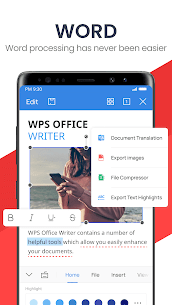
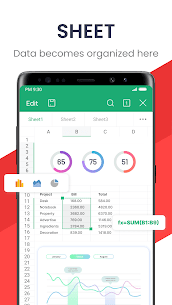
Beyond its AI innovations, WPS Office offers a robust suite of traditional tools that rival desktop software. As a professional word processor, it supports a wide range of file formats and templates, helping you create everything from reports and spreadsheets to presentations and invoices. The editing experience is fluid and optimized for mobile devices, allowing users to work productively without limitations.
Whether you’re crafting an important document, managing data sheets, or preparing slides for a meeting, WPS Office provides all the necessary tools at your fingertips. Real-time collaboration lets teams work together seamlessly, edit simultaneously, and share instant feedback — ensuring productivity remains high even in remote environments.
Comprehensive PDF Solutions
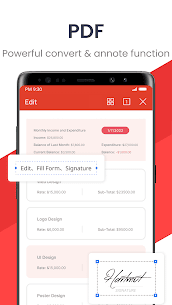
One of WPS Office’s most popular features is its advanced PDF toolkit. Users can easily scan, view, edit, and convert PDFs directly from their Android devices. Need to sign a contract, annotate a document, or merge files? WPS Office handles it all.
You can convert Word, Excel, PowerPoint, and image files into PDFs with just a few taps. Editing capabilities include adding comments, highlighting sections, splitting or merging documents, and applying or removing watermarks. Its built-in PDF scanner allows you to digitize paper documents into high-quality PDFs, perfect for archiving or sharing.
This level of versatility turns WPS Office into a full-fledged PDF workstation that eliminates the need for multiple separate apps.
Cloud Integration and Remote Collaboration
In a world where cloud accessibility defines convenience, WPS Office Cloud ensures that your work travels with you. Every file is securely stored and synchronized across devices — from mobile phones to laptops. This seamless integration guarantees that you can resume editing from any device without losing progress.
WPS Office also supports third-party cloud platforms like Google Drive, Dropbox, OneDrive, Box, and Evernote, allowing easy document import and export. Users can share their files through Wi-Fi, NFC, DLNA, email, or social platforms such as WhatsApp, Telegram, and Facebook. Additionally, with 1GB of free WPS Cloud storage, it’s effortless to collaborate online, share documents with teams, and edit together in real-time.
Templates and Tools for Every Occasion
The built-in template library adds another layer of convenience, offering pre-designed formats for resumes, budgets, reports, and presentations. Instead of starting from scratch, you can customize templates to fit your professional or personal needs. Combined with WPS’s powerful editing tools, users can easily produce stunning, professional-quality content in minutes.
Conclusion
WPS Office stands as a shining example of how technology can simplify work and boost creativity. It merges traditional office functionality with the power of AI, ensuring that every user—from students to business professionals—has access to cutting-edge tools that save time and elevate productivity. Whether you’re drafting a document, analyzing data, managing projects, or reviewing PDFs, WPS Office delivers an unmatched mobile office experience that adapts to your workflow.
With its seamless integration, cloud connectivity, and intelligent automation, WPS Office is not just another office app—it’s your ultimate partner in achieving more every day.
Images
Download links
How to install WPS Office Mod APK?
1. Tap the downloaded WPS Office Mod APK file.
2. Touch install.
3. Follow the steps on the screen.
Note: Important!
- Delete all previous Original/Mod before installing the latest mod.
- If necessary, log in with your email/social media. Modded App cannot be logged in with Gmail.
- Enjoy !!!