
3C All-in-One Toolbox
How to install 3C All-in-One Toolbox Mod APK?
1. Tap the downloaded 3C All-in-One Toolbox Mod APK file.
2. Touch install.
3. Follow the steps on the screen.
Note: Important!
- Delete all previous Original/Mod before installing the latest mod.
- If necessary, log in with your email/social media. Modded App cannot be logged in with Gmail.
- Enjoy !!!
Mod Info:
- Pro / Paid features unlocked – no additional key required;
- Disabled / Removed unwanted Permissions + Receivers + Providers + Services;
- Optimized and zipaligned graphics and cleaned resources for fast load;
- Ads Permissions / Services / Providers removed from AndroidManifest;
- Ads links removed and invokes methods nullified;
- Ads layouts visibility disabled;
- Google Play Store install package check disabled;
- Debug code removed;
- Remove default .source tags name of the corresponding java files;
- No active trackers or advertisements;
- AOSP compatible mode;
- Languages: Full Multi Languages;
- CPUs: armeabi-v7a, arm64-v8a, x86, x86_64;
- Screen DPIs: 120dpi, 160dpi, 240dpi, 320dpi, 480dpi, 640dpi;
- Original package signature changed;
Description
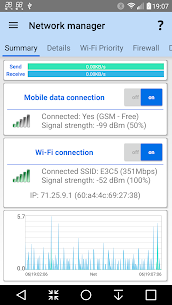
3C All-in-One Toolbox is the ultimate utility suite for users who demand deep, granular control over their Android devices. It consolidates a massive array of features into a single, giant toolbox, all presented within a modern and easy-to-use interface. This is the only app you will ever need to monitor, control, and fine-tune every aspect of your system, from its core hardware to its individual applications.
A Powerful Suite of Management Tools
At its heart, 3C All-in-One Toolbox is a collection of powerful, interconnected managers that give you complete command over your device.
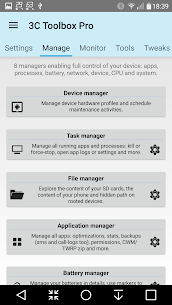
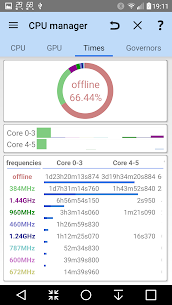
- Total System Control: The Device Manager is your automation hub, offering powerful profiles, task scheduling, and a device watchdog to keep your system running exactly as you want it. Dive deeper with the CPU Manager to control everything from single to octacore CPUs, thermal settings, and custom kernel parameters. The System and ROM Managers provide even more control, allowing you to configure low-level Linux kernel and Android OS settings.
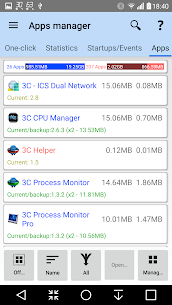
- The Ultimate Application Manager: Go beyond simple installs and uninstalls. This manager provides robust backup and restore functionality for all your favorite apps, and even includes the ability to import backups from Titanium Backup. For rooted users with the Xposed framework, you can secure and customize your apps’ events, orientation, and permissions.
- A File Manager That Does It All: Experience a simple yet incredibly powerful file explorer. It features thumbnails, folder size analysis, and the unique ability to stream your videos and photos directly to your favorite player without downloading them first. This works for files stored locally or on any Samba, FTP, WebDAV, Google Drive, or Dropbox location.
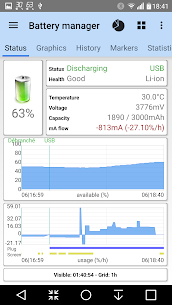
- The Definitive Battery Manager: Go beyond simple percentages. This tool helps you analyze and improve your device’s power consumption with complete data, including real-time current draw (mA) and a full charge cycle history. It offers special support for dual-battery devices and advanced notifications for LG Quick Circle and Samsung Edge screens.
Comprehensive Monitoring and Real-Time Insights
3C All-in-One Toolbox is not just about control; it’s about understanding. The app provides best-in-class monitoring and recording for all application and hardware component activities. This includes historical graphics in your status bar notifications, highly configurable widgets that can display everything from a simple gauge to complex data, and visual “line indicators” that display key information on top of everything.
A Commitment to Privacy and Transparency
This app is built for power users who value their privacy. While some advanced features may require root access or the 3C Companion app for PC, the application is transparent about its use of permissions. It offers two optional accessibility services designed to help you stop apps or back up data automatically, and it makes a firm promise that these services will never, ever collect any information.
Unlock the Full Potential with Pro
While incredibly powerful on its own, you can unlock the full suite of features by going pro or using in-app purchases. This unlocks:
- The ability to hide any tabs or menu items for a cleaner interface.
- An expanded 4×6 grid for your main screen buttons.
- Automatic backups and new app notifications.
- The creation of multiple schedules, watchers, and profiles.
- And much more!
Tools for the Advanced User
For advanced debugging and investigation, the toolbox includes a Terminal Emulator & Script Editor that allows you to run scripts at boot, as well as a System Logcat and Kernel Reader with advanced filtering and search capabilities.
3C All-in-One Toolbox is the definitive, all-encompassing utility for anyone who wants to truly master their Android device.
What's new
Improves firewall user experience
Allows disabling firewall temporarily
Improves installation failure reporting
Fix display of many tags over two lines
Fix wakelock information on Android 11 and below
Fix progress percentage copying large files (22GB+)
Images
Download links
How to install 3C All-in-One Toolbox Mod APK?
1. Tap the downloaded 3C All-in-One Toolbox Mod APK file.
2. Touch install.
3. Follow the steps on the screen.
Note: Important!
- Delete all previous Original/Mod before installing the latest mod.
- If necessary, log in with your email/social media. Modded App cannot be logged in with Gmail.
- Enjoy !!!
Related apps





Video
Most viewed apps
Most rated apps


