
8Bit Photo Lab
How to install 8Bit Photo Lab Mod APK?
1. Tap the downloaded 8Bit Photo Lab Mod APK file.
2. Touch install.
3. Follow the steps on the screen.
Note: Important!
- Delete all previous Original/Mod before installing the latest mod.
- If necessary, log in with your email/social media. Modded App cannot be logged in with Gmail.
- Enjoy !!!
Description
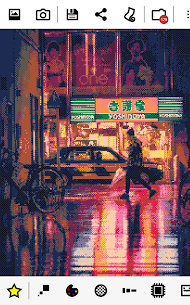
8Bit Photo Lab turns any photo on your phone into classic 8-bit pixel art with just a few taps. Whether you want to recreate the look of vintage gaming consoles, design retro posters, make memes, or simply have fun with your photos, this app gives you a powerful and enjoyable creative tool. You can choose a picture, browse pre-defined filters, and instantly preview the retro effect before saving or sharing your result in one click.
Capture Retro Moments with Live Preview
The app includes a Live Preview Camera that lets you apply the 8-bit effect before you even take the shot. You can shoot photos and record video with the pixel art style already active, which means you see the retro result in real time as you frame your subject.
Choose from Over 50 Color Palettes
8Bit Photo Lab gives you more than 50 authentic color palettes inspired by iconic retro hardware. You can choose from GameBoy, GameBoy Advance, NES, Amstrad CPC 6128, Apple II, ZX Spectrum, Commodore 16 and 64, VIC 20, CGA, EGA, Atari ST, Amiga, VGA, and many more. The app also supports custom color palettes with color interpolation, which lets you create duotone effects and more personalized looks.
Fine-Tune Every Detail of Your Pixel Art
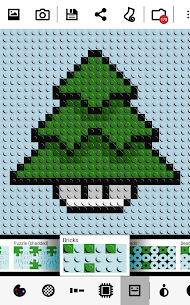
The app gives you deep control over the final appearance of your image. You can select from 15 dithering types including error diffusion, noise, pattern, and checkerboard to simulate a wider range of colors within a limited palette. Resolution options range from 8×8 all the way up to 2048×2048, and you can export high-quality PNG files at up to 4096×4096. Multiple pixel aspect ratios, attribute clash modes, and output styles such as fuse beads, bricks, puzzle, and painted pixels give you even more creative flexibility.
Adjust Colors and Add Retro Touches
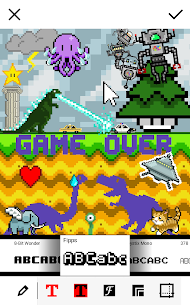
Four color adjustment parameters let you control brightness, saturation, contrast, and local contrast for each image. Local contrast helps you bring out detail and maintain subject definition even at lower resolutions, while reducing it creates a soft focus effect that can take your art in a completely different direction. You can also add retro 8-bit text, apply glitch effects, and decorate your creations with a selection of 8-bit stickers for extra personality.
Add Chaos with the Glitch Menu
The glitch menu lets you push your pixel art into creative chaos. You can apply screen melt, pixel scattering, pixel sorting, cellular automaton effects, block swapping, RGB offsetting, and interlacing. These effects pay homage to the unpredictable behavior of old computers and give your images a wild and unique edge that stands out.
Simple to Use and Powerful Enough to Impress
8Bit Photo Lab balances ease of use with genuine creative depth. You can start with a predefined look and then adjust palettes, dithering, resolution, and color settings until you get exactly the result you want. Every change updates instantly, so you can browse and experiment quickly. A grid overlay option also makes the app useful for bead artists and cross-stitchers who need precise pixel alignment in their work.
What's new
- 64 optimized and 128 optimized palettes (PRO)
- Improved optimized palette color selection algorithm
- Info bubble for palettes describes the palette and the systems which used them (can be disabled from the settings)
- Fixed saving issue on Android 10
Images


Download links
How to install 8Bit Photo Lab Mod APK?
1. Tap the downloaded 8Bit Photo Lab Mod APK file.
2. Touch install.
3. Follow the steps on the screen.
Note: Important!
- Delete all previous Original/Mod before installing the latest mod.
- If necessary, log in with your email/social media. Modded App cannot be logged in with Gmail.
- Enjoy !!!
Related apps





Developer's apps

Most viewed apps
Most rated apps


