
AFWall+ (Android Firewall +)
How to install AFWall+ (Android Firewall +) Mod APK?
1. Tap the downloaded AFWall+ (Android Firewall +) Mod APK file.
2. Touch install.
3. Follow the steps on the screen.
Note: Important!
- Delete all previous Original/Mod before installing the latest mod.
- If necessary, log in with your email/social media. Modded App cannot be logged in with Gmail.
- Enjoy !!!
Mod Info:
- Donate / Paid features unlocked – no additional key required;
- Debug code removed;
- Languages: Full Multi Languages;
- CPUs: armeabi-v7a, arm64-v8a, x86, x86_64;
- Screen DPIs: 120dpi, 160dpi, 240dpi, 320dpi, 480dpi, 640dpi;
- Original package signature changed;
Description
AFWall+ gives you precise control over which Android apps can access the internet. It works as a front-end for the Linux iptables firewall, so you can allow or block connections per app on mobile data (2G/3G/4G/5G), Wi‑Fi, roaming, and even across LAN or VPN. If you want tighter privacy and lower background data usage, AFWall+ helps you enforce rules instead of relying on each app’s settings.
Root Requirement and Superuser Permission
AFWall+ needs root access because it applies firewall rules through iptables. That’s why it requests the ACCESS_SUPERUSER permission: it must gain elevated rights to create and enforce network rules at the system level.
Permissions Note (INTERNET)
AFWall+ only uses the INTERNET permission for LAN-related functionality due to Android API limitations. You can review details in the project FAQ/wiki.
Rule Management and Daily Usability Features
AFWall+ makes firewall rule management easier with tools such as:
- Import/export rules to external storage (with a UI)
- App search and filtering
- Quick selection actions: select all / none / invert / clear per network column
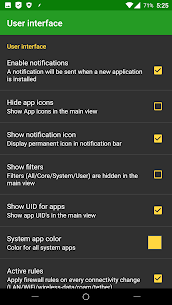
- Optional highlighting of system apps with custom colors
- Option to hide app icons for faster list loading
- Notifications for newly installed apps
Profiles, Automation, and Shortcuts
You can create multiple firewall profiles and switch between them quickly. AFWall+ also supports Tasker/Locale automation, and it offers a widget-style UI so you can apply profiles in a few taps.
Network Coverage: Roaming, VPN, LAN, Tethering, Tor
AFWall+ supports a wide set of real-world networking scenarios:
- Roaming controls for mobile networks
- VPN support
- LAN filtering
- Tethering support
- Tor support
- IPv4 and IPv6 support
Logs, Monitoring, and Notifications
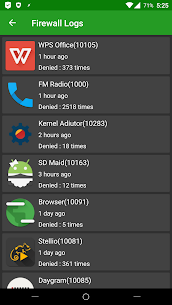
AFWall+ includes improved rule/log viewers and lets you copy or export logs to external storage. It can also show blocked packet notifications, so you can verify that your rules work as intended.
Compatibility and Platform Support
AFWall+ supports Android versions 5.x through 11.x (with older versions available for legacy Android). It also supports multiple CPU architectures (x86/MIPS/ARM) and works on Wi‑Fi-only tablets.
What's new
* Switch to NDK for nflog, busybox and iptables.
* Notification related issues and bug fixes.
* Security issues. It break custom rules again. Please check github for workaround
* Allow blocking localhost connection
* Storing iptables.log with time and location
* High contrast mode theme
* Bug: Hostnames are not show in the logs
* Ability to copy domain/hostname in the logs.
Images


Download links
How to install AFWall+ (Android Firewall +) Mod APK?
1. Tap the downloaded AFWall+ (Android Firewall +) Mod APK file.
2. Touch install.
3. Follow the steps on the screen.
Note: Important!
- Delete all previous Original/Mod before installing the latest mod.
- If necessary, log in with your email/social media. Modded App cannot be logged in with Gmail.
- Enjoy !!!
Related apps





Video
Most viewed apps
Most rated apps


