
AIDA64
How to install AIDA64 Mod APK?
1. Tap the downloaded AIDA64 Mod APK file.
2. Touch install.
3. Follow the steps on the screen.
Note: Important!
- Delete all previous Original/Mod before installing the latest mod.
- If necessary, log in with your email/social media. Modded App cannot be logged in with Gmail.
- Enjoy !!!
Mod Info:
- Premium / Paid features unlocked;
- Disabled / Removed unwanted Permissions + Receivers + Providers + Services;
- Optimized and zipaligned graphics and cleaned resources for fast load;
- Ads Permissions / Services / Providers removed from AndroidManifest;
- Ads links removed and invokes methods nullified;
- Ads layouts visibility disabled;
- Google Play Store install package check disabled;
- Debug code removed;
- Remove default .source tags name of the corresponding java files;
- Analytics / Crashlytics / Firebase disabled;
- Changed layout action bar color from lite-blue to dark-blue;
- No active trackers or advertisements – offline mode;
- AOSP compatible mode;
- Languages: Full Multi Languages;
- CPUs: armeabi-v7a, arm64-v8a, x86, x86_64;
- Screen DPIs: 160dpi, 240dpi, 320dpi, 480dpi, 640dpi;
- Original package signature changed;
Description
AIDA64 for Android is a system information and diagnostics utility for Android devices. It builds on the hardware-detection expertise of the AIDA64 Windows app and shows detailed data for phones, tablets, smartwatches, and Android TVs. You can use it to identify components, verify specs, monitor temperatures and clocks in real time, and troubleshoot device behavior with clear system readouts.
What AIDA64 Can Show
AIDA64 reports a wide range of device information, including:
CPU and SoC
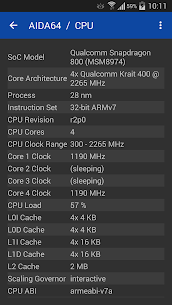
- CPU detection and SoC identification
- Real-time CPU core clock measurements
- Device model and hardware identification
Display and Camera
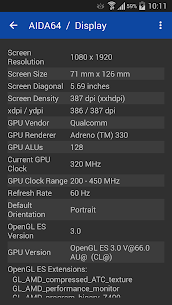
- Screen dimensions and pixel density
- Camera specifications (for example supported picture resolutions)
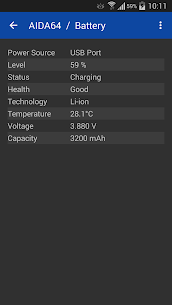
Battery Monitoring
- Battery level
- Battery temperature
- Battery charge rate (when supported by your device/Android APIs)
Network Information
- Wi‑Fi status and details
- Cellular network information
Operating System Details
- Android OS information and properties
- Dalvik/ART-related properties
Memory, Storage, and Graphics
- RAM and storage usage statistics
- OpenGL ES GPU details and real-time GPU clock measurement
- Vulkan support information
- OpenCL, CUDA (where relevant), plus PCI/USB device listing
Sensors and Installed Components
- Sensor polling and sensor lists
- Installed apps, codecs, and system directory listings
Wear OS Support
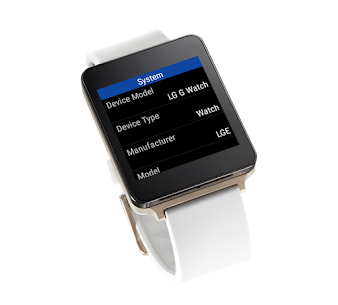
- A dedicated Android Wear module with a native watch app experience
System Requirements
- Android 4.4 or later
Permissions (and Why They’re Needed)
AIDA64 requests only a few permissions to display specific information:
- ACCESS_NETWORK_STATE: detect and display network connectivity status
- ACCESS_WIFI_STATE: show Wi‑Fi info like SSID and signal strength
- INTERNET: required for some network-related functionality
- CAMERA: used only to read camera capabilities (such as resolution). AIDA64 does not take photos or record video.
Known Issues and Limitations
AIDA64 depends on device manufacturers providing correct hardware values to Android. When those values are wrong, AIDA64 can only report what the system exposes:
- Screen diagonal size may be incorrect if the device’s xdpi/ydpi values are wrong. If you see this, you can send a device report from the About page so the developer can improve detection.
- Camera capabilities may appear incorrect for the same reason (incorrect manufacturer profiles). Reporting helps fixes in future updates.
- Battery capacity can be accurate only for factory-default batteries. If you install an extended-capacity replacement battery, Android typically won’t expose the new true capacity.
- Charge rate may be misreported on devices that don’t fully support the battery APIs introduced in Android 5.0 (even some devices shipped with 5.0+ have partial support).
What's new
Latest version:
- Improved support for foldable devices
- Fixed: core architecture detection for Exynos 2600
Previous version 2.16:
- Fixed: layout issues with Android 15 and 16
Previous version 2.09:
- Blue Theme
Previous version 2.08:
- Improved temperature measurement
- Fixed: crash when Google Play Services is not installed
Previous version 2.06:
- Black Theme
Previous version 2.05:
- Irish localization
Previous version 2.03:
- Czech localization
Images

Download links
How to install AIDA64 Mod APK?
1. Tap the downloaded AIDA64 Mod APK file.
2. Touch install.
3. Follow the steps on the screen.
Note: Important!
- Delete all previous Original/Mod before installing the latest mod.
- If necessary, log in with your email/social media. Modded App cannot be logged in with Gmail.
- Enjoy !!!
Related apps





Most viewed apps
Most rated apps


