
Alarmy
How to install Alarmy Mod APK?
1. Tap the downloaded Alarmy Mod APK file.
2. Touch install.
3. Follow the steps on the screen.
Note: Important!
- Delete all previous Original/Mod before installing the latest mod.
- If necessary, log in with your email/social media. Modded App cannot be logged in with Gmail.
- Enjoy !!!
Mod Info
● Premium | Paid Features Unlocked
● No ads
● Stable mod
● No login request
● Debug info removed
● All premium features are working
● No active trackers or advertisements
● Requires android 9.0 and up
● CPUs arch: Universal
● Optimized and cleaned resources for fast loading.
Description
Alarmy helps you wake up on time with an extra-loud alarm clock designed for deep sleepers. You can start mornings with powerful alarm sounds, choose wake-up missions that force action, and build routines that keep you consistent. The app focuses on motivation and habit-building, so you wake up alert instead of hitting snooze repeatedly.
Ultra-Loud Alarm Sounds That Get Your Attention
Alarmy solves the problem of quiet alarms by using intense, attention-grabbing tones. It includes strong sound options such as “End of the World” and “Cock-a-doodle-doo,” which work well when you sleep heavily or keep missing standard alarms. You can also switch to calmer tones if you want a gentler start on certain days.
Smart Wake-Up Missions That Make You Move
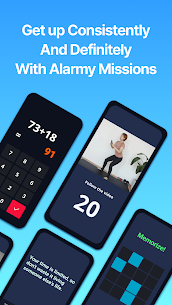
Alarmy uses missions to make sure you actually get out of bed. You can pick challenges that fit your style and difficulty level:
- Barcode or photo missions that make you stand up and scan or take a specific picture
- Math and memory missions that push your brain to fully wake up
- Typing motivational quotes that reinforce goals and focus
- Shake or squat missions that add movement and reduce sleep inertia
Wake Up Check for Snooze Addicts
Alarmy targets chronic snoozing with Wake Up Check. If you ignore the check, the app restarts your wake-up missions. This feature helps people who tend to fall back asleep easily, including users with ADHD who want a stronger structure to stay awake.
Useful for Students and Workers
Alarmy adapts to different daily schedules. Students can set a photo or barcode mission tied to a textbook to jump directly into study mode. Workers can combine loud tones with typing missions to start the day with energy and focus, especially on early shifts or busy mornings.
Personalized Routines and Sound Choices
Alarmy lets you customize your alarm experience and build repeatable habits. You can choose from many alarm tones, from aggressive wake-up sounds to peaceful melodies, then combine them with missions to create a morning routine and a more consistent daily rhythm.
Sleep Tracker and Sleep Sounds for Better Rest
Alarmy also helps you improve sleep quality, not just waking. You can use the sleep tracker to monitor your sleep cycle and reduce snoring, then play calming sounds like rain, ocean waves, or ASMR to relax at night. This pairing supports deeper rest so waking up becomes easier over time.
Motivation Tools to Start the Day Strong
Alarmy adds features that push motivation early in the morning. You can set your background to motivational quotes or videos and use typing missions to repeat goals daily, which helps you reinforce habits and stay focused.
Who Benefits Most From Alarmy
Alarmy works especially well if you:
- Sleep deeply and need a truly loud alarm
- Want an alarm that uses missions instead of a simple stop button
- Need structure for a morning routine and consistent habits
- Study for exams and want ADHD-friendly wake-up support
- Want to track sleep and build a healthier sleep schedule
Images



Download links
How to install Alarmy Mod APK?
1. Tap the downloaded Alarmy Mod APK file.
2. Touch install.
3. Follow the steps on the screen.
Note: Important!
- Delete all previous Original/Mod before installing the latest mod.
- If necessary, log in with your email/social media. Modded App cannot be logged in with Gmail.
- Enjoy !!!
Related apps




Latest Apps
Popular apps


