
All-In-One Offline Maps

Description
Tired of watching maps load? All-In-One OfflineMaps lets you display a map once, then it saves it on your device so you can open it instantly later—even without any network connection. You stay in control when coverage drops, when you travel overseas, or when you need to cut mobile data usage. The app helps you avoid getting stuck with blank tiles and keeps your navigation reliable anywhere.
Get More Than Basic Road Views
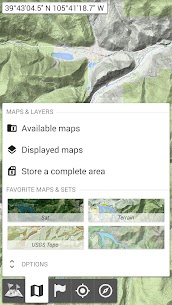
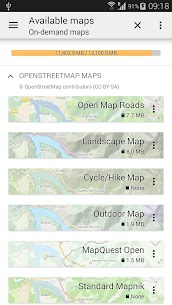
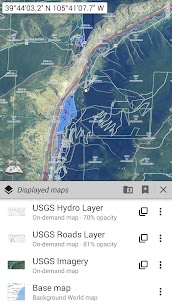
You can choose from many map types, not just standard road maps. The app offers classic road maps, detailed topographic maps, aerial/satellite imagery, and extra overlay layers that add more context to any view. It includes sources like OpenStreetMap (Roads and Topo), USGS National Map (high-resolution topo and aerial imagery), and worldwide Soviet military topographic maps. You can stack layers and adjust opacity precisely, so you see exactly what you need.
Save Large Areas Quickly and Manage Storage Easily
You can select big regions in only a few clicks and store them for offline use. The app keeps your stored map space organized, and you can delete saved areas easily whenever you want to free up storage. This approach makes it simple to prepare before a trip and clean up afterward.
Create and Manage Unlimited Placemarks
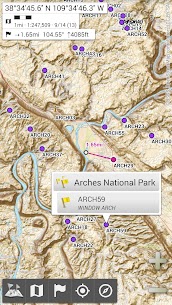
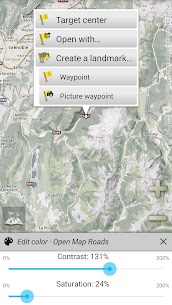
You can add waypoints, icons, routes, areas, and tracks directly on the map. The SD-Card Placemarks Explorer helps you manage everything efficiently, so you can store lots of locations and retrieve them anytime. You build a personal map of your adventures and keep it accessible offline.
Use GPS Location, Direction, and Map Rotation
The app shows your live GPS position and direction on the map. It can rotate the map to match your real-world orientation (depending on what your device supports), which makes navigation feel natural. You can also turn GPS display on or off quickly to conserve battery when you don’t need continuous tracking.
Customize Units, Coordinates, and On-Map Tools
You can switch between metric, imperial, or hybrid distance units. The app supports many coordinate formats—such as UTM, MGRS, USNG, OSGB Grid, Irish Grid, Swiss Grid, Lambert grids, DFCI grid, and QTH Maidenhead. You can even import hundreds of coordinate systems from spatialreference.org. It also offers on-map grid displays, full-screen viewing, multi-touch zoom, and other practical navigation tools.
Images
Download links
How to install All-In-One Offline Maps Mod APK?
1. Tap the downloaded All-In-One Offline Maps Mod APK file.
2. Touch install.
3. Follow the steps on the screen.
Note: Important!
- Delete all previous Original/Mod before installing the latest mod.
- If necessary, log in with your email/social media. Modded App cannot be logged in with Gmail.
- Enjoy !!!
Related apps





Latest Apps
Popular apps


