
AndroVid
How to install AndroVid Mod APK?
1. Tap the downloaded AndroVid Mod APK file.
2. Touch install.
3. Follow the steps on the screen.
Note: Important!
- Delete all previous Original/Mod before installing the latest mod.
- If necessary, log in with your email/social media. Modded App cannot be logged in with Gmail.
- Enjoy !!!
Mod Info
● Paid Features Unlocked
● No ads
● Stable mod
● Shop unlock
● No watermark
● Working all devices
● Performance Improve
● Includes spring premium
● Unlimited premium assets
● No active trackers or advertisements.
● Requires android 8.0 and up
● CPUs arch: arm64-v8a
● Optimized and cleaned resources for fast loading.
Description
AndroVid stands out as a versatile, user-friendly video editing app that empowers creators to produce stunning content effortlessly. Discover AndroVid, the ultimate video editor and maker app packed with pro tools like music addition, effects, collages, and AI features—perfect for YouTube, TikTok, and Instagram, all offline. With its robust suite of features, it transforms raw footage into polished videos, collages, and slideshows, supporting exports in HD, UHD (4K), or compact sizes for seamless sharing.
Powerful Video Editing Essentials
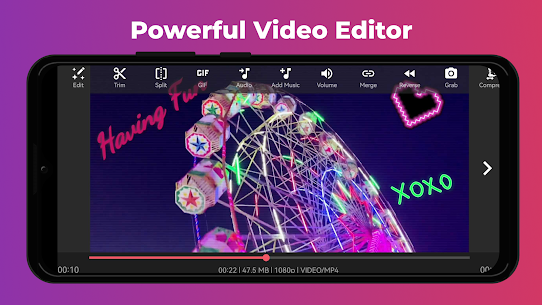
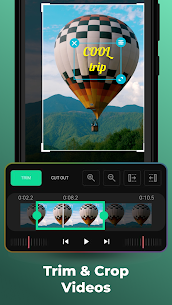
Users dive right into professional-grade editing with AndroVid’s intuitive tools. They trim, cut, crop, and merge video clips to craft seamless narratives. The app’s Quick Trimmer slices footage without quality loss or re-encoding, preserving every detail at lightning speed. For precision, the True Trimmer offers frame-by-frame control, ideal for fine-tuning action-packed sequences. Creators easily delete unwanted middle sections or split videos into multiple clips, combining them into one cohesive masterpiece. Export options flex from high-definition UHD to low-file-size formats, ensuring videos suit any platform or storage need. Whether speeding up montages or slowing down dramatic moments, AndroVid handles it all with smooth transitions and effects.
Immersive Music and Audio Integration
Elevate videos by layering in the perfect soundtrack. AndroVid lets users select from an extensive library of background tracks or import personal favorites. They trim and splice music clips, blending multiple segments for dynamic audio builds. Independent volume controls balance original video sound with added tunes, preventing overpowering mixes. This feature shines for vlogs, tutorials, or music videos, where synced audio captivates audiences. Plus, the Video to MP3 Converter extracts audio tracks effortlessly, saving them as MP3, M4A, OGG, WAV, or FLAC files—perfect for playlists or repurposing content.
Creative Text, Stickers, and Animations
Personalize footage with vibrant overlays. Users add customizable text in various fonts, colors, and styles, complete with shadow adjustments for depth. Emojis, stickers, GIFs, and custom watermarks bring personality to every frame. Animate elements to make them dance or fade in dramatically, grabbing viewers’ attention instantly. Drawing tools allow freehand sketches directly on videos—adjust brush width, color, and transparency for artistic flair. These options turn ordinary clips into eye-catching social media posts.
Stunning Photo Collages and Grids
AndroVid doubles as a collage powerhouse. Creators combine up to nine photos into eye-popping layouts using diverse grids and frames. They enhance images with filters, text overlays, stickers, and effects for a polished look. The AI-powered face blur feature protects privacy in group shots or selfies. This tool streamlines creating shareable memories, like vacation recaps or event highlights, all in one app.
Dynamic Slideshows and Visual Effects
Transform static photos into captivating slideshow videos. Users sequence images with fading transitions and background music, producing heartfelt tributes or product demos. Filters like Vintage, Sepia, Vignette, Gray, and Blur add mood, while FX effects deliver unique flair. A standout capability: stack multiple filters and blend them creatively, yielding custom aesthetics no other app matches easily. Videos pop with color grading that rivals pro software.
Advanced Video Manipulation Tools
Reverse footage for fun effects, like undoing a jump or creating mesmerizing loops. The Video Converter changes formats to GIF, 3GP, AVI, FLV, MP4, MPG, MOV, WMV, or VOB, resizing for smaller files without hassle. Frame Grabber pulls high-quality stills from any video moment, saving them straight to the gallery. Speed controls ramp up fast motion for energetic clips or dial down for silky slow-motion drama. Rotate videos by 90 or 180 degrees, flip them vertically or horizontally—all without re-encoding for instant results.
Customization for Social Media Perfection
Tailor content for platforms like YouTube, Instagram, TikTok, Facebook, and WhatsApp. Aspect ratio tools fit videos perfectly without cropping, swapping in blurred backgrounds or solid colors for pro framing. The Compressor shrinks file sizes by tweaking quality, resolution, or length, making uploads a breeze. Video Enhancer boosts clarity by adjusting brightness, contrast, saturation, and temperature, rescuing dull footage.
Effortless Organization and Playback
AndroVid organizes media like a pro manager. Users browse all phone videos and photos, play clips smoothly, and share directly to social apps. Rename, sort, delete, or recover from the Recycle Bin to keep libraries tidy. Photo editing extends to gallery views, with quick enhancements on the go. Offline functionality means creators edit anywhere, no internet required.
In summary, AndroVid packs pro-level tools into an accessible package, making video creation fun and efficient for beginners and experts alike. Its offline mode, AI smarts, and export versatility set it apart, fueling endless creativity across social platforms.
What's new
Bug fixes and stability improvements for a smoother editing experience.
Images


Download links
How to install AndroVid Mod APK?
1. Tap the downloaded AndroVid Mod APK file.
2. Touch install.
3. Follow the steps on the screen.
Note: Important!
- Delete all previous Original/Mod before installing the latest mod.
- If necessary, log in with your email/social media. Modded App cannot be logged in with Gmail.
- Enjoy !!!
Related apps


Video
Most viewed apps
Most rated apps


