
Any.do
How to install Any.do Mod APK?
1. Tap the downloaded Any.do Mod APK file.
2. Touch install.
3. Follow the steps on the screen.
Note: Important!
- Delete all previous Original/Mod before installing the latest mod.
- If necessary, log in with your email/social media. Modded App cannot be logged in with Gmail.
- Enjoy !!!
Mod Info:
- Premium Subscription / Paid features unlocked;
- Disabled / Removed unwanted Permissions + Receivers + Providers + Services;
- Optimized and zipaligned graphics and cleaned resources for fast load;
- Ads Permissions / Services / Providers removed from AndroidManifest;
- Ads links removed and invokes methods nullified;
- Ads layouts visibility disabled;
- Google Play Store install package check disabled;
- Debug code removed;
- Remove default .source tags name of the corresponding java files;
- Analytics / Crashlytics / Firebase disabled;
- Languages: Full Multi Languages;
- CPUs: armeabi-v7a, arm64-v8a, x86, x86_64;
- Screen DPIs: 120dpi, 160dpi, 240dpi, 320dpi, 480dpi, 640dpi;
- Original package signature changed;
Description
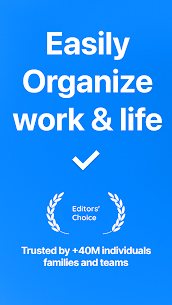
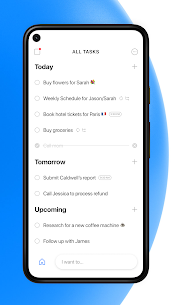
Any.do combines your daily to-do lists, reminders, notes, checklists, and calendar events into a single workspace. You can plan your day, capture tasks quickly, and keep everything organized—whether you manage personal errands, family plans, or team projects.
Calendar + Daily Planner Views (Side-by-Side)
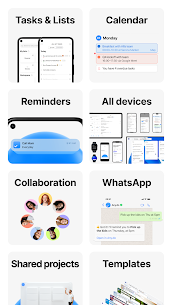
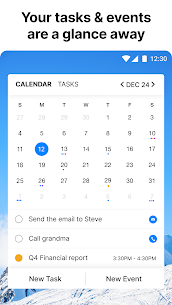
Any.do lets you view tasks and calendar events together so you can plan realistically. You can switch between daily, 3‑day, weekly, and agenda views and use the calendar widget to keep upcoming plans visible on your home screen. Built-in reminders help you stay on schedule while you manage both tasks and events in the same place.
Sync Across Calendars and Devices
Any.do keeps your tasks, reminders, notes, and agenda synced so you don’t lose track of anything. You can connect calendars such as Google Calendar, your phone calendar, Outlook, and even Facebook events, then see everything in one organized timeline. The app also supports syncing on Wear OS, so you can stay updated from your watch.
Reminders That Fit Real Life
Any.do supports several reminder types to match different situations:
- One-time reminders
- Recurring reminders
- Location-based reminders
- Voice reminders
It also lets you create tasks and receive reminders in WhatsApp, which helps if you prefer notifications where you already chat.
Collaboration: Share Lists and Assign Tasks
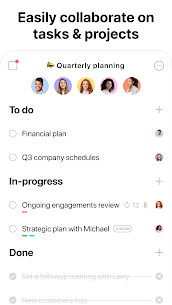
Any.do makes teamwork simple. You can share lists with friends, family, or coworkers, assign tasks, and coordinate responsibilities from the same task list. This setup works well for home routines, shared projects, and planning events without duplicated effort.
Fast Task Entry and Simple Controls
Any.do focuses on quick actions so you spend less time managing the app and more time finishing tasks. You can drag and drop to reorder tasks, swipe to complete items, and use simple interactions to clear finished to-dos and keep lists clean.
Email-to-Task and File Attachments
You can turn emails into tasks by forwarding messages to [email protected]. Any.do also supports attaching files to tasks, including items from services like Dropbox or Google Drive, which helps when a task needs documents, images, or reference material.
Integrations for Work and Automation
Any.do integrates with many popular services, including Google Calendar, Outlook, WhatsApp, Slack, Gmail, Google Tasks, Evernote, Trello, Zapier, Asana, Microsoft To Do, OneNote, Salesforce, Office 365, Exchange, Jira, and voice assistants like Google Assistant and Amazon Alexa.
Grocery and Shopping Lists You Can Share in Real Time
Any.do also works as a shared grocery list. You create a shopping list, share it with others, and see items update in real time—useful when multiple people buy groceries or manage household supplies.
What's new
Finally, one simple app to organize your life and manage your team’s work.
What's New?
Workspace tasks in calendar – You can now view your assigned workspace tasks in your calendar
Update status – You can now mark a workspace task directly from my day
External keyboard support – Any.do now supports connecting your android tablet to an external keyboard
Redesigned Calendar – All new calendar design
Update status – Mark workspace tasks as completed directly from My day
Images
Download links
How to install Any.do Mod APK?
1. Tap the downloaded Any.do Mod APK file.
2. Touch install.
3. Follow the steps on the screen.
Note: Important!
- Delete all previous Original/Mod before installing the latest mod.
- If necessary, log in with your email/social media. Modded App cannot be logged in with Gmail.
- Enjoy !!!
Related apps




Most viewed apps
Most rated apps


