
ASR Voice Recorder
How to install ASR Voice Recorder Mod APK?
1. Tap the downloaded ASR Voice Recorder Mod APK file.
2. Touch install.
3. Follow the steps on the screen.
Note: Important!
- Delete all previous Original/Mod before installing the latest mod.
- If necessary, log in with your email/social media. Modded App cannot be logged in with Gmail.
- Enjoy !!!
Mod Info:
- Pro / Paid features unlocked – no additional key required;
- Disabled / Removed unwanted Permissions + Receivers + Providers + Services;
- Optimized and zipaligned graphics and cleaned resources for fast load;
- Ads Permissions / Services / Providers removed from AndroidManifest;
- Ads links removed and invokes methods nullified;
- Ads layouts visibility disabled;
- Google Play Store install package check disabled;
- Debug code removed;
- Remove default .source tags name of the corresponding java files;
- Analytics / Crashlytics / Firebase disabled;
- Languages: Full Multi Languages;
- CPUs: armeabi-v7a, arm64-v8a;
- Screen DPIs: 120dpi, 160dpi, 240dpi, 320dpi, 480dpi, 640dpi;
- Original package signature changed;
Description

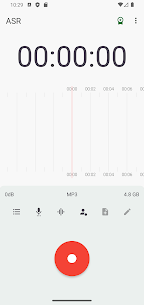
ASR works as a sound and voice recording app that helps you capture meetings, quick voice notes, lessons, songs, and sudden ideas. You can start recording fast, manage files easily, and control audio quality based on what you record.
Recording Formats and Quality Control
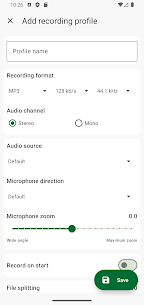
ASR lets you record in multiple audio formats, including MP3, WAV, OGG, FLAC, M4A, and AMR, so you can choose smaller files or higher fidelity. You can also adjust sample rate and bit rate to fine-tune recording quality and storage use.
Profiles for Faster Setup
ASR includes recording profiles that let you switch settings quickly. You can save a profile for lectures, another for music ideas, and another for meetings, then apply the right one without reconfiguring everything.
Cloud Upload and Sharing (Pro)
With the Pro version, ASR integrates cloud uploads so you can back up recordings automatically. It supports Google Drive, Dropbox, OneDrive, Box, Yandex Disk, FTP, WebDav, and even auto-email sending, which helps you keep recordings synced and accessible.
Organize Recordings Your Way
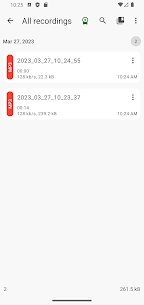
You can group recordings using tags/labels to keep projects separated and searchable. ASR also lets you delete or share multiple recordings at once, which saves time when you manage large batches.
Notes, Editing, and Conversion Tools
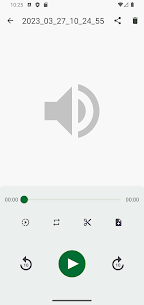
ASR allows you to add notes while recording or during playback, which helps you mark action items or key timestamps. It also includes an audio converter that lets you cut sections and save only the parts you need from a longer recording.
Playback Controls for Review and Study
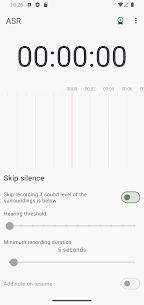
You can change playback speed with the speed controller, which makes it easier to review meetings faster or slow down lessons for clarity. ASR also offers a skip silence mode to reduce dead time in recordings.
Recording Controls and Storage Options
ASR provides dedicated buttons to pause a recording or discard it instantly. You can choose a custom recording folder to keep files organized on your device, and you can adjust gain to increase or decrease recorded volume.
Background Recording and Monitoring
You can record and play audio in the background, so the app does not interrupt your workflow. ASR also supports listening while recording with headphones, which helps you monitor audio as you capture it.
Bluetooth, Widgets, and Automation
ASR can record from a Bluetooth headset microphone, which is useful for hands-free recording. You can enable auto-start recording and use a widget and shortcut for quick access from your home screen.
Transfer, Casting, and Network Features
ASR supports transferring recordings between devices on the same Wi‑Fi network. It also offers casting over a local Wi‑Fi network, which can make playback easier on compatible devices.
Language Support
ASR supports multiple languages, making the app accessible for users in different regions.
What's new
This version includes bug fixes and improvements.
Images
Download links
How to install ASR Voice Recorder Mod APK?
1. Tap the downloaded ASR Voice Recorder Mod APK file.
2. Touch install.
3. Follow the steps on the screen.
Note: Important!
- Delete all previous Original/Mod before installing the latest mod.
- If necessary, log in with your email/social media. Modded App cannot be logged in with Gmail.
- Enjoy !!!
Related apps





Developer's apps

Video
Latest Apps
Popular apps


