
Auto Clicker
How to install Auto Clicker Mod APK?
1. Tap the downloaded Auto Clicker Mod APK file.
2. Touch install.
3. Follow the steps on the screen.
Note: Important!
- Delete all previous Original/Mod before installing the latest mod.
- If necessary, log in with your email/social media. Modded App cannot be logged in with Gmail.
- Enjoy !!!
Mod Info
Paid Features Unlocked
● No ads
● Stable mod
● No active trackers or advertisements
● Requires android 7.0 and up
● CPUs arch: Universal
● Optimized and cleaned resources for fast loading.
Description

Auto Clicker – Automatic Tap is a powerful Android application that helps users automate repeated taps and swipes with customizable intervals, floating controls, and script support, making gameplay and repetitive tasks easier and more efficient.
Introduction
Auto Clicker – Automatic Tap is a practical Android application designed for users who need to perform repeated screen taps or swipes without manual effort. Whether you are playing idle or click-based games, testing applications, or automating repetitive actions, this app provides a reliable and flexible solution. It works without root access, supports modern Android versions, and offers a clean interface that can be understood even by first-time users.
What makes Auto Clicker especially appealing is its balance between simplicity and advanced control. You can start with basic automatic tapping in seconds, yet still access powerful features such as multiple click points, swipe gestures, timers, and script import or export. For Android users looking to reduce manual screen interaction, this app delivers consistent performance and ease of use.
Simple and User-Friendly Interface
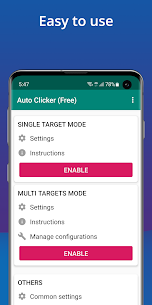
One of the strongest points of Auto Clicker – Automatic Tap is its intuitive user interface. The layout is clean and focused, allowing users to configure automatic taps without confusion. Settings are clearly labeled, and most actions can be completed in just a few steps. This makes the app suitable not only for experienced users but also for beginners who have never used automation tools before.
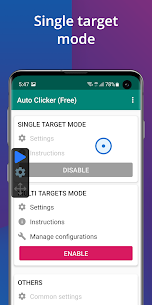
The floating control panel is especially useful. It stays visible on top of other apps, enabling you to start or stop automatic tapping instantly. You do not need to exit your game or application, which improves efficiency and keeps the workflow smooth. This floating overlay design ensures that automation control is always within reach.
Automatic Taps with Custom Intervals
Auto Clicker allows users to define exactly how and when taps occur. You can set specific intervals between taps, giving you full control over speed and timing. This is particularly helpful for games or tasks that require precise repetition rather than random tapping.
By adjusting intervals, users can simulate human-like tapping patterns or create fast automated clicks depending on their needs. The flexibility of timing customization ensures compatibility with many types of applications, from idle games to productivity tools.
Support for Multiple Click Points and Swipes
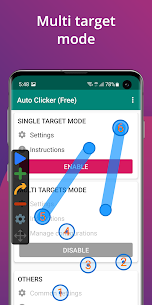
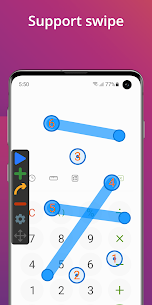
Beyond basic single-point tapping, Auto Clicker supports multiple click points and swipe gestures. This feature expands its usefulness significantly. Users can create complex sequences that involve tapping different areas of the screen in a specific order or performing swipe motions automatically.
This functionality is ideal for games that require navigation across menus, repeated actions at different locations, or gestures instead of simple taps. The ability to combine taps and swipes allows users to automate entire workflows instead of just a single repetitive action.
Global Timer for Controlled Automation
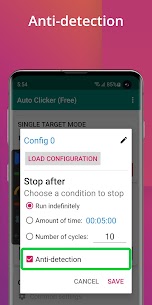
The built-in global timer is another practical feature. It allows users to run automatic tapping for a defined period of time and then stop automatically. This is useful when you want the app to perform tasks while you are away from the device, without worrying about endless tapping.
By setting a timer, users can manage battery usage more efficiently and avoid unnecessary background activity. This feature adds a layer of control and safety, especially for long-running automation sessions.
Import and Export Automation Scripts
For advanced users, Auto Clicker offers the ability to import and export automatic scripts. This makes it easy to save your configurations, reuse them later, or share them with others. Script support also simplifies switching between different automation setups without needing to reconfigure everything from scratch.
This feature is particularly valuable for users who frequently automate similar tasks or manage multiple devices. It adds long-term convenience and makes the app more scalable for repeated use.
No Root Required and Secure Operation
Auto Clicker works without root access, which is a major advantage for most Android users. Rooting a device can be risky and void warranties, so having a powerful automation tool that does not require root makes the app accessible to a wider audience.
The app uses Android’s Accessibility Service to function. While this permission is necessary for automation, the requirement is clearly explained, and users remain in control of granting or revoking access. This approach aligns with standard Android security practices.
Compatibility and Performance
Auto Clicker – Automatic Tap supports Android 7.0 and above, ensuring compatibility with a wide range of modern devices. Performance is stable, and the app runs smoothly even during extended automation sessions. The lightweight design helps minimize system resource usage, making it suitable for daily use.
Users who rely on older Android versions should note the minimum requirement, but for most devices currently in use, compatibility is not an issue.
Ideal Use Cases
Auto Clicker is especially popular among gamers who play click-based or idle games, where repetitive tapping is a core mechanic. However, its usefulness goes beyond gaming. It can be used for app testing, repetitive form interactions, and other scenarios where repeated screen actions are required.
By automating these tasks, users can save time, reduce physical strain, and improve overall productivity.
Conclusion
Auto Clicker – Automatic Tap is a versatile and reliable automation tool for Android users who want to simplify repetitive screen interactions. With its user-friendly interface, floating control panel, customizable intervals, support for multiple click points and swipes, and script management features, it offers both simplicity and depth.
The fact that it does not require root access and works on Android 7.0 and above makes it accessible and safe for everyday use. Whether you are a gamer or a productivity-focused user, Auto Clicker provides an efficient way to automate tasks and regain control of your time.
Frequently Asked Questions
What is Auto Clicker – Automatic Tap used for?
Auto Clicker – Automatic Tap is used to automate repeated screen taps and swipes on Android devices, helping users perform repetitive actions without manual effort.
Does Auto Clicker require root access?
No, the app does not require root access. It works using Android’s Accessibility Service.
Which Android versions are supported?
Auto Clicker supports Android 7.0 and higher.
Can I automate multiple actions at once?
Yes, the app supports multiple click points and swipe gestures, allowing users to create complex automation sequences.
Is there a way to limit how long the auto tap runs?
Yes, the global timer feature allows users to set a specific duration for automatic tapping.
Images
Download links
How to install Auto Clicker Mod APK?
1. Tap the downloaded Auto Clicker Mod APK file.
2. Touch install.
3. Follow the steps on the screen.
Note: Important!
- Delete all previous Original/Mod before installing the latest mod.
- If necessary, log in with your email/social media. Modded App cannot be logged in with Gmail.
- Enjoy !!!
Related apps





Video
Most viewed apps
Most rated apps


