
BD File Manager File Explorer
How to install BD File Manager File Explorer Mod APK?
1. Tap the downloaded BD File Manager File Explorer Mod APK file.
2. Touch install.
3. Follow the steps on the screen.
Note: Important!
- Delete all previous Original/Mod before installing the latest mod.
- If necessary, log in with your email/social media. Modded App cannot be logged in with Gmail.
- Enjoy !!!
Mod Info:
Paid Features Unlocked
● No ads
● Stable mod
● Debug info removed
● Custom theme color
● Auto clean recycle bin
● Smart selection of duplicate files
● No active trackers or advertisements
● Requires android 6.0 and up
● CPUs arch: armeabi-v7a, arm64-v8a
● Optimized and cleaned resources for fast loading.
Description
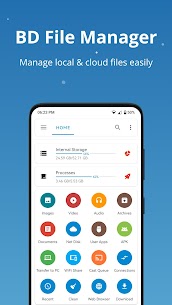
BD File Manager helps you manage files from a single place, whether they live on your phone, an SD card, a USB/OTG drive, a shared folder on your network, or a cloud drive. You can browse, move, copy, and organize content quickly, and you can keep your storage cleaner by finding large or unnecessary files.
Connect to LAN Shares and Network Servers
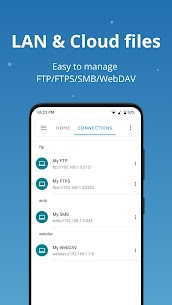
BD File Manager lets you access files across your local network without switching apps. You can connect to common LAN protocols such as SMB, FTP, FTPS, SFTP, and WebDAV, then manage folders on PCs, NAS devices, and servers as easily as local storage.
Access Cloud Drives in the Same Interface
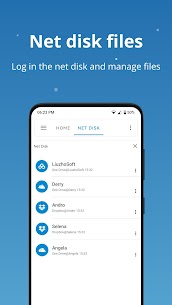
You can also open cloud storage directly inside BD File Manager. The app supports popular services like Google Drive, Dropbox, and OneDrive, so you can browse cloud folders, manage documents, and move files between cloud and local storage more efficiently.
Built-In Media Player for Video and Music
BD File Manager includes a built-in video and music player, allowing you to play media from local storage, LAN locations, or network disks. This saves time because you can preview files right where you manage them.
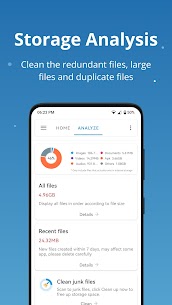
Storage Analysis and Space Cleanup Tools
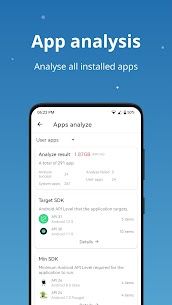
BD File Manager analyzes internal storage so you can understand what consumes space. It helps you identify items such as temporary files, cache, logs, duplicates, and large files, and it shows folder sizes and occupancy ratios to guide your cleanup decisions.
Junk File Cleaner
The app includes an integrated junk cleaner that quickly locates junk files and helps you remove them to free up storage space.
Manage Internal Storage, SD Cards, USB, and OTG
BD File Manager supports both internal and external storage management. You can organize files across your phone storage, SD cards, USB drives, and OTG-connected devices in one workflow.
Category Views for Faster Navigation
Instead of digging through folders, you can jump straight to file categories such as:
- Downloads
- Images
- Audio
- Videos
- Documents
- Recent files
Compress and Extract Archives
BD File Manager handles common archive formats for compression and extraction, including ZIP, RAR, 7Z, ISO, TAR, and GZIP, which helps when you download packaged files or need to bundle folders for sharing.
App Manager with Deep Details
The built-in App Manager lets you manage installed apps (local, user, and system apps where supported). You can inspect details such as permissions, activities, signatures, and manifest files, which can be useful for power users and troubleshooting.
PC Access and Wireless File Sharing
BD File Manager can turn your phone into an FTP-accessible device so you can manage Android storage from a PC wirelessly, without a data cable. You can also transfer files quickly within the same LAN, which makes sharing between devices faster and more convenient.
What's new
New
- Added support for magnet link and torrent file downloads
- Added a new authorization method for accessing Android/data
Fixes
- Fixed SMB anonymous access failures
- Fixed an issue where tasks moved to the Recycle Bin could not be cancelled
- Fixed an issue where batch renaming could fail
Images
Download links
How to install BD File Manager File Explorer Mod APK?
1. Tap the downloaded BD File Manager File Explorer Mod APK file.
2. Touch install.
3. Follow the steps on the screen.
Note: Important!
- Delete all previous Original/Mod before installing the latest mod.
- If necessary, log in with your email/social media. Modded App cannot be logged in with Gmail.
- Enjoy !!!
Related apps




Developer's apps
Most viewed apps
Most rated apps


