
Camera360
How to install Camera360 Mod APK?
1. Tap the downloaded Camera360 Mod APK file.
2. Touch install.
3. Follow the steps on the screen.
Note: Important!
- Delete all previous Original/Mod before installing the latest mod.
- If necessary, log in with your email/social media. Modded App cannot be logged in with Gmail.
- Enjoy !!!
Mod Info:
Paid Features Unlocked
● No ads
● Stable mod
● 100+ Professional portrait beautifying tool
● 600+ Filters of different stvles and cute stickers
● No active trackers or advertisements
● Requires android 5.0 and up
● CPUs arch: armeabi-v7a, arm64-v8a
● Optimized and cleaned resources for fast loading.
Description
Camera360 has reached over one billion downloads worldwide and has built a reputation as a go-to selfie camera app. The app focuses on helping you present yourself the way you want, and many public figures and creators rely on it for everyday photos. With years of work in photography technology, Camera360 combines beauty tools, creative filters, and detailed editing controls in one place.
Smooth Skin Retouching
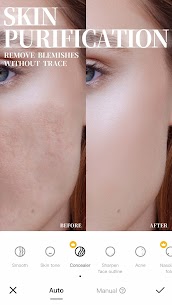
You can soften and refine your skin to create a clean, silky look. The app reduces the appearance of uneven texture and helps you achieve a more polished selfie without complicated manual edits.
Small Face and Micro-Adjustments
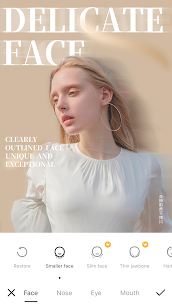
Camera360 lets you fine-tune facial proportions with multiple small adjustments. You can shape features with subtle control so changes look natural rather than overly edited.
Face and Body Shaping with Protected Areas
You can reshape your face or body exactly where you want, and you can protect areas you don’t want to change. This approach helps you keep important details intact while you refine specific parts for a more confident result.
One-Tap Beauty Enhancements
When you want fast results, you can apply one-touch beauty. The app automatically adjusts your look in a single tap, which helps you upgrade a photo quickly before sharing.
Magic Sky and Atmosphere Changes
You can replace dull skies and create a mood that matches your style. Camera360 lets you turn a cloudy background into something brighter, more dreamy, or even anime-inspired, so your photos feel more intentional and creative.
Artistic Styles, Anime Looks, and Movie Filters
You can transform photos with “artist-style” filters that make images feel like paintings. You can also apply cartoon/anime effects for a distinctive look. If you prefer a cinematic vibe, you can choose film-inspired filters, including black-and-white and color movie tones.
A Large Filter Collection and Natural Makeup
Camera360 includes 300+ filters covering styles like retro, black and white, HDR, lomo, and more. You can also apply natural-looking makeup filters and customize the colors and style to match your preferences.
Stickers with Face Recognition
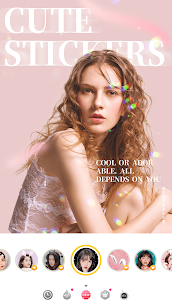
You can add cute stickers—including animated ones—and the app uses face recognition to react to your face and expressions. This feature helps you create playful selfies that feel more interactive and personal.
Short Movie Recording with Music
You can record short videos (around 10–60 seconds) and apply filters and makeup while you shoot. You can also change the music to match the vibe of your clip, which makes the app useful for quick, shareable content.
Advanced Color Control and Image Correction
Camera360 supports detailed color editing when you want to change a specific color or refine the overall look. You can also correct perspective both vertically and horizontally, which helps when you edit building shots or want straighter, more balanced lines. The app provides multiple tuning controls—such as exposure, saturation, highlights, shadows, temperature, hue, and more—so you can finish photos with precision.
Mix and Apply Filters Selectively
You can blend filters creatively by applying them only to parts of a photo. This selective approach gives you more freedom to experiment and produce unique results instead of relying on a single filter across the entire image.
What's new
Optimize some minor issues to improve the experience
————
Follow us on:
Twitter: @Camera360
Instagram: @Camera360_Official
Facebook: @camera360official
Images


Download links
How to install Camera360 Mod APK?
1. Tap the downloaded Camera360 Mod APK file.
2. Touch install.
3. Follow the steps on the screen.
Note: Important!
- Delete all previous Original/Mod before installing the latest mod.
- If necessary, log in with your email/social media. Modded App cannot be logged in with Gmail.
- Enjoy !!!
Related apps





Video
Most viewed apps
Most rated apps


