
Chronus Information Widgets

Mod Info:
- Pro / Paid features unlocked;
- Disabled / Removed unwanted Permissions + Receivers + Providers + Services;
- Optimized and zipaligned graphics and cleaned resources for fast load;
- Ads Permissions / Services / Providers removed from AndroidManifest;
- Ads links removed and invokes methods nullified;
- Google Play Store install package check disabled;
- Debug code removed;
- Remove default .source tags name of the corresponding java files;
- Analytics / Crashlytics / Firebase disabled;
- Languages: Full Multi Languages;
- CPUs: universal architecture;
- Screen DPIs: 120dpi, 160dpi, 240dpi, 320dpi, 480dpi, 640dpi;
- Original package signature changed;
Description
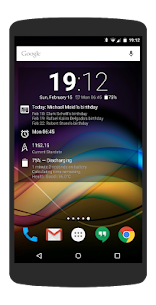
Chronus bundles a flexible set of Clock, Weather, News, Tasks, Stocks, Fitness, and Calendar widgets for your Home screen and supported Lock screen setups. Instead of installing multiple single-purpose widgets, you can rely on Chronus to deliver the same daily information in one consistent, stylish package.
Optimized Engine That Saves Battery and Data
Chronus runs all its widgets on the same highly optimized back-end services. This shared system reduces duplicated background activity, so your device spends less CPU time, uses less network data, and consumes less battery power—while still keeping your widgets information-rich and responsive.
Core Widgets Included in All Versions
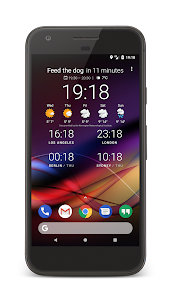
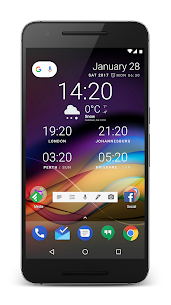
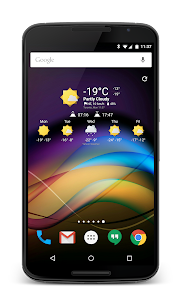
Chronus includes a wide range of ready-to-use widgets, such as Flex, Flex (Analog), Clock+, Clock+ (Dash), Dash, Pixel+, Pixel2+, News, Tasks, and Weather. You can place different styles on different screens and still manage them through one unified app.
Deep Customization for Look and Layout
Chronus lets you customize the appearance of almost every component. You can adjust styling, spacing, colors, and other visual details so the widgets match your wallpaper, icon pack, and overall theme instead of forcing a single fixed design.
Weather Providers and Weather Panel
Chronus pulls weather data through a built-in weather panel and supports multiple providers, including Weatherbit.io, WeatherAPI.com, Visual Crossing, Tomorrow.io, WeatherStack, OpenWeatherMap, Weather Underground (PWS), Accuweather, and MET Norway. You can choose the provider that works best for your location and accuracy needs.
Notifications for Weather, Calendar, and Tasks
Chronus actively keeps you informed by sending notifications for weather updates, upcoming calendar events, and task reminders. You stay aware of what matters without opening separate apps throughout the day.
News Feed and Read-It-Later Support
Chronus includes a News Feed panel with built-in RSS sources. When you want to save articles for later, you can send them to Pocket directly from the panel, which helps you skim headlines now and read in detail later.
Tasks and Calendar Integration
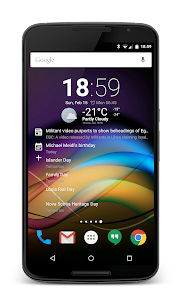
The Tasks widget supports Google Tasks so you can keep to-dos visible on your screen. Chronus also includes a calendar panel that shows a scrollable list of upcoming events. You can highlight important events using custom colors and bold fonts, which makes deadlines and meetings stand out at a glance.
Backup, Restore, and Extensions
Chronus lets you back up and restore widget settings, so you can rebuild your layout quickly after changing phones, resetting your device, or experimenting with new designs. You can also add two DashClock Extensions into the Flex and Dash widgets, and you can use built-in extensions such as Gmail, missed calls, calendar, and text messages.
Wear OS and ROM Support
Chronus supports Wear OS and includes a basic Chronus Wear watch face. It can also act as a weather provider for CyanogenMod, LineageOS, and other derived ROMs, which helps users who customize Android at the system level.
Pro Features: Expanded Widgets, Providers, and Controls
Chronus Pro unlocks additional widgets such as Forecast, Calendar, Clock+ (Forecast), and Stocks. It also adds more news sources (including Feedly, Twitter, and Reddit), more task providers (including Microsoft Exchange, Evernote, and Todoist), and additional experimental weather providers.
Pro Customization and Power Tools
With Pro, you gain more alignment, style, color, and layout options across all widgets. You can assign custom tap actions to open specific apps or activities, set stock alerts, use a Daydream screensaver mode, add unlimited DashClock Extensions, and enable a full Chronus Wear watch face that includes a weather forecast.
Images
Download links
How to install Chronus Information Widgets Mod APK?
1. Tap the downloaded Chronus Information Widgets Mod APK file.
2. Touch install.
3. Follow the steps on the screen.
Note: Important!
- Delete all previous Original/Mod before installing the latest mod.
- If necessary, log in with your email/social media. Modded App cannot be logged in with Gmail.
- Enjoy !!!
Related apps




Latest Apps
Popular apps


