
CoinCalc
How to install CoinCalc Mod APK?
1. Tap the downloaded CoinCalc Mod APK file.
2. Touch install.
3. Follow the steps on the screen.
Note: Important!
- Delete all previous Original/Mod before installing the latest mod.
- If necessary, log in with your email/social media. Modded App cannot be logged in with Gmail.
- Enjoy !!!
Mod Info:
- Pro / Paid features unlocked;
- Disabled / Removed unwanted Permissions + Receivers + Providers + Services;
- Optimized and zipaligned graphics and cleaned resources for fast load;
- Ads Permissions / Services / Providers removed from Android.manifest;
- Ads links removed and invokes methods nullified;
- Ads layouts visibility disabled;
- Google Play Store install package check disabled;
- Debug code removed;
- Remove default .source tags name of the corresponding java files;
- Languages: Full Multi Languages;
- CPUs: universal architecture;
- Screen DPIs: 160dpi, 240dpi, 320dpi, 480dpi, 640dpi;
- Original package signature changed;
Description
CoinCalc works as a simple currency and exchange-rate converter that helps you calculate values quickly without a complicated setup. You can convert everyday money and popular cryptocurrencies in one place, which makes the app useful for travelers, online shoppers, investors, and anyone who needs quick rate checks.
Huge Currency Support (700+)
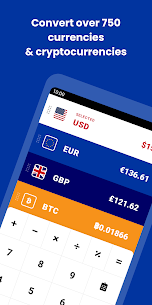
CoinCalc supports over 700 currencies, including major global options like USD, EUR, and GBP. It also includes a wide range of smaller or less common currencies, so you can handle conversions beyond the basics without switching apps.
Crypto Ready: Coins and Tokens Included
CoinCalc supports many cryptocurrencies, including Ethereum, Bitcoin, Litecoin, Steem, Storj, and Dogecoin, plus hundreds more. You can use it to compare crypto values against fiat currencies or against other coins when you track prices and plan trades.
Home Screen Widget and Dark Mode
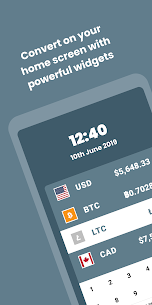
CoinCalc offers a compact home screen widget that lets you view rates and run quick conversions without opening the full app. It also includes dark mode, which improves readability in low light and matches your preferred theme.
Multi-Currency Conversions and Built-In Calculator
You can convert multiple currencies at the same time, which helps when you compare prices across regions or track several assets. The app also includes calculator functions, so you can do quick math and conversions in one workflow.
Portfolio Tracking and History Charts
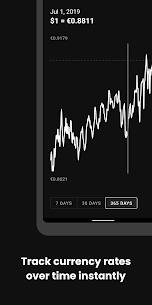
CoinCalc lets you track a currency portfolio, making it easier to monitor holdings across different currencies and crypto assets. You can also view currency history over time, which helps you understand trends instead of relying only on the current rate.
Offline Mode with Saved Rates
CoinCalc continues to work offline, which is useful when you travel or lose connectivity. Each time you open the app, it saves updated exchange rates locally, so you can keep converting with the latest available data even without an active connection.
Faster Access Through Search and Sorting
CoinCalc includes search and smart sorting so you can find the currencies you use most and keep them easy to reach. This reduces scrolling and makes day-to-day conversions faster.
Always Updated for Better Accuracy
Exchange rates change constantly, and CoinCalc focuses on keeping you current. When you open the app, it updates and stores the newest rates, so your conversions stay as accurate as possible for real-world decisions.
What's new
Updates for newer Android versions
Images

Download links
How to install CoinCalc Mod APK?
1. Tap the downloaded CoinCalc Mod APK file.
2. Touch install.
3. Follow the steps on the screen.
Note: Important!
- Delete all previous Original/Mod before installing the latest mod.
- If necessary, log in with your email/social media. Modded App cannot be logged in with Gmail.
- Enjoy !!!
Related apps





Latest Apps
Popular apps


