
FX File Explorer

Mod Info
Paid Features Unlocked
● No ads
● Stable mod
● Debug info removed
● Multiple languages available
● No active trackers or advertisements
● Requires android 6.0 and up
● CPUs arch: Universal
● Optimized and cleaned resources for fast loading.
Description
FX File Explorer is a powerful, privacy-focused file management app featuring Material Design, seamless device-to-device transfers, dual-window support, and an optional FX+ Add-On that unlocks cloud storage, network access, encrypted files, and much more.
A Beautiful, Modern Interface Built for Productivity
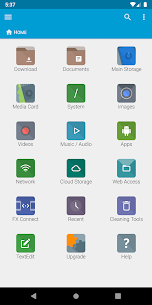
FX File Explorer brings Material Design to your fingertips, giving you a clean, intuitive interface that makes file management feel natural and effortless. The app centers around a productivity-focused Home Screen that puts your most important folders, media libraries, and cloud storage front and center the moment you open it. You no longer have to dig through layers of menus just to reach the files you use every day.
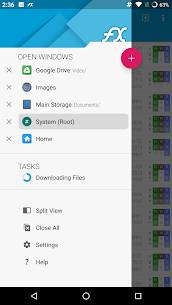
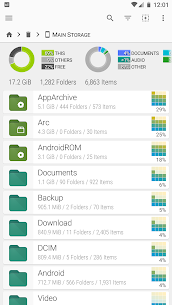
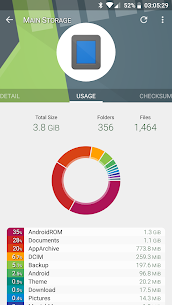
To help you work even faster, FX supports multiple windows simultaneously, including a dual-view mode that lets you see and manage two folders side by side — just like working on a desktop computer. When you need to understand how your storage is being used, the Usage View mode displays the total size and content breakdown of every folder as you browse, giving you a clear picture of exactly where your space is going.
Transfer Files Between Devices with Ease
FX File Explorer introduces two powerful new ways to move files between your devices without the hassle of cables or third-party services.
FX Connect uses Wi-Fi Direct to transfer files directly from one phone to another at fast wireless speeds. It also supports NFC, which means you can simply touch the backs of two phones together to instantly establish a connection — no pairing screens, no passwords, no waiting. This feature requires the FX+ Add-On.
Web Access takes a different approach by turning your phone into a hub you can manage straight from your computer’s web browser. You can drag and drop entire folders from your computer directly onto your phone over Wi-Fi, or stream your phone’s music playlists to your computer without moving a single file. Whether you are organizing documents or listening to your favorite albums, Web Access makes it effortless. This feature also requires the FX+ Add-On.
The app also includes SMBv2 support, ensuring smooth and reliable connectivity with modern Windows networks.
Your Privacy Comes First
Unlike many free apps, FX File Explorer does not display advertisements and does not track your activity in any way. The app never contacts external servers in the background — what stays on your phone stays on your phone.
NextApp, Inc., a US-based corporation founded in 2002, built FX entirely with proprietary in-house code. You can trust that no shortcuts or third-party code compromises your data or your privacy. In a world where apps routinely harvest user data, FX stands apart by simply refusing to do it.
Unlock Even More Power with the FX+ Add-On
The optional FX+ Add-On module transforms FX File Explorer from a capable file manager into a full-featured productivity powerhouse. Once you activate it, you gain access to a wide range of advanced features designed to handle almost any file management task you can think of.
FX+ lets you connect to networked computers using FTP, SSH FTP, WebDAV, and Windows Networking through both SMB1 and SMB2 protocols. It also connects you to all the major cloud storage platforms, including Google Drive, Dropbox, Box, SugarSync, SkyDrive, and OwnCloud, so you can access and manage your cloud files directly from within the app.
Security-conscious users will appreciate the ability to create and explore AES-256 and AES-128 encrypted zip files, keeping sensitive data locked away behind strong encryption. FX+ also includes an encrypted password keyring that lets you protect all your network and cloud login credentials behind a single master password.
For media lovers, FX+ lets you browse your audio library by artist, album, or playlist, manage and organize playlists, and directly explore your photo and video folders. Managing your installed applications becomes easier too, with the ability to browse apps based on the permissions they require.
Powerful Built-In Tools Ready to Use
FX File Explorer ships with a solid suite of built-in editing and viewing tools that handle everyday tasks without requiring any additional downloads. The Text Editor supports undo and redo history, cut and paste, full-text search, and pinch-to-zoom for comfortable reading and editing on any screen size.
You also get a Binary Hex Viewer, an Image Viewer, a Media Player, and a pop-up Audio Player that keeps your music going while you continue browsing files. Archive management is fully covered with built-in support for creating and extracting Zip, Tar, GZip, Bzip2, and 7zip files, along with a dedicated RAR file extractor. A Shell Script Executor rounds out the toolkit for power users who want even deeper control over their device.
Download FX File Explorer and Take Control of Your Files
FX File Explorer gives you everything you need to manage your files with the speed, flexibility, and confidence of a desktop experience — right on your phone or tablet. Whether you are a casual user who wants a cleaner way to browse files, or a power user who needs network access, cloud integration, and encrypted storage, FX has a solution ready for you.
Download FX File Explorer today and discover a smarter, safer, and more productive way to handle your files.
Images

Download links
How to install FX File Explorer Mod APK?
1. Tap the downloaded FX File Explorer Mod APK file.
2. Touch install.
3. Follow the steps on the screen.
Note: Important!
- Delete all previous Original/Mod before installing the latest mod.
- If necessary, log in with your email/social media. Modded App cannot be logged in with Gmail.
- Enjoy !!!
Related apps





Latest Apps
Popular apps


