
Glitch Lab
How to install Glitch Lab Mod APK?
1. Tap the downloaded Glitch Lab Mod APK file.
2. Touch install.
3. Follow the steps on the screen.
Note: Important!
- Delete all previous Original/Mod before installing the latest mod.
- If necessary, log in with your email/social media. Modded App cannot be logged in with Gmail.
- Enjoy !!!
Mod Info
◉ Max enabled.
◉ Analytics disabled.
◉ GooglePlayServices disabled.
◉ InAppBillingService disabled.
◉ Debug information removed.
◉ Resources optimized.
◉ Architecture: armeabi-v7a arm64-v8a x86 x86_64
◉ Language: Full Multi Language
Description
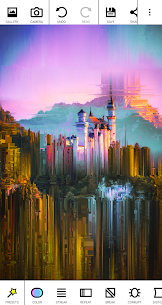
Glitch Lab brings classic glitch aesthetics and fresh experimental ideas into one editing app. It follows a simple philosophy: keep the workflow easy, but give artists real control. You can start with a preset-style look in seconds, then refine it with deeper settings to build a unique style.
A Large Effects Library Organized by Category
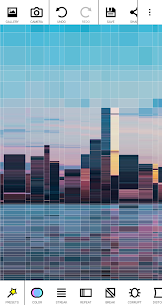
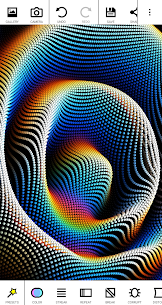
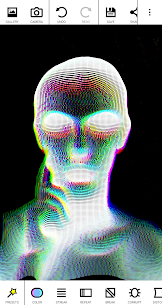
Glitch Lab groups its filters into clear categories so you can explore quickly and stay organized while experimenting. The app includes 100+ effects that cover:
- Color adjustments and color-driven glitch styles
- Streaking, breaking, repeating, and data-corruption inspired effects
- Pixel sorting for dramatic smear-and-shift visuals
- Retro effects like pixelation and scanlines
- 3D looks such as sphere mapping, voxel styles, and smooth-surface effects
- Text and gimmicks for stylized overlays and playful distortion
- Art filters that push images toward illustrative or abstract results
Combine Filters for Endless Variations
Glitch Lab stays simple to use, but it becomes powerful when you stack effects. You can layer multiple filters, tweak parameters, and create endless variations from a single photo. This combination approach encourages experimentation and makes each result feel custom.
Powerful Interface with Real Control
Glitch Lab supports a workflow that lets you take risks and refine your work:
- Infinite undo/redo so you can explore without losing progress
- Erase parts of the last effect (PRO) to blend glitch effects selectively
- Bookmark images to save progress or reuse images as masks
- Area-of-effect options (enabled in settings) to apply effects more precisely instead of affecting the whole image
Animate Your Glitches with the Video Module
Glitch Lab includes an animation system that lets you create smooth glitch videos. You set keyframes and the app interpolates parameters between them, producing fluid transitions instead of jumpy changes. You need to enable video features in the app settings before using this module.
What's new
Stability improvements.
Images

Download links
How to install Glitch Lab Mod APK?
1. Tap the downloaded Glitch Lab Mod APK file.
2. Touch install.
3. Follow the steps on the screen.
Note: Important!
- Delete all previous Original/Mod before installing the latest mod.
- If necessary, log in with your email/social media. Modded App cannot be logged in with Gmail.
- Enjoy !!!
Related apps





Developer's apps

Most viewed apps
Most rated apps


