
Habitify
How to install Habitify Mod APK?
1. Tap the downloaded Habitify Mod APK file.
2. Touch install.
3. Follow the steps on the screen.
Note: Important!
- Delete all previous Original/Mod before installing the latest mod.
- If necessary, log in with your email/social media. Modded App cannot be logged in with Gmail.
- Enjoy !!!
Mod Info:
- Pro Lifetime / Paid features unlocked;
- Disabled / Removed unwanted Permissions + Receivers + Providers + Services;
- Optimized and zipaligned graphics and cleaned resources for fast load;
- Ads Permissions / Services / Providers removed from AndroidManifest;
- Ads links removed and invokes methods nullified;
- Ads layouts visibility disabled;
- Google Play Store install package check disabled;
- Debug code removed;
- Remove default .source tags name of the corresponding java files;
- Ultra compress packaging for small size;
- Analytics / Crashlytics / Firebase disabled;
- Facebook ads bundled SDK removed completely;
- No active trackers or advertisements;
- Languages: Full Multi Languages;
- CPUs: armeabi-v7a, arm64-v8a, x86, x86_64;
- Screen DPIs: 120dpi, 160dpi, 240dpi, 320dpi, 480dpi, 640dpi;
- Original package signature changed;
Description
Habitify acts as an all-in-one habit tracker and life companion that helps you build good routines and drop bad ones. It uses a science-backed behavior change approach and has supported millions of users over the years. You set habits, track them consistently, and use feedback to improve a little every day.
More Than a Simple Habit Checklist
Habitify goes beyond a basic to-do list by giving you a full system to manage habits, routines, and personal goals in one place. You can track daily actions effortlessly and connect productivity tools like Google Calendar to align habits with your schedule. When you organize habits around real time blocks, you stay focused and reduce missed tasks.
Automate Health Habits With Health Connect
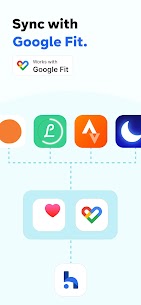
Habitify can read health data through Health Connect so you don’t log the same habit twice. The app uses this data to automatically track and record progress for health-related habits, which supports consistency and saves time.
- Activity goals: Habitify auto-logs goals like “Walk 10,000 steps” or “Run 5km” by reading metrics such as Steps, Distance, FloorsClimbed, and WheelchairPushes.
- Workout and calorie goals: Habitify confirms workout habits and calorie targets using data like ExerciseSession, ActiveCaloriesBurned, TotalCaloriesBurned, CyclingPedalingCadence, and StepsCadence.
- Wellness goals: Habitify can auto-complete habits such as drinking water, logging meals, or sleeping 8 hours by reading Hydration, Nutrition, and SleepSession data from connected apps.
Smart Reminders That Prevent Missed Habits
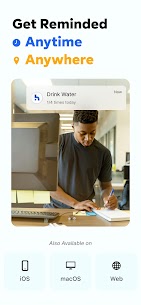
Habitify uses a strong reminder system to keep you on track. You can set time-based reminders for different parts of your day and location-based reminders that trigger when you arrive somewhere. The app also supports habit stacking, so completing one habit can automatically cue the next one, helping you build routines that stick.
Progress Insights That Keep You Motivated
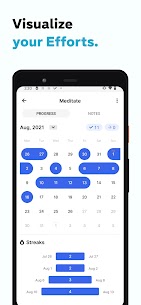
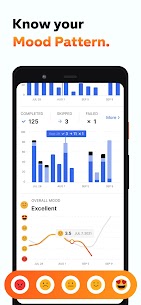
Habitify gives you detailed analytics so you can stay consistent and understand what works. You can review progress for individual habits or overall performance, spot patterns in your behavior, and identify strengths and areas to improve. Visual feedback reinforces positive actions and helps you stay motivated over the long term.
Organize Habits the Way You Live
Habitify helps you structure your day clearly. You can group habits by time of day—morning, afternoon, or evening—and use folders to organize by goal, life area, or routine. This setup helps you always know what to do next and when to do it.
Built for Wear OS With Real-Time Sync
Habitify supports Wear OS so you can log habits quickly from your wrist. You can use complications to see progress directly on your watch face, and tiles to view what’s due next and mark habits done in seconds. When you log a habit on your watch, the app syncs updates instantly to your phone and desktop.
Screen Time Tracking With Accessibility Support
Habitify includes screen time tracking to support healthier digital habits. The app uses the AccessibilityService API to detect which app is active so it can track time spent on selected apps and apply it to habits like limiting social media or using educational apps. Habitify keeps this tracking focused on progress measurement and does not read screen content or collect sensitive personal information.
Access Habitify Across All Your Devices
Habitify runs on Android, iOS, Wear OS, desktop, and web, and it syncs your data in real time across platforms. You can track habits anywhere and keep your progress consistent whether you use a phone, watch, or computer.
What's new
Power Up Your Growth Journey 2026
Habitify 32.1.0 brings you:
- Mindful Prompt: Reflect on your notes when skipping to stay motivated.
- Repeat Interval Picker: Fully customize specific repeat units.
- Extra Effort: Keep logging your wins even after finishing your goal.
- UI: Modern Edge-to-Edge design and Collapsible Header.
- Language: Set app language independently from system (Android 13+).
Happy tracking!
Images

Download links
How to install Habitify Mod APK?
1. Tap the downloaded Habitify Mod APK file.
2. Touch install.
3. Follow the steps on the screen.
Note: Important!
- Delete all previous Original/Mod before installing the latest mod.
- If necessary, log in with your email/social media. Modded App cannot be logged in with Gmail.
- Enjoy !!!
Related apps




Video
Latest Apps
Popular apps


