
ImageMeter

Mod Info
- Business Version Unlocked
Description
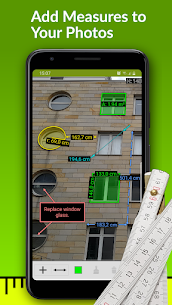
ImageMeter lets you turn ordinary photos into clear, measured documentation. You can place length measurements, angles, areas, and written notes right on top of an image, which often explains a situation faster than a hand-drawn sketch. When you photograph rooms, façades, or equipment on a job site, you can add dimensions and comments immediately, then organize and export everything from your phone or tablet.
Photo-Based Measuring with Perspective Correction
ImageMeter includes a standout feature that allows you to measure inside a photo after you calibrate the image using a reference object with a known size. Once you set that reference, the app calculates additional dimensions in the picture—even when the object sits far away, sits at an angle, or remains hard to reach with a tape measure. The app accounts for perspective foreshortening so you still get correct values when the scene doesn’t face the camera straight on.
Bluetooth Laser Distance Meter Compatibility
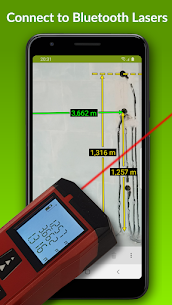
ImageMeter supports a wide range of Bluetooth laser distance meters, which helps you capture accurate measurements quickly. You can connect supported devices to measure lengths, areas, and angles, then place those values into your annotations without manually typing every number.
Pro Version Features: Measurements, Notes, and Exports
The Pro version expands ImageMeter into a full measurement and annotation toolkit. You can:
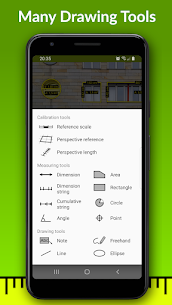
- Measure lengths, angles, circles, and irregular areas using a single reference measurement
- Work in metric or imperial units, including decimal and fractional inches
- Add text notes, draw freehand marks, and create basic geometric shapes
- Export your work to PDF, JPEG, or PNG for sharing and archiving
- Improve annotation readability by adjusting brightness, contrast, and saturation
- Sketch on blank canvases when you need a clean diagram in addition to photos
- Use model-scale mode to show real-world sizes and scaled values for building models
- Display metric and imperial values at the same time
- Draw faster with cursor snapping and speed up entry with autocompletion
- Measure pole height by using two reference marks on the pole
Advanced Annotation Add-On: Scaled PDFs and Rich Documentation
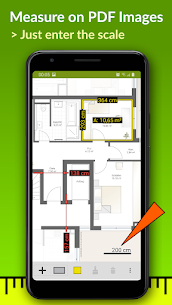
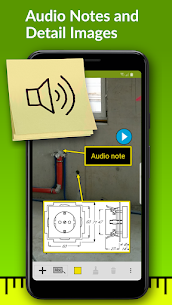
With the Advanced Annotation Add-On, you can move beyond photos and handle technical documents more effectively. You can import PDFs and measure drawings at scale, attach audio notes, and use picture-in-picture to show detail views. The add-on also supports measurement strings and cumulative strings, and it helps you organize projects by sorting images into subfolders with color codes.
Business Version: Cloud Sync, Tables, and Multi-Device Work
The Business version targets teams and professionals who need centralized access and reporting. It can automatically upload images to OneDrive, Google Drive, Dropbox, or Nextcloud, then keep data backed up and synchronized across multiple devices. You can also generate measurement data tables, export them for spreadsheet use, and embed those tables into exported PDFs so your deliverables include both visuals and structured numbers.
Supported Bluetooth Laser Distance Meters (Examples)
ImageMeter supports many models across major brands, including:
- Leica Disto: D110, D810, D510, S910, D2, X4, D3a-BT, D8, A6, D330i
- Bosch: PLR30c/40c/50c, GLM50c/100c/120c/400c
- Stanley: TLM99s, TLM99si
- Stabila: LD520, LD250
- Hilti: PD-I, PD-38
- Other supported devices: CEM iLDM-150, Toolcraft LDM-70BT, TruPulse 200/360, Suaoki D5T/P7, Mileseey P7/R2B, eTape16, Precaster CX100, ADA Cosmo 120
Images
Download links
How to install ImageMeter Mod APK?
1. Tap the downloaded ImageMeter Mod APK file.
2. Touch install.
3. Follow the steps on the screen.
Note: Important!
- Delete all previous Original/Mod before installing the latest mod.
- If necessary, log in with your email/social media. Modded App cannot be logged in with Gmail.
- Enjoy !!!
Related apps




Latest Apps
Popular apps


