
Inure App Manager

Mod Info:
Paid Features Unlocked
● No ads
● Stable mod
● Debug info removed
● Multiple languages available
● All premium features are working
● No active trackers or advertisements
● Requires android 5.0 and up
● CPUs arch: Universal
● Optimized and cleaned resources for fast loading.
Description
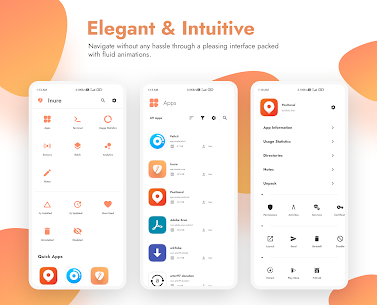
Inure works as a powerful, open-source app manager and analyzer that helps you take control of everything installed on your Android device. It delivers an attractive, easy-to-navigate interface and backs it up with smooth, fluid animations that make every action feel responsive. You can use Inure to manage installed apps, inspect APKs, and dig into an app’s internal building blocks—such as activities and services—so you can review or adjust how apps behave.
Manage and Monitor All Installed Apps
Inure organizes all apps into a clean list and helps you understand what you actually use. You can check usage stats for every app and keep personal notes tied to specific apps, which makes it easier to remember why you installed something or what settings you changed. Inure also lets you fetch details about apps even after you uninstall them, so you don’t lose important reference information.
Deep App Analysis and APK Tools
Inure lets you view and analyze both installed apps and standalone APK files stored on your device. You can scan your storage for APKs, then install standard APKs as well as split APK packages using the built-in installer. This workflow helps you examine what you’re installing before you commit, and it simplifies manual installation when you need it.
Control Apps: Uninstall, Disable, and Force Close
Inure gives you direct controls to remove or manage apps. You can uninstall apps, disable them, or force close them when they misbehave. The app supports actions on both user apps and system apps, and it can work with or without root depending on what you want to do and what your device allows.
Components, Permissions, and App Ops
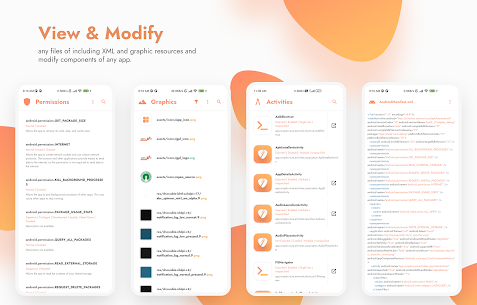
Inure opens access to an app’s core components through a dedicated component viewer and editor. You can inspect items like services and activities and modify them on the fly when your device configuration supports it. You also get permission control tools that let you grant or deny permissions per app, and Inure adds native App Ops support for more advanced permission-style controls on compatible systems.
Privacy Tools: Trackers Detection and Blocking
Inure helps you spot privacy risks by scanning apps for trackers. After it identifies trackers, you can take action and block them, giving you more control over what apps can collect or share.
Power User Support: Root and Shizuku
Inure supports root features for users who run rooted devices, and it also integrates with the Shizuku API for advanced operations without full root in some setups. This approach gives you flexibility: you can use Inure as a standard app manager or turn it into a deeper control center if you enable power-user access.
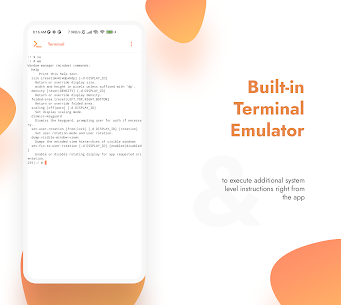
Built-in Extras Beyond App Management
Inure includes several utilities that turn it into a general-purpose file and content viewer:
- An audio player
- A font preview tool for TTF files
- An image viewer
- A built-in text viewer and editor
- A Markdown viewer and HTML support
- Code highlighting for selected programming languages
- XML pretty-printing with highlighting
- An SVG viewer
User Interface and Customization Features
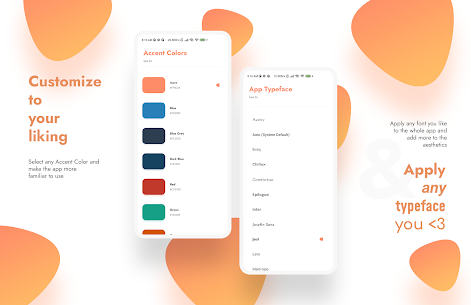
Inure focuses heavily on design and personalization. It runs in full-screen mode while blending smoothly with the status and navigation bars. The app uses polished animations, shared transitions, and icon-linked navigation to keep the experience consistent. You can customize the accent color, change the app’s font style, and enable rounded corners, colored shadows, and glowing icon effects. Inure also includes a native theme engine with support for light and dark modes, including AMOLED, Slate, Grey, and High Contrast dark themes, plus a distinctive switch style that matches the overall look.
Images
Download links
How to install Inure App Manager Mod APK?
1. Tap the downloaded Inure App Manager Mod APK file.
2. Touch install.
3. Follow the steps on the screen.
Note: Important!
- Delete all previous Original/Mod before installing the latest mod.
- If necessary, log in with your email/social media. Modded App cannot be logged in with Gmail.
- Enjoy !!!
Related apps





Most viewed apps
Most rated apps


