
jetAudio
How to install jetAudio Mod APK?
1. Tap the downloaded jetAudio Mod APK file.
2. Touch install.
3. Follow the steps on the screen.
Note: Important!
- Delete all previous Original/Mod before installing the latest mod.
- If necessary, log in with your email/social media. Modded App cannot be logged in with Gmail.
- Enjoy !!!
Mod Info:
- No root or Lucky Patcher or Google Play Modded required;
- Sound Effects Plugins / Paid features unlocked;
- Disabled / Removed unwanted Permissions + Receivers + Providers + Services;
- Optimized and zipaligned graphics and cleaned resources for fast load;
- Google Play Store install package check disabled;
- Debug code removed;
- Remove default .source tags name of the corresponding java files;
- AOSP compatible mode;
- Menu cleaned;
- Languages: Full Multi Languages;
- CPUs: armeabi-v7a, arm64-v8a;
- Screen DPIs: 120dpi, 160dpi, 213dpi, 240dpi, 320dpi, 480dpi, 640dpi;
- Original package signature changed;
Description
jetAudio brings the same audio-focused playback experience that helped it become a top-rated and widely downloaded media player on CNET.com to Android devices. You can start with jetAudio Basic (free) to test the app before upgrading to the Plus version for an ad-free experience and additional advanced tools.
Wide Format Support for Local Music
jetAudio plays most common and many niche audio formats you may already have in your library, including WAV, MP3, OGG, FLAC, M4A, MPC, TTA, WV, APE, MOD (S3M/IT), SPX, OPUS, AIFF, and more. Some devices may not support WMA, so compatibility depends on your hardware.
Sound Enhancements, Effects, and EQ Control
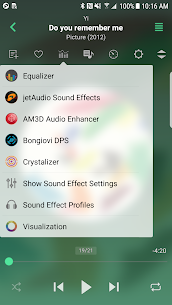
jetAudio focuses heavily on sound shaping. It includes effects such as X-Wide, Reverb, and X-Bass, plus AGC (Automatic Gain Control) to reduce volume jumps between tracks. You also get 32 built-in EQ presets, and you can fine-tune your sound further with a graphic equalizer (10-band in Basic, expanded options in Plus). The player also supports advanced playback tools like speed control, crossfade, and gapless playback.
Optional Plugins: Effects and Visualizations
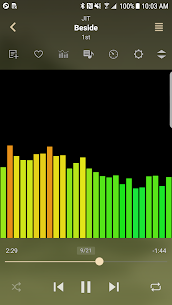
jetAudio supports additional sound and visualization plugins that you can purchase separately through in-app purchases, including:
- Crystalizer
- AM3D Audio Enhancer
- Bongiovi DPS
- Visualizations
Stream Music from Home Network and Cloud Storage
jetAudio doesn’t limit you to local files. You can stream audio over Wi‑Fi from shared folders and servers such as:
- Windows shared folders
- USB drives attached to a router
- NAS/network drives
- WebDAV servers
You can also stream from cloud services, including Google Drive, Dropbox, Box, and OneDrive.
Features Included in Both Basic and Plus
jetAudio offers a long list of listening and control features in both versions, such as:
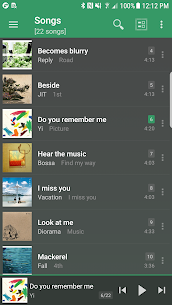
- Multiple list/grid layout modes
- 14 home screen widgets in various sizes
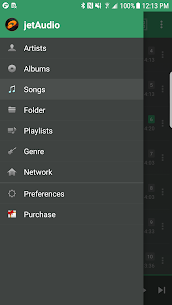
- Artist/album/song/playlist/genre/folder browsing
- Crossfade, gapless playback, fade in/out
- Playback speed control (with pitch adjustment)
- Repeat A↔B, balance control, sleep timer (up to 24 hours)
- Gesture controls (flick navigation) and “shake to skip”
- Bluetooth headset button support and AVRCP track info sharing
- Multi-select for deleting tracks or adding to playlists
- Optional screen-on and orientation lock
Plus Version Only: Extra Tools for Power Users
When you upgrade, jetAudio Plus adds several premium features, including:
- 20-band graphic equalizer
- Built-in tag editor (MP3, FLAC, OGG, M4A)
- Lyric display from tags (unsynced lyrics)
- Multiple lock screen styles
- Pitch shifter and more precise speed controls (50%–200%)
- Grid browsing modes across more library views
- Adjustable fast-forward/rewind intervals
- Expanded notification controls (on supported Android versions)
- MIDI playback via jetAudio’s WaveTable MIDI engine
If you want, tell me whether you need a short Play Store-style summary or a longer SEO-friendly article version, and I’ll rewrite it in that format.
What's new
v13.1.0
- Improved Android Auto
- Improved UI
- Bug fixes
Images
Download links
How to install jetAudio Mod APK?
1. Tap the downloaded jetAudio Mod APK file.
2. Touch install.
3. Follow the steps on the screen.
Note: Important!
- Delete all previous Original/Mod before installing the latest mod.
- If necessary, log in with your email/social media. Modded App cannot be logged in with Gmail.
- Enjoy !!!
Related apps





Latest Apps
Popular apps


