
MediaMonkey
How to install MediaMonkey Mod APK?
1. Tap the downloaded MediaMonkey Mod APK file.
2. Touch install.
3. Follow the steps on the screen.
Note: Important!
- Delete all previous Original/Mod before installing the latest mod.
- If necessary, log in with your email/social media. Modded App cannot be logged in with Gmail.
- Enjoy !!!
Mod Info:
- Pro + Addons / Paid features unlocked – no additional key required;
- Disabled / Removed unwanted Permissions + Receivers + Providers + Services;
- Optimized and zipaligned graphics and cleaned resources for fast load;
- Google Play Store install package check disabled;
- Debug code removed;
- Remove default .source tags name of the corresponding java files;
- Analytics / Crashlytics disabled;
- AOSP compatible mode;
- Languages: Full Multi Languages;
- CPUs: armeabi-v7a, arm64-v8a, x86, x86_64;
- Screen DPIs: 120dpi, 160dpi, 213dpi, 240dpi, 320dpi, 480dpi, 640dpi;
- Original package signature changed;
Description
MediaMonkey is a lightweight but capable music player designed for people who keep big music collections and want them organized and consistent across devices. It plays music and video, manages metadata, and helps you keep playlists, ratings, lyrics, and play history synchronized—especially when you pair it with MediaMonkey for Windows.
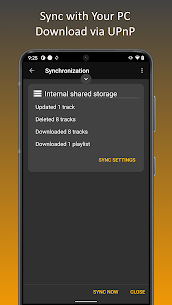
Sync with MediaMonkey for Windows
MediaMonkey can sync with the Windows desktop version so your library stays aligned everywhere. You can:
- keep tracks, playlists, and videos synchronized
- sync key file details such as ratings, lyrics, play history, and other metadata
This makes it useful if you manage your primary library on a PC but listen on your phone.
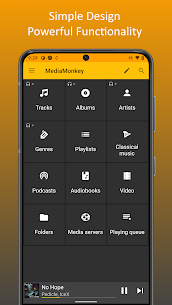
Library Management for Music, Classical, Audiobooks, Podcasts, and Video
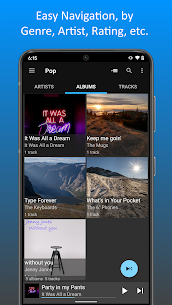
MediaMonkey organizes more than just songs. You can manage classical music, audiobooks, podcasts, and videos with a UI built for browsing large collections. You can navigate by Artist, Album, Composer, Genre, Playlist, and more. The search tools help you scan your entire library quickly or jump to related tracks.
Powerful Tag Editing and Metadata Cleanup
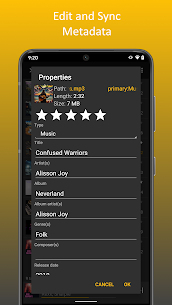
MediaMonkey lets you edit file info directly on your device. You can update Artist, Album, Composer, ratings, and other tags, including support for multiple attributes (for example, Genre = Rock; Alternative). You can also:
- look up album art and lyrics
- batch-edit multiple files at once to clean up large imports fast
Playlist Tools with Hierarchies
You can build and manage playlists with more structure than a basic player. MediaMonkey supports hierarchical playlists, and you can add, remove, and re-order tracks easily. If you use the Windows app, you can also sync playlists between desktop and Android.
Player Features and Queue Control
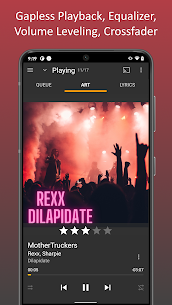
MediaMonkey includes playback tools that help daily listening feel smoother:
- replay gain for steadier volume across tracks
- 5-band equalizer to adjust sound
- sleep timer for hands-free listening at night
- queue management for controlling what plays next
- bookmarking for long files like audiobooks and videos so you can resume where you left off
Sharing, Scrobbling, and Casting
MediaMonkey can share your play history with third-party scrobblers such as Simple Last.fm and Last.fm. It also supports casting to Google Chromecast and UPnP/DLNA devices (where supported), which makes it easier to move audio to speakers or other playback systems.
Car and Home Convenience Features
MediaMonkey supports Android Auto for in-car listening. It also offers:
- home screen and lock screen widgets
- ringtone setting for tracks
- track sharing
- themes for customizing the look
Network Media Access (UPnP/DLNA)
In addition to casting, MediaMonkey can access and download media from UPnP/DLNA servers (where supported), which helps if you store your library on a home server or network drive.
What's new
1290
Sync
-Connection via VPN
-Autoplaylists incomplete
-Playlist hierarchy not updated
-Fails in some cases
-Error handling
Misc
-Artwork lookup
-Stability
1285
-Improved UI (menus & playlist editing)
-Adaptive background for Albums
-16 KB page size support
Fixes
------
UPnP Casting:
-NEXT may skip tracks
-Wiim/Marantz playback
Playback:
-'Missing codec' error
-Volume leveling for quiet tracks
Sync:
-May update tracks unnecessarily
Misc:
-'Mounting storage' alert for usb audio
Images
Download links
How to install MediaMonkey Mod APK?
1. Tap the downloaded MediaMonkey Mod APK file.
2. Touch install.
3. Follow the steps on the screen.
Note: Important!
- Delete all previous Original/Mod before installing the latest mod.
- If necessary, log in with your email/social media. Modded App cannot be logged in with Gmail.
- Enjoy !!!
Related apps



Latest Apps
Popular apps


